
Last updated on
Oct 22, 2026

Get the free Meru University Student Personal Details Form
We are not affiliated with any brand or entity on this form

Fill out
Complete the form online in a simple drag-and-drop editor.

eSign
Add your legally binding signature or send the form for signing.

Share
Share the form via a link, letting anyone fill it out from any device.

Export
Download, print, email, or move the form to your cloud storage.
Why pdfFiller is the best tool for your documents and forms


End-to-end document management
From editing and signing to collaboration and tracking, pdfFiller has everything you need to get your documents done quickly and efficiently.
Accessible from anywhere
pdfFiller is fully cloud-based. This means you can edit, sign, and share documents from anywhere using your computer, smartphone, or tablet.
Secure and compliant
pdfFiller lets you securely manage documents following global laws like ESIGN, CCPA, and GDPR. It's also HIPAA and SOC 2 compliant.
What is Student Details Form
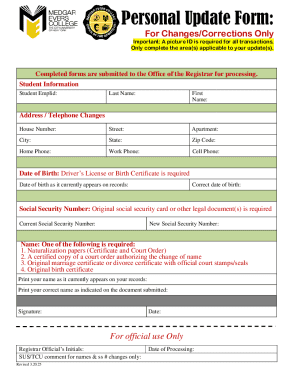
The Meru University Student Personal Details Form is a document used by students at Meru University of Science and Technology to provide essential personal information for enhancing student welfare.
pdfFiller scores top ratings on review platforms




Who needs Student Details Form?
Explore how professionals across industries use pdfFiller.

Student Details Form is needed by:
-
Meru University students registering for courses
-
Administrative staff processing student information
-
Student welfare officers assessing student needs
-
Academic advisors helping students with enrollment
-
Emergency contacts providing essential information
Comprehensive Guide to Student Details Form
What is the Meru University Student Personal Details Form?
The Meru University Student Personal Details Form is essential for students enrolling at Meru University of Science and Technology in Kenya. This form serves to collect vital personal information to enhance student welfare and support university administration. Students are required to submit details, including their full name and registration number, among other personal data.
Importantly, students must provide two signed copies of the completed form, ensuring compliance with university protocols. This necessity underscores the form's role in maintaining accurate student records.
Purpose and Benefits of the Meru University Student Personal Details Form
Filling out the Meru University Student Personal Details Form is crucial as it helps improve student welfare and ensures effective communication within the university. Accurate personal details facilitate smoother enrollment processes and access to university services.
By providing precise information, students enable university authorities to better understand their needs and address concerns effectively. This form not only supports administrative procedures but also contributes to the overall enhancement of students' educational experiences.
Key Features of the Meru University Student Personal Details Form
This form comprises multiple fillable fields designed to capture essential information from students. Key fields include the student's full name, date of birth, and contact information.
Additional important elements include signature lines for verification purposes and a well-organized structure that guides users through the completion process. Such features are crucial for ensuring that all necessary details are accurately provided, thus streamlining the registration experience.
Who Needs the Meru University Student Personal Details Form?
The Meru University Student Personal Details Form is intended for all students enrolled at Meru University. New students must complete the form during their enrollment period, while returning students are also required to submit updated information as needed.
This form plays a significant role in maintaining current and accurate records, making it vital for the university's administration and the students’ academic journey.
How to Fill Out the Meru University Student Personal Details Form Online (Step-by-Step)
Completing the Meru University Student Personal Details Form online is straightforward. Follow these steps for a successful submission:
-
Access the form through the provided platform.
-
Gather all necessary personal information beforehand, including your registration number and contact details.
-
Fill in each required field accurately, including name and date of birth.
-
Sign the form electronically if applicable and attach any required documents.
-
Review your entries to ensure all information is correct before submission.
Utilizing a digital platform like pdfFiller can greatly simplify this process and ensure compliance with university requirements.
Common Errors When Filling Out the Meru University Student Personal Details Form
Students should be aware of common errors that can occur when completing the form. Issues such as missing signatures, incorrect entries, or leaving required fields blank can lead to delays in processing.
To avoid such mistakes, it's advisable to validate all submitted information against a checklist prior to final submission. Taking these steps can ensure the accuracy of your form and facilitate a smoother registration experience.
Submission Methods and How to Submit the Meru University Student Personal Details Form
Students have several options for submitting the Meru University Student Personal Details Form once completed. Submissions can be made either online or in physical format, depending on the university's guidelines.
It is crucial to adhere to important deadlines for submission to ensure timely processing of student records. If issues arise, students should reach out to the designated contact for assistance during the submission process.
The Role of pdfFiller in Completing the Meru University Student Personal Details Form
pdfFiller plays a significant role in streamlining the completion of the Meru University Student Personal Details Form. The platform offers various features, including editing, eSigning, and secure forms management.
Students can benefit from enhanced security measures, which protect their sensitive personal information while using the platform. User testimonials highlight the effectiveness of pdfFiller in simplifying form completion, making it a trusted choice for students.
What Happens After You Submit the Meru University Student Personal Details Form?
Upon submission of the Meru University Student Personal Details Form, students will receive confirmation and any relevant tracking information. It's important to understand the timeline for processing, as students should expect to receive follow-up communication.
In cases where a form is rejected or requires amendments, students should know the steps to take for resubmission. Maintaining awareness of these processes will help ensure a smooth transition through university administrative requirements.
Getting Started with pdfFiller to Complete Your Form
To utilize pdfFiller for completing the Meru University Student Personal Details Form, students can easily access the platform through a web browser. The user-friendly interface allows for seamless navigation and form filling without the need for downloads.
By reinforcing security and compliance with personal data, pdfFiller ensures that students' sensitive information is managed safely throughout the form completion process. Students are encouraged to take advantage of these features to facilitate their registration and enrollment.
How to fill out the Student Details Form
-
1.To start filling out the Meru University Student Personal Details Form, access pdfFiller and search for the form using its name or keywords related to Meru University.
-
2.Once you locate the form, click on it to open it in the pdfFiller interface where you will see all the fillable fields clearly labeled.
-
3.Before you begin, gather all necessary information such as your full name, registration number, nationality, date of birth, and emergency contact details.
-
4.Begin filling out each field, starting with your full name. Click on the space provided and type your name as it appears on official documents.
-
5.Proceed to enter your University Registration Number by locating that field and typing in the complete number assigned to you.
-
6.Continue filling in your date of birth, ensuring you use the correct format required by the form.
-
7.After inputting personal information, navigate to the contact information section. Ensure accuracy here as this is vital for university communications.
-
8.Finally, complete the emergency contacts section by providing the names and contact numbers of individuals who can be reached if necessary.
-
9.Once all fields are filled, review the information for any errors or missing information by going through each entry carefully.
-
10.Sign the form electronically in the designated signature line to validate your information.
-
11.Finally, save the completed form. Use the download option to save it to your device, or submit it directly to the university through pdfFiller if that option is provided.

Who is eligible to fill out the Meru University Student Personal Details Form?
All students enrolling or currently enrolled at Meru University of Science and Technology in Kenya are eligible to fill out this form to provide essential personal information.
What information is required to complete the form?
The form requires your full name, university registration number, nationality, date of birth, contact information, and details of emergency contacts.
When is the deadline for submitting the personal details form?
While specific deadlines may vary, it is advisable to submit your form as early as possible to ensure that your information is processed in a timely manner.
How should I submit my completed form?
You can submit the completed form electronically via pdfFiller if the university allows online submissions, or print and hand it in directly to your student services office.
Are there any common mistakes to avoid when filling out the form?
Common mistakes include incorrect personal details, missing signature lines, and failing to double-check for completeness before submission. Always review your form carefully.
What happens after I submit my form?
After submission, the administrative staff at Meru University will process your information for student welfare and registration purposes, so you can expect follow-up if any details are needed.
Is notarization required for this form?
No, notarization is not required for the Meru University Student Personal Details Form, but student signatures are mandatory.
Related Forms





Get the latest insights from our blog



If you believe that this page should be taken down, please follow our DMCA take down process
here
.
This form may include fields for payment information. Data entered in these fields is not covered by PCI DSS compliance.