
Last updated on
Oct 22, 2026

Get the free USACE Protective Footwear Purchase Record
We are not affiliated with any brand or entity on this form

Fill out
Complete the form online in a simple drag-and-drop editor.

eSign
Add your legally binding signature or send the form for signing.

Share
Share the form via a link, letting anyone fill it out from any device.

Export
Download, print, email, or move the form to your cloud storage.
Why pdfFiller is the best tool for your documents and forms


End-to-end document management
From editing and signing to collaboration and tracking, pdfFiller has everything you need to get your documents done quickly and efficiently.
Accessible from anywhere
pdfFiller is fully cloud-based. This means you can edit, sign, and share documents from anywhere using your computer, smartphone, or tablet.
Secure and compliant
pdfFiller lets you securely manage documents following global laws like ESIGN, CCPA, and GDPR. It's also HIPAA and SOC 2 compliant.
What is USACE Footwear Form
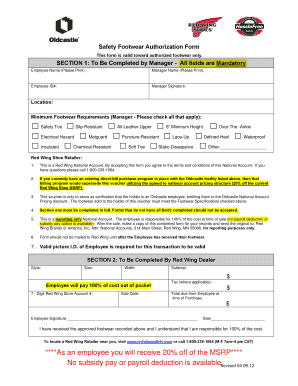
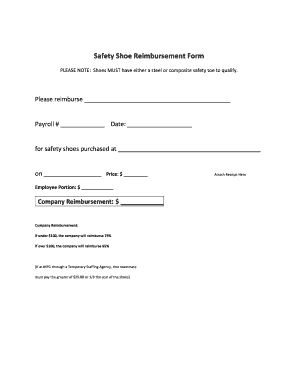
The USACE Protective Footwear Purchase Record is a government form used by U.S. Army Corps of Engineers (USACE) employees to request reimbursement for purchasing protective footwear required for their duties.
pdfFiller scores top ratings on review platforms




Who needs USACE Footwear Form?
Explore how professionals across industries use pdfFiller.

USACE Footwear Form is needed by:
-
U.S. Army Corps of Engineers employees
-
Supervisors approving purchase requests
-
HR departments managing safety equipment standards
-
Government agencies overseeing employee safety
-
Finance teams processing reimbursements
-
Safety officers evaluating equipment compliance
Comprehensive Guide to USACE Footwear Form
What is the USACE Protective Footwear Purchase Record?
The USACE Protective Footwear Purchase Record is a vital form used by the U.S. Army Corps of Engineers (USACE) to facilitate the reimbursement process for employees purchasing protective footwear necessary for their roles. This document ensures that personnel maintain compliance with safety requirements mandated by the organization.
To successfully submit the form, applicants must include required attachments, such as purchase invoices and hazard evaluation documents. By utilizing this form, employees can efficiently claim reimbursement for expenses incurred while acquiring essential safety gear.
Purpose and Benefits of the USACE Protective Footwear Purchase Record
The USACE Protective Footwear Purchase Record plays an integral role in maintaining safety among employees by emphasizing the necessity of protective footwear. This form not only streamlines the reimbursement process but also ensures that all claims are documented, thereby reinforcing compliance with safety regulations.
Managers and supervisors highlight the importance of accurate documentation in driving reimbursement approvals. By supporting employees’ needs for protective footwear, the form ultimately contributes to enhanced workplace safety.
Who Needs the USACE Protective Footwear Purchase Record?
Various roles within USACE require the completion of the USACE Protective Footwear Purchase Record. Supervisors and employees working in hazardous environments that necessitate safety footwear should be familiar with this form. Eligibility for reimbursement includes individuals whose positions specifically demand protective gear as outlined in job descriptions.
By understanding the criteria for submission, employees can better navigate the reimbursement process and ensure they meet all requirements.
How to Fill Out the USACE Protective Footwear Purchase Record Online
To complete the USACE Protective Footwear Purchase Record, users should first access the digital form through pdfFiller. Following this, they will need to fill in various fields with accurate information, ensuring all required details are provided.
-
Enter personal information, including name and job title.
-
List the protective footwear purchased along with details such as the cost and store where the purchase was made.
-
Attach required documents like invoices and hazard evaluations as supporting evidence.
Common Errors and How to Avoid Them
When completing the USACE Protective Footwear Purchase Record, several frequent mistakes can occur. Mislabeling or neglecting to sign the form are common errors that can delay reimbursement. Users should also be mindful of entering wrong information in personal detail fields.
-
Check all fields for completeness before submission.
-
Utilize a validation checklist to ensure all necessary documents are attached.
Submission Methods for the USACE Protective Footwear Purchase Record
The completed USACE Protective Footwear Purchase Record can be submitted electronically via pdfFiller, which simplifies the process. Alternative methods include mailing or delivering the form in person, allowing for flexibility in how it is submitted.
To avoid delays, users must pay attention to submission deadlines and ensure they send their forms well in advance of these cut-off dates.
What Happens After You Submit the USACE Protective Footwear Purchase Record?
Once the USACE Protective Footwear Purchase Record is submitted, users can track their submission status through the designated channels established by USACE. The processing timeline for reimbursements typically varies, and users can expect notifications regarding the status of their claims.
-
Be aware of common reasons for claim rejections, which can help prevent future issues.
-
Follow up if no updates are received within a specified timeframe.
How pdfFiller Can Assist with the USACE Protective Footwear Purchase Record
pdfFiller offers a range of features that simplify the completion and submission of the USACE Protective Footwear Purchase Record. Users can easily edit the document, sign it electronically, and securely upload necessary attachments.
Moreover, pdfFiller employs robust security measures, including 256-bit encryption, to protect sensitive information as users manage their documents efficiently and securely.
Sample of a Completed USACE Protective Footwear Purchase Record
Providing a visual reference, a sample of a filled-out USACE Protective Footwear Purchase Record can significantly aid users in understanding how to complete the form correctly. Annotations highlighting each section will clarify the necessary information required in the blank fields.
Ensuring all required fields are completed and accurately filled in will improve the likelihood of a successful claim.
Your Go-To Resource for Filling Out the USACE Protective Footwear Purchase Record
To build confidence in utilizing the USACE Protective Footwear Purchase Record, users are encouraged to explore pdfFiller as their primary resource. The platform supports ease of use with various tools to enhance the document filling process.
Additionally, users can discover other related resources on the pdfFiller platform to assist with government forms, ensuring seamless document management.
How to fill out the USACE Footwear Form
-
1.To begin, access the USACE Protective Footwear Purchase Record form on pdfFiller by using the provided link or searching for it within the pdfFiller platform.
-
2.Once opened, familiarize yourself with the layout. Use the tools on pdfFiller’s interface to navigate through the form's fillable fields.
-
3.Before you start filling out the form, gather all necessary information such as purchase invoices, hazard evaluation documents, and any previous claim forms you might need.
-
4.Begin by filling in all required fields. Ensure you accurately enter your personal details, including name, identification number, and the details of the protective footwear purchased.
-
5.If section checkboxes are applicable, ensure they are marked correctly; this might include options related to the type of footwear or reason for purchase.
-
6.Once you have filled out all relevant sections, review the completed form for accuracy. Double-check that all required fields are filled and that there are no spelling errors.
-
7.To finalize the form, navigate to the signature section. Use pdfFiller’s signature tool to electronically sign the document.
-
8.After completing the review, you can save your work by selecting the save option. You may download a copy for your records or submit it as instructed.
-
9.If submission is required, follow the specific process outlined in your department—often emailing to a supervisor or uploading through an internal portal.

Who is eligible to use the USACE Protective Footwear Purchase Record?
This form is intended for employees of the U.S. Army Corps of Engineers who are required to purchase protective footwear for their job duties.
What supporting documents do I need to submit with the form?
You will need to attach an invoice for the footwear purchase, a claim form, and any hazard evaluation documentation as part of your submission.
How do I submit the completed form?
After completing the form, you can submit it to your supervisor via email or through your department's designated submission process following their guidelines.
Is there a deadline for submitting the reimbursement requests?
While specific deadlines may vary, it is generally advised to submit the form promptly after the purchase to ensure timely reimbursement processing.
What are common errors to avoid when filling out the form?
Common mistakes include leaving required fields blank, incorrect signatures, or failing to attach the necessary supporting documents. Always double-check your entries.
How long does it take to process my reimbursement request?
Processing times can vary based on department workload, but typically reimbursements may take several weeks. It’s advisable to inquire with your supervisor for more specific timelines.
Do I need to notarize the form?
No, this form does not require notarization. However, it must be signed by the employee's supervisor for approval.
Related Forms





Get the latest insights from our blog


If you believe that this page should be taken down, please follow our DMCA take down process
here
.
This form may include fields for payment information. Data entered in these fields is not covered by PCI DSS compliance.