
Last updated on
Oct 22, 2026

Get the free Construction Daily Log Template
We are not affiliated with any brand or entity on this form

Fill out
Complete the form online in a simple drag-and-drop editor.

eSign
Add your legally binding signature or send the form for signing.

Share
Share the form via a link, letting anyone fill it out from any device.

Export
Download, print, email, or move the form to your cloud storage.
Why pdfFiller is the best tool for your documents and forms


End-to-end document management
From editing and signing to collaboration and tracking, pdfFiller has everything you need to get your documents done quickly and efficiently.
Accessible from anywhere
pdfFiller is fully cloud-based. This means you can edit, sign, and share documents from anywhere using your computer, smartphone, or tablet.
Secure and compliant
pdfFiller lets you securely manage documents following global laws like ESIGN, CCPA, and GDPR. It's also HIPAA and SOC 2 compliant.
What is Construction Daily Log
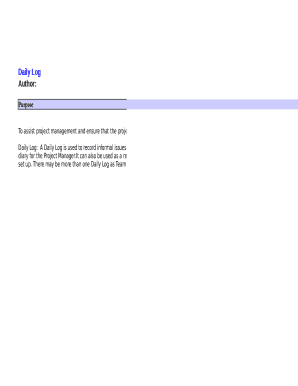
The Construction Daily Log Template is a business form used by construction professionals to document daily activities on site, ensuring accurate record-keeping and accountability.
pdfFiller scores top ratings on review platforms




Who needs Construction Daily Log?
Explore how professionals across industries use pdfFiller.

Construction Daily Log is needed by:
-
Construction managers needing to track daily site progress
-
Site supervisors responsible for verifying project compliance
-
Contractors wanting to document crew hours and work performed
-
Project owners requiring updates on project activity
-
Accountants needing records for financial reporting
Comprehensive Guide to Construction Daily Log
What is the Construction Daily Log Template?
The Construction Daily Log Template is an essential tool for construction professionals to accurately document daily activities and conditions on-site. This log helps in maintaining a comprehensive record of events throughout the project lifecycle, ensuring accountability and transparency.
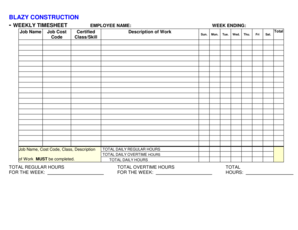
The template includes various components that facilitate thorough record-keeping. Key fields in the template encompass the project name, date, weather conditions, work performed, materials received, and crew details, allowing for an organized approach to tracking progress.
Purpose and Benefits of the Construction Daily Log Template
Construction professionals utilize daily logs primarily to document ongoing project activities, which is crucial for compliance and effective project management. By maintaining accurate records, teams can ensure that there is a reliable reference for all activities that took place.
The benefits of using a daily construction log extend beyond simple documentation. It aids in tracking construction expenses, managing resources efficiently, and minimizing disputes by providing a clear history of events on the site.
Key Features of the Construction Daily Log Template
This template features essential fields that are critical for effective documentation. Some of the key items include:
-
Project name
-
Date
-
Weather conditions
-
Work performed details
Moreover, it offers functionalities such as electronic signatures and easy accessibility, allowing users to complete it seamlessly from any device.
Who Needs the Construction Daily Log Template?
The Construction Daily Log Template is vital for several roles within the construction industry. Authors, such as site supervisors and project managers, are responsible for creating the log, while reviewers verify its accuracy and compliance.
It serves various professionals involved in the construction process, ensuring that everyone from crew members to stakeholders has access to important updates and records.
How to Fill Out the Construction Daily Log Template Online (Step-by-Step)
Filling out the construction daily log template online can be done efficiently using pdfFiller. Follow these steps to complete the log:
-
Access the template on pdfFiller.
-
Enter the project name, contract number, and site address.
-
Record the date and indicate the weather conditions.
-
Detail the crew members and the hours worked.
-
Fill in the work performed and materials received fields.
-
Document any delays or disruptions encountered.
-
Sign and save the completed log.
Common Errors and How to Avoid Them
When filling out the Construction Daily Log Template, several common mistakes may occur. These can lead to incomplete or inaccurate records that can affect project management.
To avoid errors, consider the following practical tips:
-
Double-check all entries for accuracy prior to submission.
-
Ensure that all required fields are filled out completely.
Validation protocols should be established to comply with project requirements and prevent omissions.
How to eSign the Construction Daily Log Template
For electronic signing, pdfFiller provides multiple options allowing users to sign documents securely online. Understanding the differences between digital and traditional wet signatures is essential.
Digital signatures are often accepted in lieu of wet signatures and enhance compliance, making the eSigning process crucial for timely documentation.
Where to Submit the Construction Daily Log Template
Submission guidelines for the Construction Daily Log Template may vary depending on jurisdiction and specific project requirements. It’s important to familiarize yourself with the local regulations that dictate how and when logs should be submitted.
Additionally, there are optional methods for sharing completed logs with stakeholders, ensuring that all relevant parties are informed and updated.
Security and Compliance for the Construction Daily Log Template
Security is a significant concern when handling sensitive project documents. pdfFiller emphasizes data protection with features like 256-bit encryption and adherence to compliance standards.
Establishing secure practices when managing construction daily logs helps protect sensitive information from unauthorized access.
Experience the Benefits of Using pdfFiller for Your Construction Daily Log Template
Utilizing pdfFiller for the Construction Daily Log Template offers users a streamlined way to fill, sign, and share documents efficiently. The platform enhances the user experience by ensuring compliance while simplifying the process of managing construction logs.
With pdfFiller, users easily achieve seamless documentation management, ultimately resulting in straightforward project oversight.
How to fill out the Construction Daily Log
-
1.Access the Construction Daily Log Template on pdfFiller by searching its name in the platform's search bar.
-
2.Open the form and familiarize yourself with the layout, which includes sections for essential project details.
-
3.Before starting to fill it in, gather all relevant information such as project name, contract number, and daily weather conditions.
-
4.Begin completing the fields from top to bottom, ensuring to enter accurate data regarding crew hours, materials received, and work performed.
-
5.Use pdfFiller's checkboxes where applicable to simplify the input process for items like inspections and delays.
-
6.For each section, ensure to provide detailed notes, especially in the 'Notes and follow-ups for tomorrow' field.
-
7.After fully completing the form, review all entered information for any errors or missing details.
-
8.Once verified, have both the author and reviewer sign the document electronically within pdfFiller.
-
9.Finalize the form by saving your changes, and download a copy for your records or share it directly via the submission options on pdfFiller.

Who needs to sign the Construction Daily Log Template?
Both the author and reviewer are required to sign the Construction Daily Log Template to ensure accountability and verify that the recorded information is accurate and complete.
What information do I need to complete the form?
To complete the Construction Daily Log Template, you will need information such as the project name, contract number, date, crew hours, weather conditions, materials received, and details about work performed.
Can I submit the completed form online?
Yes, once you have completed and signed the Construction Daily Log Template in pdfFiller, you can submit it directly online or download it for offline submission, depending on your project's requirements.
What are common mistakes to avoid when filling out this form?
Common mistakes when filling out the Construction Daily Log Template include forgetting to complete all required fields, inaccurate recording of hours, and neglecting to have both signatures. Always double-check your entries.
Is there a deadline for submitting the Construction Daily Log Template?
While the Construction Daily Log Template itself does not have a strict submission deadline, it is best practice to complete and submit it daily or at the end of each workweek to ensure timely record-keeping.
What if I need to amend the information in the completed log?
If you need to amend any information in the Construction Daily Log Template after it has been completed, you should make the necessary changes, ensure that both the author and reviewer sign the amendments, and retain copies for accurate records.
What types of projects benefit from using this log template?
The Construction Daily Log Template is beneficial for a variety of construction projects, including residential, commercial, and industrial builds, as it systematically records daily site activities, which is crucial for project management.
Related Forms




Get the latest insights from our blog


If you believe that this page should be taken down, please follow our DMCA take down process
here
.
This form may include fields for payment information. Data entered in these fields is not covered by PCI DSS compliance.