
Last updated on
Oct 22, 2026

Get the free ACH Account Change Authorization Form
We are not affiliated with any brand or entity on this form

Fill out
Complete the form online in a simple drag-and-drop editor.

eSign
Add your legally binding signature or send the form for signing.

Share
Share the form via a link, letting anyone fill it out from any device.

Export
Download, print, email, or move the form to your cloud storage.
Why pdfFiller is the best tool for your documents and forms


End-to-end document management
From editing and signing to collaboration and tracking, pdfFiller has everything you need to get your documents done quickly and efficiently.
Accessible from anywhere
pdfFiller is fully cloud-based. This means you can edit, sign, and share documents from anywhere using your computer, smartphone, or tablet.
Secure and compliant
pdfFiller lets you securely manage documents following global laws like ESIGN, CCPA, and GDPR. It's also HIPAA and SOC 2 compliant.
What is ACH Change Form
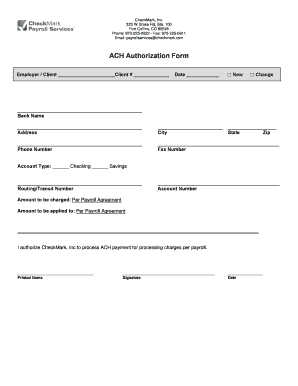
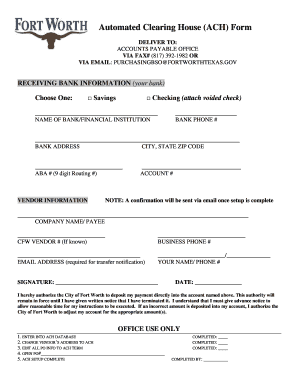
The ACH Account Change Authorization Form is a document used by providers to modify bank information for ACH deposits.
pdfFiller scores top ratings on review platforms




Who needs ACH Change Form?
Explore how professionals across industries use pdfFiller.

ACH Change Form is needed by:
-
Businesses needing to update direct deposit information
-
Accounting departments managing payroll
-
Employees changing bank accounts for direct deposits
-
Financial institutions facilitating ACH transfers
-
Payroll service providers
-
Contractors requiring bank modifications
Comprehensive Guide to ACH Change Form
What is the ACH Account Change Authorization Form?
The ACH Account Change Authorization Form is a crucial document used to modify bank information for ACH deposits. This form allows providers to ensure their bank details are accurate and up to date for seamless processing of payments. Key fields required on the form include the provider's name, bank name, account number, and routing number. Accurate completion of this form is essential for effective bank information modification.
Purpose and Benefits of the ACH Account Change Authorization Form
This form plays a pivotal role in ensuring timely updates to bank information necessary for ACH payments. Utilizing the ACH Account Change Authorization Form offers several benefits, including increased accuracy in transactions, enhanced efficiency in processing, and greater reliability in payment methods. Failing to update bank information can lead to payment delays, which can affect financial operations.
Who Needs the ACH Account Change Authorization Form?
The ACH Account Change Authorization Form is essential for various providers who need to update their banking details. Businesses or individuals should consider using this form when they encounter significant changes in their banking relationships, such as switching accounts or banks. Common scenarios necessitating the use of this form include changing bank affiliations or opening new accounts.
How to Fill Out the ACH Account Change Authorization Form Online
Filling out the ACH Account Change Authorization Form online is straightforward with pdfFiller. Follow these steps to complete your form:
-
Access the form through the pdfFiller platform.
-
Input your provider's name, bank name, and account number in the designated fields.
-
Ensure that you include the correct routing number and account type.
-
Review the filled-out form for accuracy before submitting.
-
Sign the form electronically to validate it.
Pay special attention to fields that require precise information to avoid delays in processing.
Review and Validation Checklist for Your Submission
Before submitting your ACH Account Change Authorization Form, consider the following checklist to ensure accuracy:
-
Verify that all required fields are accurately filled out.
-
Cross-check your bank account information with your latest bank statements.
-
Gather any necessary documents required for verification.
-
Avoid common errors, such as typos in account numbers or missing signatures.
This validation process helps confirm that your form is complete and minimizes the risk of rejection.
How to Submit the ACH Account Change Authorization Form
You have several methods to submit the completed ACH Account Change Authorization Form. These options include:
-
Emailing the signed form to the specified address.
-
Faxing the form directly to the financial department.
-
Submitting via a secure online portal if applicable.
Be mindful of submission deadlines and processing times, as timely submissions can affect the update of your bank information. Additionally, confirm if there are any fees associated with the submission method you choose.
Security and Compliance When Handling the ACH Account Change Authorization Form
When submitting the ACH Account Change Authorization Form, security and compliance are paramount. pdfFiller employs advanced security measures, including 256-bit encryption, to safeguard your sensitive information throughout the submission process. This platform adheres to compliance standards like HIPAA and GDPR, ensuring your personal and banking data is handled securely and responsibly.
What Happens After You Submit the ACH Account Change Authorization Form?
After submitting the ACH Account Change Authorization Form, it undergoes a review and approval process. Users may track the status of their submission through the designated methods provided by their bank or financial institution. Be aware of the potential consequences of errors or rejections, and know how to address them promptly to avoid inconveniences in your banking transactions.
Utilizing pdfFiller for Your ACH Account Change Authorization Form
Using pdfFiller to complete your ACH Account Change Authorization Form enhances your experience significantly. The platform offers key features that simplify the form-filling process, such as a user-friendly interface and real-time editing capabilities. Engage with pdfFiller today to streamline your document management and successfully modify your bank information.
How to fill out the ACH Change Form
-
1.To access the ACH Account Change Authorization Form on pdfFiller, visit the site and search for the form by name using the search bar. Once found, click on it to open the fillable document.
-
2.As the form opens, use pdfFiller’s interface to navigate through the document. Click on each fillable field to enter your information, ensuring to fill in the provider's name, address, phone number, bank name, account number, routing number, and account type.
-
3.Before you start filling out the form, gather all necessary information, including your current bank details and the new bank information you wish to provide for ACH deposits. This preparation will streamline the completion process.
-
4.Once you have filled in all the required fields, take a moment to review the entire form. Make sure all entered details are accurate and that you have not missed any mandatory fields, especially the signature.
-
5.After confirming the accuracy of your information, locate the save or submit button on the pdfFiller interface. You can save the document as a PDF, download it for your records, or choose to electronically submit it as instructed in the form.

Who is eligible to use the ACH Account Change Authorization Form?
Eligible users include any provider who needs to update their bank information for ACH deposits, such as businesses, contractors, and employees receiving payments via direct deposit.
Are there deadlines to submit this form for processing?
While specific deadlines may vary by company, it's generally advisable to submit the ACH Account Change Authorization Form well in advance of the next payment cycle to ensure timely processing.
What methods can I use to submit the completed form?
You can submit the filled form by emailing it to the specified address mentioned in the form instructions or by saving and downloading it to your computer for submission if required by your organization.
What supporting documents are required when submitting this form?
Typically, you may need to provide identification along with the form or any other documentation your organization requires to verify your bank details. Check with your organization for specific requirements.
What are common mistakes to avoid when filling out this form?
Common mistakes include missing signatures, providing incorrect bank details, and failing to review the form before submission. Ensure every section is filled accurately to avoid processing delays.
How long does it take for changes to be processed after submission?
Processing times can vary based on the organization’s policies. Typically, allow at least one full payroll cycle for the changes to take effect on direct deposits.
What if I need to make changes to my submission after sending the form?
If changes are needed after submission, contact your payroll or finance department immediately for guidance on correcting any errors or updating your bank information.
Related Forms




Get the latest insights from our blog


If you believe that this page should be taken down, please follow our DMCA take down process
here
.
This form may include fields for payment information. Data entered in these fields is not covered by PCI DSS compliance.