
Last updated on
Oct 24, 2026

Get the free Employee Alcohol and Drug Testing Consent Form
We are not affiliated with any brand or entity on this form

Fill out
Complete the form online in a simple drag-and-drop editor.

eSign
Add your legally binding signature or send the form for signing.

Share
Share the form via a link, letting anyone fill it out from any device.

Export
Download, print, email, or move the form to your cloud storage.
Why pdfFiller is the best tool for your documents and forms


End-to-end document management
From editing and signing to collaboration and tracking, pdfFiller has everything you need to get your documents done quickly and efficiently.
Accessible from anywhere
pdfFiller is fully cloud-based. This means you can edit, sign, and share documents from anywhere using your computer, smartphone, or tablet.
Secure and compliant
pdfFiller lets you securely manage documents following global laws like ESIGN, CCPA, and GDPR. It's also HIPAA and SOC 2 compliant.
What is Drug Testing Consent
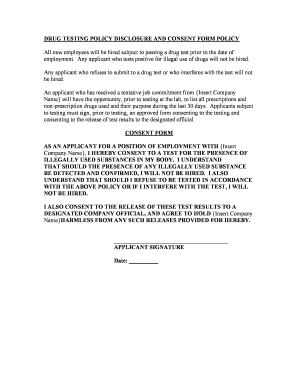
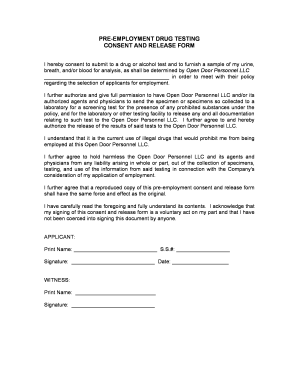
The Employee Alcohol and Drug Testing Consent Form is a legal document used by employers to obtain consent from employees for drug and alcohol testing procedures.
pdfFiller scores top ratings on review platforms




Who needs Drug Testing Consent?
Explore how professionals across industries use pdfFiller.

Drug Testing Consent is needed by:
-
Human Resources Departments needing employee consent for testing.
-
Employees required to comply with company drug testing policies.
-
Employers enforcing workplace health and safety regulations.
-
Legal teams managing compliance with drug testing laws.
-
Safety-sensitive workers subjected to regular testing.
Comprehensive Guide to Drug Testing Consent
What is the Employee Alcohol and Drug Testing Consent Form?
The Employee Alcohol and Drug Testing Consent Form serves as a crucial document for companies, enabling them to secure employee consent for necessary drug and alcohol testing. This form details the company's policies regarding prohibited substances, the specific circumstances under which testing is mandated, and the consequences of non-compliance. Obtaining employee consent is essential to ensure transparency and adherence to legal standards in the workplace, highlighting the significance of this form in maintaining a safe work environment.
Purpose and Benefits of the Employee Alcohol and Drug Testing Consent Form
The primary function of the Employee Alcohol and Drug Testing Consent Form is to protect both the employer and the employee by ensuring compliance with the organization's drug and alcohol policy. It fosters a safe workplace, which is crucial for maintaining productivity and overall employee well-being. Moreover, having a standardized consent form helps streamline the testing process and minimizes potential legal liabilities associated with drug and alcohol testing.
-
Ensures adherence to company policies
-
Promotes workplace safety
-
Protects against litigation risks
-
Facilitates efficient handling of testing procedures
Key Features of the Employee Alcohol and Drug Testing Consent Form
This form includes several key features designed to ensure clarity and compliance during the testing process. Required fields for both employee and HR signatures ensure that all parties acknowledge their roles in the agreement. Important information, such as the employee’s full name, department, and the date, must be provided to validate the form.
-
Employee’s Full Name
-
Department Information
-
Date of Completion
-
Signature Lines for Employee and HR Representative
Who Needs the Employee Alcohol and Drug Testing Consent Form?
The Employee Alcohol and Drug Testing Consent Form is essential for employees undergoing drug and alcohol testing and HR representatives administering these tests. Specific scenarios that necessitate the use of this consent form include pre-employment screenings, random testing during employment, and post-incident testing to ensure workplace safety. Understanding the target audience for this form helps ensure its effective implementation in applicable circumstances.
How to Fill Out the Employee Alcohol and Drug Testing Consent Form Online
Completing the Employee Alcohol and Drug Testing Consent Form online is a straightforward process. To ensure accuracy, follow these steps:
-
Access the form through the designated platform.
-
Fill out the required fields, including 'Employee’s Full Name' and 'Department.'
-
Review the information for completeness.
-
Sign the form electronically as required.
Common errors to avoid include incomplete fields and inconsistent information, which could delay processing.
Submitting the Employee Alcohol and Drug Testing Consent Form
After completing the form, submission can be done through various methods, including online and physical submission options. While submitting online, be aware of any potential service fees and specific deadlines associated with the form’s processing. Understanding submission requirements is crucial for ensuring timely compliance with company policies.
Security and Compliance for the Employee Alcohol and Drug Testing Consent Form
Security and compliance are paramount when handling the Employee Alcohol and Drug Testing Consent Form. Notable legal considerations include compliance with regulations such as HIPAA and GDPR, which safeguard employee privacy. The use of pdfFiller for document management ensures that sensitive information is protected through high-level security measures, including 256-bit encryption and adherence to industry compliance standards.
What Happens After Submission of the Employee Alcohol and Drug Testing Consent Form?
Once the Employee Alcohol and Drug Testing Consent Form is submitted, several steps follow to ensure proper processing. Typically, the employee receives a confirmation that the form was submitted, along with the timeline for when results can be expected. Tracking the status of the form is also advised to remain informed about processing updates.
Sample of a Completed Employee Alcohol and Drug Testing Consent Form
Providing a visual example of a filled-out Employee Alcohol and Drug Testing Consent Form can be highly beneficial for users. This sample can help clarify the expected format and details required. Additionally, common mistakes, such as omitting required signatures or providing incorrect information, should be highlighted to avoid issues during the submission process.
Experience the Ease of Completing the Employee Alcohol and Drug Testing Consent Form with pdfFiller
Utilizing pdfFiller offers a seamless experience for creating, editing, and securely signing the Employee Alcohol and Drug Testing Consent Form. This cloud-based platform enhances document management by allowing users to fill out the form hassle-free and with the assurance that sensitive information is handled securely. pdfFiller provides a straightforward solution for all document needs related to employee testing compliance.
How to fill out the Drug Testing Consent
-
1.To access the Employee Alcohol and Drug Testing Consent Form on pdfFiller, visit the website and sign in or create an account if you haven't done so already.
-
2.Once logged in, use the search bar to find the form by entering its name, 'Employee Alcohol and Drug Testing Consent Form'.
-
3.Click on the form to open it in pdfFiller’s interface where you will see various fillable fields.
-
4.Before filling out the form, gather essential information such as your full name, department, and the date.
-
5.Start filling in your details by clicking on each field. Enter your 'Employee's Full Name' and select your 'Department' from the dropdown, if applicable.
-
6.Follow the prompts included within the document, particularly paying attention to sections that require acknowledgment of testing policies.
-
7.Once all fields are completed, carefully review the data you've entered for accuracy.
-
8.Ensure you have signed in the designated 'Employee Signature' section and that the HR representative's signature line is ready for their input.
-
9.After reviewing the entire document, save your progress by clicking on the 'Save' button, or download it directly to your device using the 'Download' option available.
-
10.For submission, either print the form to hand-sign and submit physically or use the electronic submission option provided by pdfFiller, ensuring compliance with your company's protocols.

Who is eligible to use the Employee Alcohol and Drug Testing Consent Form?
Typically, any employee subject to drug and alcohol testing as part of their employment is eligible to use this form. It is essential for employees working in safety-sensitive roles.
What information do I need before completing the form?
Before starting, ensure you have your full name, department, and the date ready. You may also want to review your company's drug testing policy for context.
How do I submit the completed consent form?
You can submit the completed form electronically through pdfFiller or print it for physical submission to your HR department, depending on your organization's procedure.
Are there any deadlines for submitting this consent form?
While specific deadlines may vary by company, it is advisable to submit the form as soon as possible to comply with testing requirements and company policies.
What common mistakes should I avoid when filling out the form?
Avoid leaving any mandatory fields blank, misspelling your name or department, or forgetting to sign the document, as these can delay processing.
How long does it take to process the consent form?
Processing times can vary depending on your HR department's workload. Generally, it shouldn’t take more than a few days to receive confirmation of your form's acceptance.
Is notarization required for this form?
No, the Employee Alcohol and Drug Testing Consent Form does not require notarization. A signature from the employee and an HR representative will suffice.
Related Forms



Get the latest insights from our blog


If you believe that this page should be taken down, please follow our DMCA take down process
here
.
This form may include fields for payment information. Data entered in these fields is not covered by PCI DSS compliance.