
Last updated on
Oct 24, 2026

Get the free Guaranty Trust Bank Online Banking Form
We are not affiliated with any brand or entity on this form

Fill out
Complete the form online in a simple drag-and-drop editor.

eSign
Add your legally binding signature or send the form for signing.

Share
Share the form via a link, letting anyone fill it out from any device.

Export
Download, print, email, or move the form to your cloud storage.
Why pdfFiller is the best tool for your documents and forms


End-to-end document management
From editing and signing to collaboration and tracking, pdfFiller has everything you need to get your documents done quickly and efficiently.
Accessible from anywhere
pdfFiller is fully cloud-based. This means you can edit, sign, and share documents from anywhere using your computer, smartphone, or tablet.
Secure and compliant
pdfFiller lets you securely manage documents following global laws like ESIGN, CCPA, and GDPR. It's also HIPAA and SOC 2 compliant.
What is GTBank Online Form
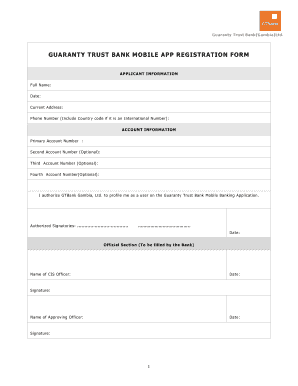
The Guaranty Trust Bank Online Banking Form is a financial document used by customers to access and manage their online banking services.
pdfFiller scores top ratings on review platforms




Who needs GTBank Online Form?
Explore how professionals across industries use pdfFiller.

GTBank Online Form is needed by:
-
Current Guaranty Trust Bank customers seeking online banking access
-
Authorized signatories needing to facilitate transactions
-
CIS Officers responsible for account management
-
Business entities managing financial reports
-
Individuals requiring beneficiary transfer services
Comprehensive Guide to GTBank Online Form
What is the Guaranty Trust Bank Online Banking Form?
The Guaranty Trust Bank Online Banking Form is essential for customers looking to access and manage their online banking services effectively. This form serves a critical purpose in facilitating various account management tasks.
It includes key components such as:
-
Account details
-
Beneficiary information
-
Transaction requests
Moreover, it requires signatures from authorized signatories and CIS officers, ensuring validity and security in transactions.
Purpose and Benefits of the Guaranty Trust Bank Online Banking Form
The primary purpose of the Guaranty Trust Bank Online Banking Form is to allow customers to manage their banking transactions online with ease. Utilizing this online banking access form offers numerous benefits.
-
Convenience of managing transactions remotely
-
Increased speed of processing requests
-
Potential for enhanced security features compared to traditional methods
Accurate completion of this form is vital for efficient processing by the bank, ensuring that all necessary information is provided.
Key Features of the Guaranty Trust Bank Online Banking Form
This form contains several essential functionalities that support users in managing their banking needs. Key features include:
-
Fillable fields for 'Account Name,' 'Account No.,' and 'Email Address'
-
Option for digital signatures, which can streamline the submission process
-
Data security measures to protect sensitive information during transactions
These features ensure that users can efficiently complete their banking tasks online.
Who Needs the Guaranty Trust Bank Online Banking Form?
Identifying the correct audience for the Guaranty Trust Bank Online Banking Form is crucial. This form is designed for individuals or businesses that fall into specific categories, such as:
-
Authorized signatories who are responsible for approving transactions
-
CIS officers who need to oversee account adjustments
Understanding the scenarios in which these users might need to fill out the form can enhance its effective usage for both new and existing customers.
How to Fill Out the Guaranty Trust Bank Online Banking Form Online (Step-by-Step)
Filling out the Guaranty Trust Bank Online Banking Form can be straightforward with the right approach. Here is a step-by-step guide:
-
Begin by providing your personal details in the designated fields.
-
Ensure all account-specific information is accurate and complete.
-
Include beneficiary information as required.
-
Review the form for any errors before submitting.
Remember, avoiding common mistakes can significantly reduce processing time and increase the success rate of your submission.
Submission Methods and Where to Submit the Guaranty Trust Bank Online Banking Form
Understanding how to submit the Guaranty Trust Bank Online Banking Form properly is vital for timely processing. Forms can be submitted using different methods:
-
Online submission through the bank's platform
-
In-person submission at designated branches
Each submission must include necessary documentation and awareness of deadlines to ensure prompt processing.
Common Errors and How to Avoid Them When Filling Out the Guaranty Trust Bank Online Banking Form
When completing the Guaranty Trust Bank Online Banking Form, users may encounter several common errors. Awareness and strategies can help avoid these pitfalls:
-
Incorrect or incomplete information in fillable fields
-
Neglecting to sign the form where required
Double-checking all entered information before submission can lead to a smoother processing experience and prevent delays.
What Happens After You Submit the Guaranty Trust Bank Online Banking Form?
After submitting the Guaranty Trust Bank Online Banking Form, users can expect a systematic processing sequence. The bank undertakes the following:
-
Reviewing the form for accuracy and completeness
-
Notifying users of any required adjustments after submission
Typically, it takes a specific duration to process these forms, and users can track their submission status to stay informed.
Secure and Compliant Handling of the Guaranty Trust Bank Online Banking Form
Ensuring the security and confidentiality of financial documents like the Guaranty Trust Bank Online Banking Form is of paramount importance. pdfFiller employs robust security measures, including:
-
Advanced encryption mechanisms for data protection
-
Compliance with relevant regulations like HIPAA and GDPR
Safeguarding personal and financial information is crucial for maintaining user trust and security.
Experience the Convenience of Filling Out the Guaranty Trust Bank Online Banking Form with pdfFiller
Using pdfFiller significantly enhances the convenience of completing the Guaranty Trust Bank Online Banking Form. Notable features include:
-
Editability of the PDF format for easy corrections
-
E-signature capabilities that save time and simplify the process
User testimonials highlight the ease of use, suggesting pdfFiller as an optimal choice for online banking form completion.
How to fill out the GTBank Online Form
-
1.To access the Guaranty Trust Bank Online Banking Form, visit pdfFiller and log in to your account. If you do not have an account, please create one before proceeding.
-
2.Once logged in, use the search bar to find 'Guaranty Trust Bank Online Banking Form.' Click on the form title to open it in the editor.
-
3.Before completing the form, gather necessary information including your account number, email address, and details for any beneficiaries involved in transactions.
-
4.Begin filling out the form by entering your personal account information in the designated fields. Make sure all entries are accurate to avoid processing delays.
-
5.Next, provide any required beneficiary information by filling in the respective fields. Double-check that these details are correct.
-
6.Complete signature lines as needed for both authorized signatories and CIS officers. This step is crucial for the form's validation and acceptance.
-
7.After filling all required fields, take a moment to review the entire form for accuracy and completeness. Ensure no sections are missed or incorrectly filled.
-
8.Once satisfied with your entries, save your progress, and choose to download a copy of the form for your records or submit it directly through pdfFiller if the platform allows.
-
9.If submitting online, follow the prompts for final submission and check for confirmation to ensure your form is processed.

Who is eligible to use the Guaranty Trust Bank Online Banking Form?
The form is available for all existing Guaranty Trust Bank customers who need to access their online banking services. Authorized signatories and CIS Officers are typically required to sign the form.
What information do I need to complete the form?
You will need your account number, account name, email address, and details for any beneficiaries you intend to transfer funds to. Ensure that all information is accurate to facilitate processing.
How can I submit the completed online banking form?
You can submit the completed Guaranty Trust Bank Online Banking Form either online through pdfFiller or by downloading, printing, and mailing it to your bank branch, depending on the submission options available.
Is notarization required for this form?
No, notarization is not required for the Guaranty Trust Bank Online Banking Form, making it easier for customers to complete and submit their requests without additional legal formalities.
What are common mistakes to avoid when filling out this form?
Common mistakes include entering incorrect account information, missing required signatures, and failing to check for completeness. Take your time to review the form before submission to ensure accuracy.
How long does it take for the bank to process the form?
Processing times may vary based on the bank's workload and specific requests; however, it generally takes a few business days to process online banking requests once submitted.
What types of transactions can I manage with this form?
With the Guaranty Trust Bank Online Banking Form, you can manage various transactions, including fund transfers, beneficiary updates, and other banking services that require authorization.
Related Forms



Get the latest insights from our blog


If you believe that this page should be taken down, please follow our DMCA take down process
here
.
This form may include fields for payment information. Data entered in these fields is not covered by PCI DSS compliance.