
Last updated on
Oct 24, 2026

Get the free Notice of Public Meeting
We are not affiliated with any brand or entity on this form

Fill out
Complete the form online in a simple drag-and-drop editor.

eSign
Add your legally binding signature or send the form for signing.

Share
Share the form via a link, letting anyone fill it out from any device.

Export
Download, print, email, or move the form to your cloud storage.
Why pdfFiller is the best tool for your documents and forms


End-to-end document management
From editing and signing to collaboration and tracking, pdfFiller has everything you need to get your documents done quickly and efficiently.
Accessible from anywhere
pdfFiller is fully cloud-based. This means you can edit, sign, and share documents from anywhere using your computer, smartphone, or tablet.
Secure and compliant
pdfFiller lets you securely manage documents following global laws like ESIGN, CCPA, and GDPR. It's also HIPAA and SOC 2 compliant.
What is Public Meeting Notice
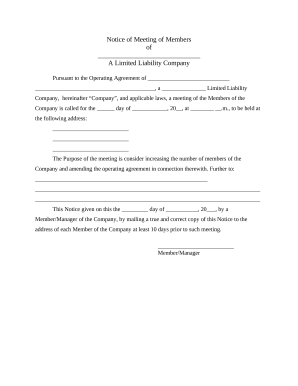
The Notice of Public Meeting is a legal notice form used by government entities to announce public meetings, detailing essential information like date, time, and agenda.
pdfFiller scores top ratings on review platforms




Who needs Public Meeting Notice?
Explore how professionals across industries use pdfFiller.

Public Meeting Notice is needed by:
-
Local government officials
-
Taxing district administrators
-
Public engagement coordinators
-
Community organizations
-
Event planners
-
Legal secretaries
Comprehensive Guide to Public Meeting Notice
What is the Notice of Public Meeting?
The Notice of Public Meeting is a vital form used to announce important gatherings, ensuring compliance with public meeting regulations. It specifies essential details including the date, time, place, and agenda of the meeting.
This form serves as a formal communication tool, helping to keep the public informed about governmental activities. Using the proper public meeting notice form is crucial for local governments and any organization required to adhere to transparency laws.
Key Features of the Notice of Public Meeting Form
The Notice of Public Meeting includes several key features that enhance its usability and efficiency. It comes as a fillable form template equipped with multiple fields and checkboxes, simplifying the completion process.
-
Clear instructions provided for users to follow
-
Mandatory use of official letterhead
-
Signature requirement from the authorized person
These features ensure that all necessary information is captured and formatted correctly, supporting effective government meeting announcements.
Who Needs the Notice of Public Meeting?
Understanding who is required to submit the Notice of Public Meeting is essential. Generally, various entities such as local governments, taxing districts, and public authorities must complete this form.
The role of the authorized person is critical, as they are responsible for ensuring that the form is submitted accurately. Situations necessitating this form often include planning meetings, budget discussions, or public hearings where community input is required.
How to Fill Out the Notice of Public Meeting Online (Step-by-Step)
Completing the Notice of Public Meeting online can be done effectively by following a structured process. Begin by gathering all required information, including the authorized person’s name, district details, and meeting agenda.
-
Access the notice of public meeting template via pdfFiller.
-
Fill out the fields with accurate details.
-
Ensure all sections are completed, including special assistance contact if needed.
Review the form for accuracy to avoid common mistakes and ensure all necessary information is included before submission.
Common Errors and How to Avoid Them
When filling out the Notice of Public Meeting, users often encounter specific pitfalls. Common errors include incomplete fields and incorrect formatting, which could lead to delays or rejections.
-
Double-check all fields to ensure completeness
-
Verify the clarity of the agenda and contact details
Taking these steps can significantly reduce the likelihood of errors and streamline the submission process.
Submission Process for the Notice of Public Meeting
Submitting the completed Notice of Public Meeting involves several options to ensure it reaches the appropriate authorities. Users can choose to send the form via mail, email, or in person, depending on local requirements.
It is crucial to be aware of relevant submission deadlines, which may vary by jurisdiction. Always have the contact information on hand for follow-up or assistance if issues arise during the submission process.
What Happens After You Submit the Notice of Public Meeting
Once the Notice of Public Meeting is submitted, it will undergo a review process by the respective authority. This step is necessary to verify compliance with all regulations and requirements.
If there are any rejections or necessary corrections, the authorized submitter will be notified to address these issues promptly. Users can expect to receive confirmations or approvals following the review process, indicating the status of their submission.
Security and Compliance for the Notice of Public Meeting
Using pdfFiller for handling the Notice of Public Meeting ensures that sensitive information is protected. The platform employs data encryption and complies with crucial regulations like HIPAA and GDPR.
Leveraging a cloud-based solution enhances the security of submitted forms, providing users with peace of mind about the privacy of their information.
How pdfFiller Enhances the Experience of Filling Out the Notice of Public Meeting
pdfFiller offers unique capabilities that improve the form completion experience. Users can take advantage of features like eSigning, sharing, and PDF editing, which add versatility to form management.
Additionally, access to customizable templates and secure storage options facilitates efficient handling of the Notice of Public Meeting, streamlining both completion and submission.
Start Your Journey with pdfFiller Today!
Embracing pdfFiller for your form needs is a practical choice, given the platform's ease of use and accessibility. It provides comprehensive tools for managing forms online, making the process straightforward and efficient.
By utilizing pdfFiller, users can explore numerous advantages while ensuring that their public meeting notices are completed accurately and securely.
How to fill out the Public Meeting Notice
-
1.Start by accessing pdfFiller and searching for 'Notice of Public Meeting' in the template library.
-
2.Once you find the form, click to open it in the editor.
-
3.Review the blank fields of the form, which will require specific information including the meeting date, time, location, and agenda.
-
4.Before filling out the form, gather necessary information such as the authorized person's details, the taxing district's name and address, and contact information for special assistance.
-
5.Use the interface to click on each field, entering the required information as prompted.
-
6.Make sure to complete all sections of the form, paying attention to details and ensuring no crucial information is missing.
-
7.Once you have filled in all the required fields, take the time to review the form for accuracy and completeness.
-
8.If you need assistance, consult the built-in instructions available within pdfFiller.
-
9.After confirming that everything is correct, you can save your work directly on pdfFiller.
-
10.Choose the option to download the form as a PDF for offline use or submit it electronically through the provided submission options.

Who is eligible to use the Notice of Public Meeting form?
Any authorized government representative or official involved in organizing public meetings can use the Notice of Public Meeting form.
What information is required to complete this form?
You will need the meeting date, time, location, agenda, the authorized person's name and position, and contact details for special assistance.
How should I submit the completed Notice of Public Meeting form?
The completed form can be submitted electronically through pdfFiller or printed and mailed to the appropriate taxing district office.
Are there any deadlines for submitting the Notice of Public Meeting?
Deadlines typically vary by jurisdiction; check with your local government for specific timelines to ensure compliance.
What common mistakes should I avoid when filling out this form?
Ensure all mandatory fields are completed, double-check spelling, and verify contact information to prevent processing delays.
How long does it take to process the Notice of Public Meeting form?
Processing times can vary based on local government procedures, but it's advisable to submit the form with ample time before the meeting.
Can I edit the Notice of Public Meeting form after submitting?
Once submitted, modifications are generally not allowed unless specified by your local government; contact them directly if changes are necessary.
Related Forms





Get the latest insights from our blog



If you believe that this page should be taken down, please follow our DMCA take down process
here
.
This form may include fields for payment information. Data entered in these fields is not covered by PCI DSS compliance.