
Last updated on
Oct 24, 2026

Get the free US Passport Issuance Consent Form
We are not affiliated with any brand or entity on this form

Fill out
Complete the form online in a simple drag-and-drop editor.

eSign
Add your legally binding signature or send the form for signing.

Share
Share the form via a link, letting anyone fill it out from any device.

Export
Download, print, email, or move the form to your cloud storage.
Why pdfFiller is the best tool for your documents and forms


End-to-end document management
From editing and signing to collaboration and tracking, pdfFiller has everything you need to get your documents done quickly and efficiently.
Accessible from anywhere
pdfFiller is fully cloud-based. This means you can edit, sign, and share documents from anywhere using your computer, smartphone, or tablet.
Secure and compliant
pdfFiller lets you securely manage documents following global laws like ESIGN, CCPA, and GDPR. It's also HIPAA and SOC 2 compliant.
What is Passport Consent Form
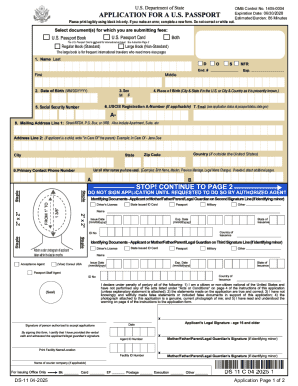
The US Passport Issuance Consent Form is a government document used by non-applying parents or guardians to authorize the issuance of a passport for a child when they cannot appear in person.
pdfFiller scores top ratings on review platforms




Who needs Passport Consent Form?
Explore how professionals across industries use pdfFiller.

Passport Consent Form is needed by:
-
Non-applying legal parents or guardians seeking passport issuance for a child.
-
Passport Authorizing Officers needing to notarize consent forms.
-
Child’s parents who may be traveling internationally.
-
Legal guardians handling passport applications for minors.
-
Notaries required for authenticating parental consent.
Comprehensive Guide to Passport Consent Form
What is the US Passport Issuance Consent Form?
The US Passport Issuance Consent Form, specifically the DS-3053 form, is a crucial document in the passport application process for minors. This form is required when one or both parents or legal guardians cannot appear in person for the passport application.
This form necessitates notarization to ensure legal recognition and is valid for a period of 90 days. It covers both types of passports, whether a passport book or a passport card, ensuring that children can obtain their necessary travel documents.
Purpose and Benefits of the US Passport Issuance Consent Form
The primary purpose of the US Passport Issuance Consent Form is to facilitate the passport application process for minors when not all legal guardians can be present. This form benefits children who require passports but find themselves without both parents present during their application.
Additionally, the DS-3053 form provides legal protections to parents and guardians, safeguarding against unauthorized passport issuance. The use of this consent form also promotes efficient processing of passport applications, reducing the potential for delays.
Who Needs the US Passport Issuance Consent Form?
The US Passport Issuance Consent Form must be completed by individuals defined as Non-Applying Legal Parents or Guardians, as well as Passport Authorizing Officers or Notaries. These roles are critical in validating the consent provided for a minor's passport issuance.
Eligibility criteria for minors requiring passports include those whose parents are unable to attend the application process. Situations that necessitate the use of this consent form range from parents being out of the country to sole custody situations.
How to Fill Out the US Passport Issuance Consent Form Online (Step-by-Step)
To complete the US Passport Issuance Consent Form online using pdfFiller, gather essential information beforehand, which includes the child's name and date of birth. A step-by-step breakdown would include:
-
Open the DS-3053 form on the pdfFiller platform.
-
Enter the child's name in the specified field.
-
Input the child's birth date accurately.
-
Complete the sections for the Non-Applying Parent/Guardian and ensure all required signatures are provided.
-
Review the form for accuracy before finalizing.
Ensure each section is filled out completely to avoid processing delays.
Review and Validation Checklist for the US Passport Issuance Consent Form
To ensure accuracy before submitting the US Passport Issuance Consent Form, it is essential to avoid common errors. Here are a few common pitfalls:
-
Missing signatures from the Non-Applying Parent/Guardian.
-
Inaccurate child information entry, such as spelling mistakes in the name.
-
Failing to notarize the form as required.
Utilize a checklist to validate the completion of each section, ensuring a smoother submission process and reducing the risk of delays.
How to Sign or Notarize the US Passport Issuance Consent Form
Notarization is a vital step in the process of completing the US Passport Issuance Consent Form. Understanding the differences between digital and wet signatures is essential, as each state may have different requirements regarding notarization.
To find a notary, consider the following:
-
Search for certified notaries in your area through local services.
-
Be prepared to present identification and the completed form for notarization.
-
Ensure that all signatures comply with state requirements to avoid complications.
Where and How to Submit the US Passport Issuance Consent Form
After completing the US Passport Issuance Consent Form, there are several methods for submission. These methods include:
-
Online submission through official government portals.
-
Mailing the form to the designated passport processing center.
-
Submitting the form in person at selected passport acceptance facilities.
It is important to also address necessary fees and payment methods associated with the submission to ensure that the application process proceeds without hitches.
What Happens After You Submit the US Passport Issuance Consent Form?
Once you submit the US Passport Issuance Consent Form, the application enters the processing stage. Typical timelines for passport applications can vary, so it is essential to monitor the application's status.
If any issues arise, such as missing documentation or questions from processing authorities, it is crucial to promptly follow up. Potential outcomes of the application include approval, requests for additional information, or rejections, each necessitating a specific follow-up process.
Security and Compliance for the US Passport Issuance Consent Form
The security and compliance of your submitted US Passport Issuance Consent Form are paramount. pdfFiller ensures adherence to robust security standards including GDPR and HIPAA compliance.
Data protection measures are implemented for handling sensitive documents, underscoring the importance of using secure platforms for document management, particularly when dealing with personal information.
Utilize pdfFiller for Your US Passport Issuance Consent Form Needs
pdfFiller provides a user-friendly interface for managing the US Passport Issuance Consent Form, enhancing your form-filling experience. Features offered by pdfFiller include:
-
eSigning capabilities for convenience.
-
Document security to protect your personal information.
-
Cloud access for flexibility in form management.
Utilizing pdfFiller can streamline the passport application process compared to traditional methods, making it a practical choice for users.
How to fill out the Passport Consent Form
-
1.To access the US Passport Issuance Consent Form on pdfFiller, navigate to the website and use the search bar to enter 'DS-3053 form'.
-
2.Once you find the form, click on it to open in pdfFiller's editor, where you can begin filling in the necessary details.
-
3.Before starting, gather all required information, including the child's full name, birthdate, and the signature of the non-applying legal parent or guardian.
-
4.Utilize the fillable fields available in pdfFiller to complete all sections accurately, ensuring you follow any prompts presented by the interface.
-
5.Be sure to pay attention to the notary section and complete it in compliance with local regulations, as notarization is required.
-
6.Review all entered information carefully to ensure everything is accurate and complete before finalizing the form.
-
7.When satisfied, save your progress or choose to download the filled form to your device for future use.
-
8.If you need to submit the form, check pdfFiller for options to email or print directly for submission to the appropriate authority.

Who is eligible to use the US Passport Issuance Consent Form?
The form is intended for non-applying legal parents or guardians who must provide consent for a child’s passport application when they cannot appear in person.
Is notarization required for this form?
Yes, the US Passport Issuance Consent Form must be notarized to be considered valid, as it requires official verification of signatures.
What information do I need to complete the form?
You will need the child's full name, birthdate, and signature of the non-applying legal parent or guardian. Ensure all information is correct to avoid delays.
How long is the consent form valid?
The US Passport Issuance Consent Form is valid for 90 days from the date it is signed and notarized, so be mindful of timing when applying.
What mistakes should I avoid when filling out the form?
Common mistakes include incorrect signatures, missing required fields, and failing to have the form notarized. Double-check all entries before submission.
How do I submit the completed consent form?
After completing the form, you can either print it for personal hand delivery or use available submission methods through pdfFiller to send it electronically to the required authority.
What is the processing time for the passport application using this consent form?
Processing times may vary, but generally, passport applications can take several weeks. It's recommended to apply as early as possible to avoid travel delays.
Related Forms



Get the latest insights from our blog


If you believe that this page should be taken down, please follow our DMCA take down process
here
.
This form may include fields for payment information. Data entered in these fields is not covered by PCI DSS compliance.