
Last updated on
Oct 24, 2026

Get the free Vehicle Release Form
We are not affiliated with any brand or entity on this form

Fill out
Complete the form online in a simple drag-and-drop editor.

eSign
Add your legally binding signature or send the form for signing.

Share
Share the form via a link, letting anyone fill it out from any device.

Export
Download, print, email, or move the form to your cloud storage.
Why pdfFiller is the best tool for your documents and forms


End-to-end document management
From editing and signing to collaboration and tracking, pdfFiller has everything you need to get your documents done quickly and efficiently.
Accessible from anywhere
pdfFiller is fully cloud-based. This means you can edit, sign, and share documents from anywhere using your computer, smartphone, or tablet.
Secure and compliant
pdfFiller lets you securely manage documents following global laws like ESIGN, CCPA, and GDPR. It's also HIPAA and SOC 2 compliant.
What is Vehicle Release
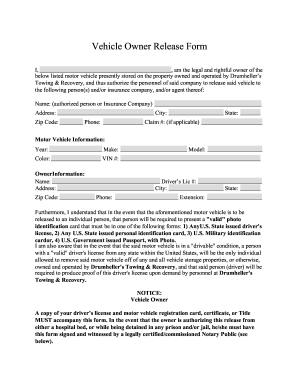
The Vehicle Release Form is a legal document used by vehicle owners to authorize the release of their vehicle from impoundment.
pdfFiller scores top ratings on review platforms




Who needs Vehicle Release?
Explore how professionals across industries use pdfFiller.

Vehicle Release is needed by:
-
Vehicle owners looking to retrieve impounded vehicles
-
Notaries public who need to verify signatures
-
Law enforcement agencies involved in vehicle impoundment
-
Legal professionals handling vehicle-related cases
-
Rental agencies dealing with impounded vehicles
Comprehensive Guide to Vehicle Release
What is the Vehicle Release Form?
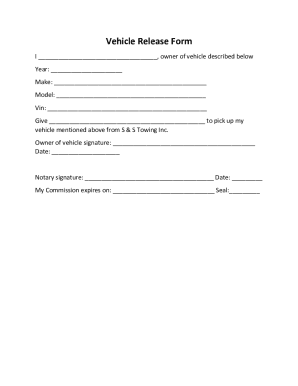
The Vehicle Release Form is a legal document designed to authorize the release of an impounded vehicle. It serves as an official record that a vehicle owner consents to the release of their vehicle from a law enforcement or city impound facility. This form is utilized primarily in the context of vehicle impoundment, simplifying the process of reclaiming vehicles that have been towed or detained.
Purpose and Benefits of the Vehicle Release Form
This form is crucial for legally authorizing the return of impounded vehicles to their rightful owners. By completing the Vehicle Release Form, individuals streamline the release process, ensuring that all legal requirements are met. Key benefits include reducing bureaucratic delays and providing clear evidence of ownership and consent during vehicle retrieval.
Key Features of the Vehicle Release Form
Essential fields in the form include vehicle details such as:
-
Year
-
Make
-
Model
-
VIN (Vehicle Identification Number)
-
Tag number
Additionally, the form mandates signatures from both the vehicle owner and a notary, ensuring the document's authenticity and legal standing.
Who Needs the Vehicle Release Form?
The Vehicle Release Form is necessary for vehicle owners as well as individuals designated by owners, such as family members or friends. This form is typically required in situations involving accidents, vehicle theft recoveries, or any instances where a vehicle has been impounded, providing a clear legal pathway for its release.
How to Fill Out the Vehicle Release Form Online (Step-by-Step)
To fill out the Vehicle Release Form using pdfFiller, follow these steps:
-
Access the Vehicle Release Form on the pdfFiller platform.
-
Enter the required vehicle details such as year, make, model, and VIN.
-
Fill in your personal information as the vehicle owner.
-
Sign the form digitally or print it for a wet signature.
-
Have your signature notarized if necessary.
-
Review all information for accuracy.
-
Submit the form as instructed.
Signing and Notarizing the Vehicle Release Form
Signing the Vehicle Release Form requires attention to specific requirements. Users must obtain notarization, which verifies the authenticity of signatures. It's important to understand the difference between digital signatures, which can be applied directly in platforms like pdfFiller, and wet signatures that must be penned in person, as both can hold legal weight in different contexts.
Submission Methods for the Vehicle Release Form
Completed Vehicle Release Forms can be submitted through multiple methods:
-
Online via pdfFiller.
-
By mail, ensuring the form is sent to the correct impound facility.
-
In person at the respective impound location.
Each submission method may have specific fees, deadlines, and processing timelines, which should be confirmed to avoid delays in vehicle release.
Common Errors and Solutions When Filling the Vehicle Release Form
Common mistakes when completing the Vehicle Release Form can lead to unnecessary complications. Users should watch for errors such as:
-
Inaccurate vehicle information.
-
Missing required signatures.
-
Forgetting to notarize the document when needed.
A review checklist is useful to validate the form's completeness before submission.
What Happens After You Submit the Vehicle Release Form?
After submission, individuals can expect the following steps:
-
Receiving confirmation of the form's receipt.
-
Tracking the processing status of the request.
-
Potential outcomes, such as approval notification or reasons for rejection.
Understanding these next steps helps owners prepare for retrieving their vehicles in a timely manner.
Enhance Your Experience with pdfFiller
pdfFiller significantly eases the process of completing the Vehicle Release Form, offering a user-friendly interface for form management. The platform not only ensures compliance with security standards but also enhances user experience through its ease of use and robust features for document handling. By leveraging pdfFiller, users can efficiently manage all their legal form needs, including the Vehicle Release Form, with confidence.
How to fill out the Vehicle Release
-
1.To access the Vehicle Release Form on pdfFiller, visit the website and search for 'Vehicle Release Form' in the templates section.
-
2.Once the form opens, familiarize yourself with the layout, which includes fillable fields for vehicle details and signature lines.
-
3.Before starting, gather essential information such as the vehicle's make, model, year, VIN, tag number, and the owner's signature.
-
4.Proceed to fill in the fields provided: enter the year, make, model, VIN, and tag number accurately to avoid any discrepancies.
-
5.As you complete the form, ensure you also provide the required signatures in the designated spaces for both the owner and the notary.
-
6.Review the entire form carefully, checking that all entered information is correct, especially the signatures and vehicle details.
-
7.Once you are satisfied with the form, use pdfFiller's save feature to store your completed document, or opt to download it directly to your device.
-
8.If required, submit the form as per your local regulations through either email or a physical copy, depending on the instructions you have.

Who is eligible to use the Vehicle Release Form?
Any vehicle owner whose vehicle has been impounded can use the Vehicle Release Form to authorize its release. Notaries and legal representatives may also need it for verification.
Is notarization required for the Vehicle Release Form?
Yes, the Vehicle Release Form requires notarization. Both the owner’s signature and the notary’s acknowledgment must be included for the release to be valid.
What information do I need to complete the form?
You'll need details such as the vehicle’s year, make, model, VIN, tag number, and the signatures of both the vehicle owner and the notary. Ensure all information is accurate.
What are the common mistakes to avoid when filling out this form?
Common mistakes include not providing complete vehicle details, skipping signature sections, or failing to have the form notarized. Double-check all fields before submission.
What is the submission process for the Vehicle Release Form?
After completing the form, you can submit it by following local regulations. This may involve emailing a digital copy or submitting a printed version to the appropriate authority.
How long does it take to process a Vehicle Release Form?
Processing times can vary by location and authority. Generally, once submitted, it may take a few days to a week, depending on the specific procedures involved.
Are there any fees associated with using the Vehicle Release Form?
While the form itself is often free, there may be fees associated with notarization or local submission processes. Check with your local agency for specific costs.
Related Forms




Get the latest insights from our blog


If you believe that this page should be taken down, please follow our DMCA take down process
here
.
This form may include fields for payment information. Data entered in these fields is not covered by PCI DSS compliance.