
Last updated on
Oct 23, 2026

Get the free Transportation Registration Form 2025-2026
We are not affiliated with any brand or entity on this form

Fill out
Complete the form online in a simple drag-and-drop editor.

eSign
Add your legally binding signature or send the form for signing.

Share
Share the form via a link, letting anyone fill it out from any device.

Export
Download, print, email, or move the form to your cloud storage.
Why pdfFiller is the best tool for your documents and forms


End-to-end document management
From editing and signing to collaboration and tracking, pdfFiller has everything you need to get your documents done quickly and efficiently.
Accessible from anywhere
pdfFiller is fully cloud-based. This means you can edit, sign, and share documents from anywhere using your computer, smartphone, or tablet.
Secure and compliant
pdfFiller lets you securely manage documents following global laws like ESIGN, CCPA, and GDPR. It's also HIPAA and SOC 2 compliant.
What is Transportation Form
The Transportation Registration Form 2025-2026 is a school enrollment document used by parents or guardians in New York to register children for school transportation services.
pdfFiller scores top ratings on review platforms




Who needs Transportation Form?
Explore how professionals across industries use pdfFiller.

Transportation Form is needed by:
-
Parents or guardians of students in Schalmont Central School District
-
Families with children attending non-public schools seeking transportation
-
School administrators needing updated transportation information
-
Emergency contacts for registered students
-
Individuals assisting with student enrollment procedures
Comprehensive Guide to Transportation Form
What is the Transportation Registration Form 2?
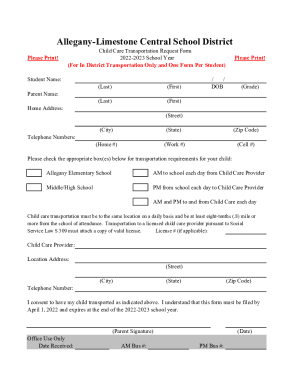
The Transportation Registration Form 2 is a crucial document used by parents and guardians in the Schalmont Central School District to register their children for school transportation services. This form is specifically designed to gather essential information such as student details, parent's contact information, and emergency contacts. By completing this form, families ensure that their children have the necessary arrangements for reliable transportation, promoting safety and accessibility to school services.
Purpose and Benefits of the Transportation Registration Form 2
The primary purpose of the Transportation Registration Form 2 is to facilitate a smooth registration process for students. Properly filled forms enable the district to organize reliable transportation services. Some benefits include:
-
Improved safety during transportation.
-
Timely access to school services.
-
Enhanced reliability for families planning their schedules.
These advantages highlight the significance of the transportation registration form in securing a safe travel experience for students.
Who Needs the Transportation Registration Form 2?
Parents or guardians of all Schalmont students, as well as those with non-public school students eligible for transportation, need to fill out this form. Timely registration is essential for ensuring that all applicable students receive transportation services. Filling out the form correctly ensures that the needs of the students are met effectively.
When to Submit the Transportation Registration Form 2?
Deadlines for submission are critical to maintaining an organized transportation system. The submission deadlines include:
-
June 30, 2025, for Schalmont students.
-
April 1, 2025, for non-public school students.
Submitting the form after these dates may lead to delays or complications in transportation arrangements, underscoring the need for prompt action.
How to Fill Out the Transportation Registration Form 2 Online
Filling out the Transportation Registration Form 2 online is a straightforward process when using pdfFiller. Follow these steps for a successful submission:
-
Access pdfFiller and select the transportation registration form.
-
Carefully enter all required information in the designated fields.
-
Review the form for accuracy.
-
Submit the completed form electronically through the platform.
-
Keep a copy of the submission confirmation for your records.
By being aware of common pitfalls, users can avoid errors that may affect their registration.
Key Information Required for the Transportation Registration Form 2
To streamline the process of filling out the Transportation Registration Form 2, ensure you gather the following information prior to starting:
-
Student names and grades.
-
Parent or guardian contact information.
-
Emergency contacts.
-
Alternate location details, if applicable.
Pre-collecting this information will enhance the efficiency of completing the form.
Common Errors and How to Avoid Them When Filling Out the Form
While completing the Transportation Registration Form 2, be mindful of common errors that could derail the process. Some typical mistakes include:
-
Missing signatures.
-
Incorrect or missing dates.
-
Incomplete fields or sections.
To avoid these pitfalls, consider using a validation checklist to review your form before submission, ensuring all necessary components are correctly filled in.
Security and Compliance for the Transportation Registration Form 2
When using pdfFiller to submit your Transportation Registration Form 2, rest assured that your data is secure. PdfFiller incorporates robust security measures, including:
-
256-bit encryption for data protection.
-
Compliance with privacy regulations such as HIPAA and GDPR.
These features address common privacy concerns and ensure that sensitive information is handled with care.
What Happens After You Submit the Transportation Registration Form 2?
After submitting the Transportation Registration Form 2, users can expect a prompt confirmation process. Many submission platforms offer tracking methods, allowing families to monitor their status. If corrections or amendments are needed post-submission, refer to the instructions provided upon confirmation for the next steps.
Experience the Benefits of Using pdfFiller for Filling Out Your Transportation Registration Form
Utilizing pdfFiller for your Transportation Registration Form simplifies the process significantly. The platform provides an array of features that enhance user experience, such as:
-
Tools for easy editing and signing of documents.
-
User-friendly design that makes navigation straightforward.
-
Robust security features ensuring data protection.
PdfFiller is your resource for efficient and secure form-filling needs, creating a seamless experience for families.
How to fill out the Transportation Form
-
1.Access the Transportation Registration Form 2025-2026 on pdfFiller by visiting their website and searching for the form using its title.
-
2.Once the form is open, navigate through the fields. Use your mouse or touchpad to click on each blank space to input information.
-
3.Before starting, gather necessary information such as student names, parent/guardian contact details, emergency contact info, and any alternate locations for drop-off or pick-up.
-
4.Fill out each field carefully, ensuring all required sections are completed. Use the checkboxes provided for gender identification where applicable.
-
5.After completing the form, take a moment to review each entry for accuracy, checking for any typos or missing information.
-
6.Once you are satisfied with the form, save your progress. You can choose to download it to your device or submit it directly via pdfFiller.
-
7.If submitting through pdfFiller, finalize the process by following any prompts to securely send your completed form to the school district.

Who is eligible to fill out the Transportation Registration Form?
The form should be completed by parents or guardians of students enrolled in Schalmont Central School District or those attending non-public schools who need transportation.
What is the deadline for submitting this form?
Parents must submit the Transportation Registration Form by June 30, 2025, for Schalmont students and by April 1, 2025, for non-public school students seeking transportation.
How can I submit the Transportation Registration Form?
You can submit the form through pdfFiller by saving the completed document and following the submission prompts, or you may print and mail it directly to the school district.
Are there any documents required to file this form?
No additional documents are mentioned in the metadata; however, it's advisable to have your child's enrollment information ready when filling out the form.
What are common mistakes to avoid when completing the form?
Ensure all fields are filled out completely, double-check contact information for accuracy, and confirm that all necessary checkboxes are selected to avoid delays in processing.
How long does it take to process the submitted form?
Processing times can vary, but typically the school district will notify you of the status or any required follow-up within a few weeks after the submission deadline.
What should I do if I need assistance with the form?
For assistance, you can contact the Schalmont Central School District directly or seek help from the school’s administrative office regarding any questions about the form or submission process.
Related Forms




Get the latest insights from our blog


If you believe that this page should be taken down, please follow our DMCA take down process
here
.
This form may include fields for payment information. Data entered in these fields is not covered by PCI DSS compliance.