
Last updated on
Oct 24, 2026

Get the free Contractor Permission Form
We are not affiliated with any brand or entity on this form

Fill out
Complete the form online in a simple drag-and-drop editor.

eSign
Add your legally binding signature or send the form for signing.

Share
Share the form via a link, letting anyone fill it out from any device.

Export
Download, print, email, or move the form to your cloud storage.
Why pdfFiller is the best tool for your documents and forms


End-to-end document management
From editing and signing to collaboration and tracking, pdfFiller has everything you need to get your documents done quickly and efficiently.
Accessible from anywhere
pdfFiller is fully cloud-based. This means you can edit, sign, and share documents from anywhere using your computer, smartphone, or tablet.
Secure and compliant
pdfFiller lets you securely manage documents following global laws like ESIGN, CCPA, and GDPR. It's also HIPAA and SOC 2 compliant.
What is Contractor Permission
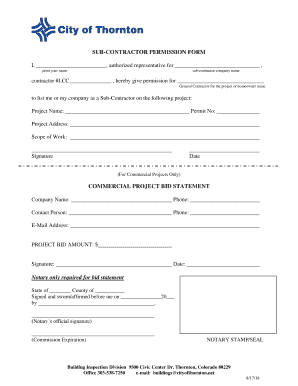
The Contractor Permission Form is a government document used by contractors in Fort Morgan, Colorado, to obtain permission for pulling various building permits.
pdfFiller scores top ratings on review platforms




Who needs Contractor Permission?
Explore how professionals across industries use pdfFiller.

Contractor Permission is needed by:
-
Building Contractors applying for permits
-
Electrical Contractors needing authorization
-
Plumbing Contractors requesting permission
-
Mechanical Contractors seeking to file for permits
-
Property owners requiring contractor services
-
Construction companies involved in building projects
Comprehensive Guide to Contractor Permission
What is the Contractor Permission Form?
The Contractor Permission Form is an essential document used in Fort Morgan, Colorado, to grant authorization for contractors to pull necessary permits, including building, electrical, plumbing, and mechanical permits. This critical document simplifies the process of contractor authorization, ensuring that all parties involved are clear about their responsibilities. By using the Colorado contractor form, contractors can efficiently manage the permitting requirements associated with their projects.
Purpose and Benefits of the Contractor Permission Form
This form is specifically designed to streamline the permitting process for contractors, allowing for quicker approvals and project initiation. The contractor signature form not only simplifies the logistical aspects but also provides legal protection, helping to clarify the responsibilities between property owners and contractors. As such, it plays a vital role in facilitating smooth operations for building, electrical, mechanical, and plumbing projects.
Key Features of the Contractor Permission Form
The Contractor Permission Form includes several important features that enhance its functionality. Key elements consist of signature lines, blank fields for contractors' names, and company details, as well as designated sections for permit numbers. These attributes ensure that the form is both user-friendly and compliant with local regulations, making it an indispensable tool for contractors required to obtain building contractor permission, electrical contractor permission, plumbing contractor permission, and mechanical contractor permission.
Who Needs the Contractor Permission Form?
This form is primarily utilized by building, electrical, plumbing, and mechanical contractors. However, it is also crucial for property owners and developers engaging various contractors. By filling out the Colorado building department form, users facilitate a better understanding of project requirements and expectations, making the process smoother for all parties involved.
Eligibility Criteria for the Contractor Permission Form
To utilize the Contractor Permission Form, both contractors and property owners must meet specific qualifications. This includes necessary licensing or registration requirements relevant in Colorado. Understanding these eligibility criteria is essential for ensuring compliance, thereby allowing contractors to operate within legal frameworks.
How to Fill Out the Contractor Permission Form Online (Step-by-Step)
Filling out the Contractor Permission Form online is an efficient process when using pdfFiller. Follow these steps for successful completion:
-
Access the form through pdfFiller’s platform.
-
Fill in the contractor’s name and company details in the designated fields.
-
Enter the job address and permit number as required.
-
Sign the form where indicated, ensuring that all necessary signatures are obtained.
-
Review the form for completeness before submission.
Common Errors to Avoid When Filling Out the Contractor Permission Form
Several frequent mistakes can complicate the submission process. Common errors include missing essential fields and providing incorrect signatures. To ensure accuracy, take the time to review the completed form thoroughly before submission, which can prevent potential delays in processing.
Submission Methods and Delivery of the Contractor Permission Form
Once the Contractor Permission Form is completed, various methods are available for submission to the respective authorities in Fort Morgan, Colorado. It is imperative to track your submission for confirmation and to facilitate follow-up inquiries. Options for submission may include online uploads or physical delivery, depending on the requirements of the local building department.
The Role of pdfFiller in Completing Your Contractor Permission Form
pdfFiller is instrumental in assisting users with filling, signing, and securely storing the Contractor Permission Form. The platform offers robust security features, ensuring compliance with regulations while processing sensitive documents. By utilizing pdfFiller, users benefit from a streamlined experience that emphasizes safe document management.
Next Steps After Submitting the Contractor Permission Form
After submitting the Contractor Permission Form, users can expect to receive communication regarding the processing timeline. It is advisable to know how to check the status of your application to stay informed. In case any issues arise with the submitted form, understanding potential outcomes will assist users in navigating the next steps effectively.
How to fill out the Contractor Permission
-
1.To begin, visit pdfFiller and search for the Contractor Permission Form.
-
2.Once located, click to open the form in pdfFiller's editor for easy access.
-
3.Review the form structure to understand the required fields before you populate any information.
-
4.Gather all necessary information beforehand, such as contractor names, company details, job address, and permit number.
-
5.Start filling in the contractor names in the designated fields, ensuring you match the specific contractor type with the corresponding area.
-
6.Continue by entering the respective company names next to each contractor for accurate documentation.
-
7.Next, make sure to fill in the job address where the permits will apply for clarity.
-
8.Be diligent about entering the permit number accurately in the required field to prevent any issues in processing.
-
9.After filling out all fields, carefully review the completed form for accuracy and completeness.
-
10.Check for any missing signatures, especially under each contractor's section, as these are mandatory.
-
11.Once satisfied with the entries, you can save your work in pdfFiller, download it for your records, or directly submit it as required.

Who is eligible to fill out the Contractor Permission Form?
The Contractor Permission Form is designed for licensed contractors in Fort Morgan, Colorado, including building, electrical, plumbing, and mechanical contractors. Property owners may also fill it out to authorize contractors to act on their behalf.
Are there any deadlines for submitting this form?
While the Contractor Permission Form itself has no fixed deadlines, it is advisable to submit it as soon as possible before starting any construction project to avoid delays in obtaining the necessary permits.
What are the submission procedures for the Contractor Permission Form?
After completing the Contractor Permission Form, you can submit it to your local building department in Fort Morgan. Make sure to check if they accept electronic submissions through pdfFiller or if you need to deliver it in person.
What supporting documents are required with this form?
Typically, no additional documents are required when submitting the Contractor Permission Form. However, having copies of contractor licenses and business registrations on hand may help facilitate processing.
What common mistakes should I avoid when filling out this form?
Common mistakes include forgetting to sign names in the required signature fields and missing information like the job address or permit number. Ensure all information is accurate and complete before submission.
How long does it take to process the Contractor Permission Form?
Processing times can vary depending on the local building department’s workload. Typically, it may take several days to weeks. Check directly with the department for precise timing.
Can I edit the Contractor Permission Form after submitting it?
Once submitted, the Contractor Permission Form cannot be edited. If changes are necessary, you typically have to resubmit the corrected form along with any relevant supporting documents.
Related Forms





Get the latest insights from our blog


If you believe that this page should be taken down, please follow our DMCA take down process
here
.
This form may include fields for payment information. Data entered in these fields is not covered by PCI DSS compliance.