

FR Cerfa 11162 free printable template
We are not affiliated with any brand or entity on this form

Fill out
Complete the form online in a simple drag-and-drop editor.

eSign
Add your legally binding signature or send the form for signing.

Share
Share the form via a link, letting anyone fill it out from any device.

Export
Download, print, email, or move the form to your cloud storage.
Why pdfFiller is the best tool for your documents and forms


End-to-end document management
From editing and signing to collaboration and tracking, pdfFiller has everything you need to get your documents done quickly and efficiently.
Accessible from anywhere
pdfFiller is fully cloud-based. This means you can edit, sign, and share documents from anywhere using your computer, smartphone, or tablet.
Secure and compliant
pdfFiller lets you securely manage documents following global laws like ESIGN, CCPA, and GDPR. It's also HIPAA and SOC 2 compliant.
What is FR Cerfa 11162
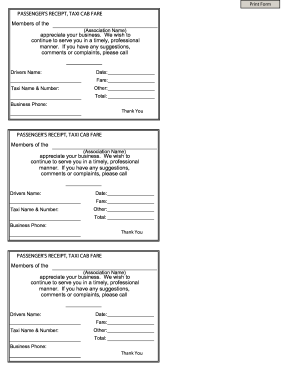
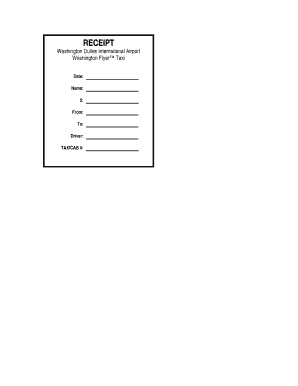
The facture taxi v1 avr08 is an invoicing document used by taxi operators to detail fares and services provided to customers.
pdfFiller scores top ratings on review platforms




Who needs FR Cerfa 11162?
Explore how professionals across industries use pdfFiller.

FR Cerfa 11162 is needed by:
-
Taxi operators needing to issue invoices.
-
Business owners managing taxi services.
-
Freelance taxi drivers requiring formal payment records.
-
Accounting professionals handling taxi service finances.
-
Transport regulators monitoring fare compliance.
How to fill out the FR Cerfa 11162
-
1.Start by accessing pdfFiller and logging into your account.
-
2.Use the search function to locate the 'facture taxi v1 avr08' form and select it to open.
-
3.Review the form layout to familiarize yourself with the data entry fields.
-
4.Gather necessary information such as the passenger name, date of service, trip details, and total fare.
-
5.Click on the relevant fields to fill in information, ensuring accuracy in all entries.
-
6.Utilize pdfFiller's tools to adjust the format if needed and add any special services provided.
-
7.Once all fields are completed, take a moment to review the entries for any mistakes or omissions.
-
8.Use the preview feature to see how the final invoice will appear once printed.
-
9.Finalize your form by clicking on the save option, allowing you to keep a copy for your records.
-
10.To submit, select the download or send options provided by pdfFiller for easy sharing with your customers.

Who is eligible to use the facture taxi v1 avr08?
The facture taxi v1 avr08 is designed for taxi operators and freelance drivers required to document fares and services for their clientele. Anyone in the taxi service industry can utilize this form for official invoicing.
Are there any deadlines for issuing this form?
While there are typically no strict deadlines for issuing invoices in the taxi industry, it is advisable to provide this document at the time of service or promptly thereafter to ensure timely payments.
How can I submit the completed form?
Once you have filled in the facture taxi v1 avr08 form on pdfFiller, you can submit it either by downloading it for physical delivery or using pdfFiller's sharing options to send it electronically to your customer.
What supporting documents do I need when using this form?
Generally, you will not need additional documents to issue an invoice. However, gathering receipts or evidence of service provided may be helpful for both your records and accountability.
What are common mistakes to avoid while filling this form?
It's crucial to avoid incomplete fields, discrepancies in fare calculation, and misrepresentation of service details. Additionally, double-check the spelling of names and contact information to prevent any issues.
How long does it take to process an invoice using this form?
Typically, the processing of an invoice is immediate once issued. However, payment timelines may vary based on the customer's payment methods and your agreement regarding payment terms.
Can I modify the facture taxi v1 avr08 template?
Yes, pdfFiller allows you to modify this template by adding customization elements such as your company logo, altering text fields, or adjusting the layout as necessary to fit your branding needs.
Related Forms


Get the latest insights from our blog


If you believe that this page should be taken down, please follow our DMCA take down process
here
.
This form may include fields for payment information. Data entered in these fields is not covered by PCI DSS compliance.