
Last updated on
Nov 10, 2026

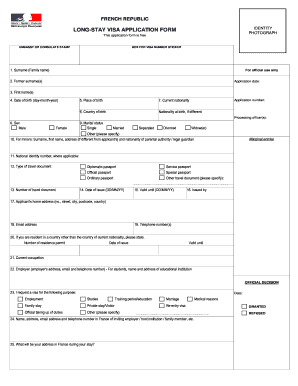
FR Cerfa 11796 free printable template
We are not affiliated with any brand or entity on this form

Fill out
Complete the form online in a simple drag-and-drop editor.

eSign
Add your legally binding signature or send the form for signing.

Share
Share the form via a link, letting anyone fill it out from any device.

Export
Download, print, email, or move the form to your cloud storage.
Why pdfFiller is the best tool for your documents and forms


End-to-end document management
From editing and signing to collaboration and tracking, pdfFiller has everything you need to get your documents done quickly and efficiently.
Accessible from anywhere
pdfFiller is fully cloud-based. This means you can edit, sign, and share documents from anywhere using your computer, smartphone, or tablet.
Secure and compliant
pdfFiller lets you securely manage documents following global laws like ESIGN, CCPA, and GDPR. It's also HIPAA and SOC 2 compliant.
What is FR Cerfa 11796
The page 1pdf is a document used by individuals or organizations to efficiently manage and complete necessary forms in PDF format.
pdfFiller scores top ratings on review platforms




Who needs FR Cerfa 11796?
Explore how professionals across industries use pdfFiller.

FR Cerfa 11796 is needed by:
-
Individuals needing to fill out forms for personal purposes
-
Businesses submitting documents for compliance
-
Students completing school-related paperwork
-
Non-profit organizations managing registrations
-
Freelancers handling contracts and agreements
Comprehensive Guide to FR Cerfa 11796
Overview of the page 1pdf
The page 1pdf serves as a vital tool for users involved in document management, specifically for managing a particular form effectively. This PDF format is designed to streamline the process of filling and submitting essential documents.
The significance of page 1pdf lies in its ability to simplify the document management process, ensuring that both businesses and individuals can manage their paperwork efficiently and securely.
Benefits of Using page 1pdf
Utilizing page 1pdf can provide users with numerous advantages in their daily tasks. Notably, it saves time and offers ease of use for those managing PDF forms.
-
Users experience enhanced accessibility to complete their forms with minimal effort.
-
pdfFiller creates a more enjoyable experience for filling out page 1pdf, thanks to its user-friendly interface.
Key Features of the page 1pdf
The page 1pdf comes equipped with a range of features that distinguish it from other PDF forms. Key functions include editing, filling, eSigning, and sharing capabilities.
It is also designed to be compatible with various browsers, making it accessible on multiple devices, which significantly enhances user convenience.
User Eligibility for page 1pdf
The page 1pdf is ideal for a variety of user profiles, ranging from businesses to individual users. Typically, it is utilized by those who need a streamlined process for filling and submitting forms.
Specific scenarios for using this form may vary, but it is crucial for users to be aware of their eligibility to ensure they meet the necessary requirements when utilizing the page 1pdf.
How to Fill Out the page 1pdf Online
Filling out the page 1pdf online is straightforward. First, access the form through pdfFiller, and you'll find user instructions provided for guidance.
-
Open the page 1pdf from the pdfFiller platform.
-
Complete each necessary field, being cautious of common errors.
-
Review the form thoroughly before submission to ensure accuracy.
Common Mistakes to Avoid When Completing page 1pdf
When completing the page 1pdf, users may encounter specific fields that are prone to errors. Awareness of these common mistakes can help streamline the submission process.
-
Double-check all entries to prevent inaccuracies in essential fields.
-
Utilize validation tools to ensure all required information is accurately filled prior to submission.
Submission Methods for page 1pdf
There are multiple options available for submitting the completed page 1pdf. Users can choose between digital submission or physical delivery of the form.
It's essential to be aware of deadlines and typical processing times to ensure timely handling of submitted forms.
Ensuring Security and Compliance with the page 1pdf
When managing sensitive information, security is paramount. pdfFiller implements robust security measures, including 256-bit encryption, to protect user data effectively.
Moreover, pdfFiller complies with all relevant laws, including HIPAA and GDPR, ensuring that users’ information is handled with the utmost care.
What Happens After You Submit the page 1pdf
Once the page 1pdf is submitted, users can expect to receive confirmation of their submission. It is also crucial to track the status of submissions to stay informed regarding processing outcomes.
In case of a rejection, users should be prepared to address any issues that may arise during the review process effectively.
Maximize Your page 1pdf Experience with pdfFiller
To ensure a seamless experience with the page 1pdf, leveraging the capabilities of pdfFiller is recommended. The platform offers a user-friendly interface along with a suite of helpful tools designed for enhanced document management.
Additionally, pdfFiller provides customer support and various resources to assist users in their form-filling journey, thus maximizing efficiency and reliability.
How to fill out the FR Cerfa 11796
-
1.Start by accessing pdfFiller's website and searching for the page 1pdf form using the search bar or document library.
-
2.Open the form by clicking on its title in the search results to load it into the pdfFiller editor.
-
3.Familiarize yourself with the interface. Use the side menu to view available tools and options for filling out the form.
-
4.Before you start, gather any necessary information required to complete the form accurately, such as personal identification and any relevant supporting documents.
-
5.Begin filling in the fields by clicking on each one and typing in the appropriate information. Use the toolbar to adjust text formats if needed.
-
6.As you progress, utilize pdfFiller's features such as electronic signature options and notes to clarify your entries.
-
7.Once you have completed all fields, review the entire form carefully for any errors or omissions. Make corrections as needed.
-
8.Finalize your document by selecting the save option or export the filled form using the download feature on pdfFiller.
-
9.You can also submit the completed form directly through pdfFiller's sharing options, which allow you to send it via email or other specified methods.

Who is eligible to use the page 1pdf?
Anyone needing to complete forms in PDF format can use the page 1pdf, including individuals, businesses, and organizations.
What is the deadline for submitting the page 1pdf?
The deadline for submission varies based on the specific purpose of the form. Be sure to check related requirements to avoid penalties.
How do I submit the completed page 1pdf?
You can submit the page 1pdf directly through pdfFiller, either by downloading it and sending it via email or using the platform's share options.
What supporting documents do I need to attach?
This form typically does not require supporting documents, but it's wise to verify specific instructions tied to its purpose for any additional requirements.
Are there common mistakes to avoid when filling out the page 1pdf?
Common mistakes include missing fields, incorrect personal information, and failing to review the completed form before submission. Take your time and double-check all entries.
How long does it take to process the page 1pdf once submitted?
Processing times can vary widely based on the recipient's response protocols. Expect a few days up to a few weeks for confirmation.
Can I make changes after submitting the page 1pdf?
Once submitted, changes to the page 1pdf may require a new form or an amendment process. Contact the receiving party for guidance on corrections.
Related Forms



Get the latest insights from our blog


If you believe that this page should be taken down, please follow our DMCA take down process
here
.
This form may include fields for payment information. Data entered in these fields is not covered by PCI DSS compliance.