Replace Digital Signature in NDA
Replace digital signatures in NDAs easily with pdfFiller's intuitive tools.
What is the Signature Tool?
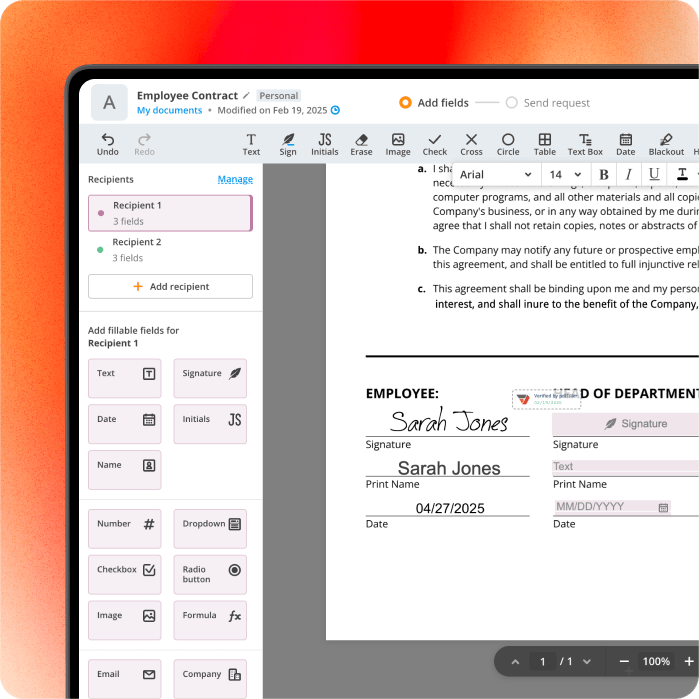
The signature tool in pdfFiller allows you to replace digital signatures efficiently. It offers a user-friendly interface that simplifies the process of signing documents. You can choose between self-signing and sending documents for signature, making it versatile for different needs. The tool provides three signing methods: drawing, typing, or uploading a signature. Each method is designed to comply with legal standards, ensuring that your signatures are valid and recognized.
Why Replace Digital Signatures?
Outdated signatures can lead to various issues, including legal complications and delays in document processing. Replacing digital signatures is crucial for maintaining compliance in NDAs, as it ensures that all parties are using the most current and valid signatures. Digital signatures offer numerous benefits, such as enhanced security and faster turnaround times, making them a preferred choice for modern document workflows.
How to Replace Your Signature
- Log into your pdfFiller account and open the NDA document.
- Select the signature field where your current signature is located.
- Choose the option to replace your signature.
- Follow the prompts to draw, type, or upload your new signature.
- Adjust the size and position of your new signature as needed.
- Save the changes to your document.
- Review the document to ensure your new signature appears correctly.
- Share or download the updated NDA as required.
Three Ways to Create a Signature
pdfFiller offers three methods for creating a digital signature: you can draw your signature using a mouse or touchscreen, type your name and select a font style, or upload an image of your handwritten signature. Each method holds legal equivalence, meaning they are all valid for signing documents. Users can choose the method that best fits their preferences and comfort level, ensuring a personalized signing experience.
Customizing Your Signature
You can customize the appearance of your signature in pdfFiller by selecting different colors and styles. Additionally, you can resize and reposition your signature to fit the document layout perfectly. The tool also allows you to set default settings for your signatures, making future replacements even easier.
Legal Validity of Signatures
Signatures created with pdfFiller comply with legal standards such as ESIGN, UETA, and eIDAS. These regulations ensure that your digital signatures are legally binding. The platform also provides audit trails, which are essential for verifying the authenticity of signed documents. Features like the verified badge add an extra layer of trust to your signatures, confirming their legal standing.
Saving and Reusing Signatures
You can save your signatures in pdfFiller for future use, streamlining your document workflows. Setting default signatures allows you to apply your preferred signature automatically to new documents. Reusing signatures not only saves time but also ensures consistency across your signed documents.
Common Scenarios for Replacing Signatures
Replacing signatures is often necessary in various scenarios, such as signing NDAs, authorizing contracts, or completing forms. In each case, having an updated digital signature ensures that the document is valid and legally binding. pdfFiller's features make it easy to manage these scenarios efficiently.
Browser Compatibility for Signing
pdfFiller supports a wide range of browsers, including Chrome, Firefox, and Safari, ensuring that you can access the signature features from any device. The platform also allows mobile signing capabilities, enabling you to sign documents on the go. This cross-device functionality enhances accessibility for all users.
Security Measures for Signatures
pdfFiller employs advanced encryption standards to protect your signatures and personal data. The platform follows strict data handling practices to ensure user privacy. These security measures build trust and confidence in the integrity of your signed documents.
Next Steps After Replacing Your Signature
After replacing your signature, you can share signed documents directly from pdfFiller. Integrating with other features of the platform allows you to manage your documents more effectively. Keeping your documents organized is essential for maintaining a smooth workflow and ensuring easy access when needed.