Update Date Form
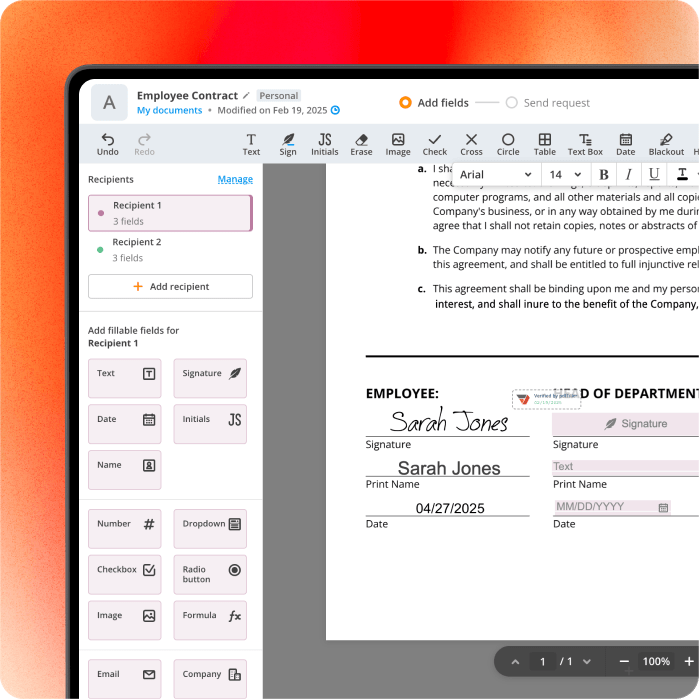
Create an interactive form to easily update dates in your documents using pdfFiller.
What is an Update Date Form?
An Update Date Form is a specialized interactive form designed to enable date updates within documents. This type of form is particularly beneficial for small and medium-sized businesses that require efficient document workflows. By utilizing fillable forms, businesses can streamline their processes, allowing recipients to update dates without the need for complex document editing. The benefits of an Update Date Form include its ease of use and accessibility, making it suitable for various industries, such as real estate, human resources, and accounting.
Why Use an Update Date Form?
Using an Update Date Form can significantly improve business operations. Traditional methods of document management often involve cumbersome processes that can lead to errors and wasted time. By adopting an Update Date Form, businesses can save time by allowing quick date updates directly within the document. This reduces the likelihood of errors that can occur during manual updates, ultimately enhancing the user experience. The simplicity of this form type makes it an ideal choice for professionals looking to improve their document automation.
How to Access the Update Date Form Feature
- Log into your pdfFiller account through the dashboard.
- Navigate to the forms section where you can create new forms.
- Select the option to create an Update Date Form.
- Follow the prompts to customize your form settings.
- No technical setup is required; the interface is user-friendly.
Steps to Create an Update Date Form
- Select the document type you want to use for your form.
- Add date fields where updates will be necessary.
- Customize form settings to fit your specific needs.
- Preview the form to ensure all elements are correctly placed.
- Save your form and share it with recipients for date updates.
- Monitor responses and manage updates efficiently through pdfFiller.
- Utilize the built-in features for tracking changes and updates.
Configuring Field Properties for Date Fields
Configuring properties for date fields in your Update Date Form is essential for ensuring accuracy. You can set required fields to ensure that recipients cannot submit the form without entering a date. Additionally, formatting the date display allows you to choose how dates appear, which can help maintain consistency across documents. Customizing field labels can also enhance clarity, making it easier for users to understand what information is needed. Avoid using default settings that may not align with your document's requirements.
Scenarios for Using Update Date Forms
Update Date Forms can be beneficial in various real-world scenarios. For instance, real estate agents can use these forms to update contract dates efficiently, ensuring all parties are informed of changes. Human resources professionals can implement date update forms for employee records, making it easier to manage contract renewals or performance review dates. Additionally, businesses can utilize these forms for invoice updates, allowing clients to confirm payment dates without the need for back-and-forth communication. These practical applications demonstrate the versatility of Update Date Forms across different industries.
Browser Compatibility for Update Date Forms
The update date form feature is compatible with several popular web browsers. Supported browsers include Google Chrome, Mozilla Firefox, and Microsoft Edge, ensuring that users can access the forms from various devices. Mobile compatibility is also a key feature, allowing users to update dates on the go. To ensure optimal performance, it is recommended to keep your browser updated to the latest version.
Limitations of Update Date Forms
While Update Date Forms offer many advantages, there are some limitations to consider. Field type restrictions may limit the types of data that can be entered, which could affect the flexibility of your forms. Additionally, document size limits may restrict the complexity of forms you can create. User plan constraints may also apply, depending on your subscription level with pdfFiller. It's important to review these limitations to ensure they align with your document management needs.
Security Features of Update Date Forms
Security is a critical aspect of using Update Date Forms. pdfFiller implements data encryption to protect sensitive information entered into forms. Compliance standards are also adhered to, ensuring that your documents meet necessary legal requirements. Furthermore, document retention policies are in place to manage how long data is stored, providing peace of mind regarding data security. These measures help ensure that your information remains secure throughout the document management process.
How Does pdfFiller Compare?
Adobe Acrobat offers comprehensive PDF editing tools but lacks the user-friendly interface of pdfFiller. Users may find it more complex to navigate. JotForm provides form-building capabilities but does not specialize in PDF document management like pdfFiller. Users may miss out on integrated document workflows. DocuSign focuses on e-signatures but lacks the extensive template library and document editing features of pdfFiller. Users may need multiple tools for complete solutions.