
Last updated on
Oct 2, 2026
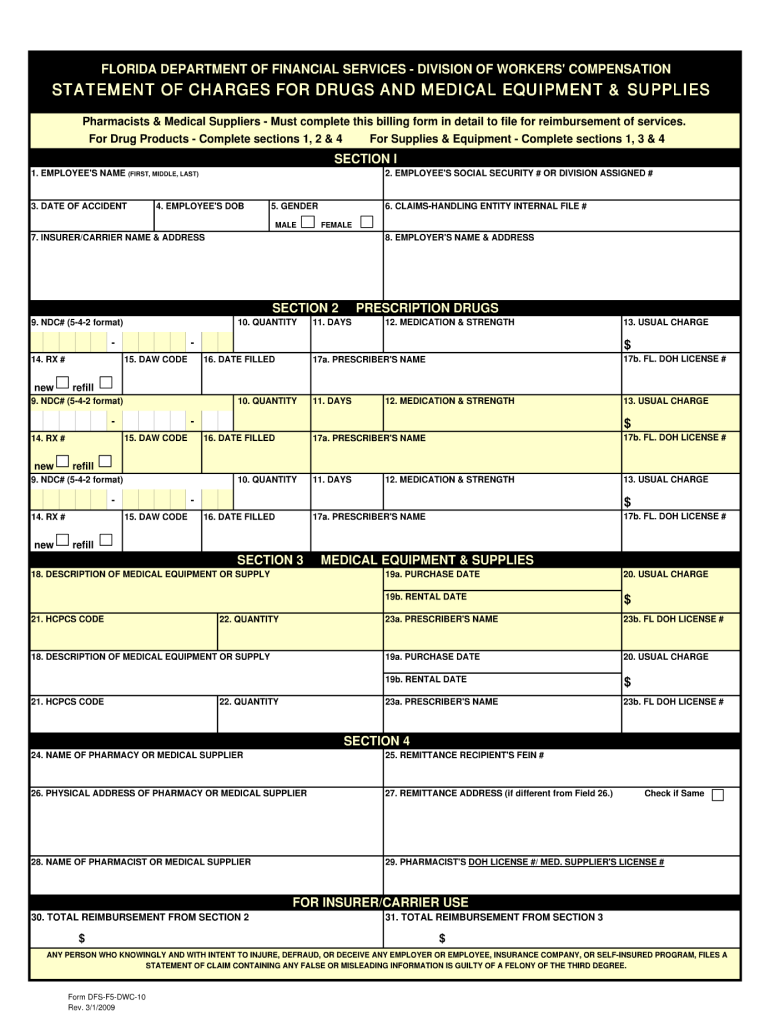
FL DFS-F5-DWC-10 2009-2026 free printable template
pdfFiller is not affiliated with any government organization

Fill out
Complete the form online in a simple drag-and-drop editor.

eSign
Add your legally binding signature or send the form for signing.

Share
Share the form via a link, letting anyone fill it out from any device.

Export
Download, print, email, or move the form to your cloud storage.
Why pdfFiller is the best tool for your documents and forms


End-to-end document management
From editing and signing to collaboration and tracking, pdfFiller has everything you need to get your documents done quickly and efficiently.
Accessible from anywhere
pdfFiller is fully cloud-based. This means you can edit, sign, and share documents from anywhere using your computer, smartphone, or tablet.
Secure and compliant
pdfFiller lets you securely manage documents following global laws like ESIGN, CCPA, and GDPR. It's also HIPAA and SOC 2 compliant.
What is FL DFS-F5-DWC-10
The FL DFS-F5-DWC-10 is a form used by employees and employers in Florida to report workplace injuries and initiate claims for workers' compensation benefits.
pdfFiller scores top ratings on review platforms




Who needs FL DFS-F5-DWC-10?
Explore how professionals across industries use pdfFiller.

FL DFS-F5-DWC-10 is needed by:
-
Florida employees reporting workplace injuries
-
Employers filing claims for workers' compensation
-
Human resources professionals managing employee claims
-
Insurance agents handling workers' compensation policies
-
Legal representatives advising clients on injury claims
Comprehensive Guide to FL DFS-F5-DWC-10
What is the FL DFS-F5-DWC-10?
The FL DFS-F5-DWC-10 form is a crucial document within Florida's workers' compensation framework, designed for reporting employee injuries or illnesses. This form serves as a formal notification to ensure that both employers and employees are aware of the necessary steps following an incident. It is an essential tool that establishes communication between the parties involved in a workers' compensation claim.
The primary filing parties for this form are employers, who must report incidents, and employees, who may rely on this documentation for their claims. Understanding the purpose of the FL DFS-F5-DWC-10 is vital for all stakeholders in the workers' compensation process.
Purpose and Benefits of the FL DFS-F5-DWC-10
The FL DFS-F5-DWC-10 form plays a significant role in ensuring timely reporting of workplace injuries or illnesses, which is crucial for claiming employee benefits. Its use benefits both employees and employers by fostering a transparent process for addressing workplace incidents.
Some advantages of utilizing the FL DFS-F5-DWC-10 include:
-
Streamlined reporting process for workplace injuries.
-
Helps in the prompt initiation of worker compensation benefits.
-
Reduces the risk of disputes between employees and employers regarding claims.
Filing this form promptly is essential in protecting the rights of injured employees and the interests of employers, making it an integral part of the workers' compensation landscape in Florida.
Who Needs to Complete the FL DFS-F5-DWC-10?
Both employers and employees need to understand their responsibilities when it comes to completing the FL DFS-F5-DWC-10 form. Employers are required to fill out this form when an employee is injured or becomes ill due to work-related activities.
Specific scenarios where the FL DFS-F5-DWC-10 must be completed include:
-
When an employee reports an injury within the workplace.
-
If an employee seeks medical treatment linked to a job-related incident.
Recognizing who needs to fill out the FL DFS-F5-DWC-10 helps ensure that appropriate steps are taken during the claims process.
Eligibility Criteria for the FL DFS-F5-DWC-10
Eligibility to file the FL DFS-F5-DWC-10 form generally includes employees who are affected by workplace injuries or illnesses and employers who are required to report such incidents. Specific regulatory requirements dictate who qualifies.
Categories of the workforce that typically can use this form include:
-
Full-time employees of organizations covered under Florida law.
-
Part-time employees who meet the conditions specified by the Florida workers' compensation act.
Special conditions might apply, such as the need for documentation of job duties or medical evaluations, depending on the specific nature of the claim.
How to Fill Out the FL DFS-F5-DWC-10 Online (Step-by-Step)
Filling out the FL DFS-F5-DWC-10 form online through pdfFiller is a straightforward process. Follow these steps to ensure accuracy:
-
Access the FL DFS-F5-DWC-10 form on pdfFiller.
-
Begin with entering the employer information in the designated fields.
-
Provide details about the employee involved, including job role and incident specifics.
-
Complete the section concerning the nature of the injury or illness.
-
Review the information for accuracy and completeness before submission.
Using pdfFiller's platform facilitates a smoother experience, with features designed to enhance form filling and ensure compliance.
Common Errors and How to Avoid Them
When completing the FL DFS-F5-DWC-10 form, mistakes can lead to processing delays or rejections. Awareness of common errors is key to preventing issues.
Frequent pitfalls include:
-
Missing essential information about the employee or incident.
-
Providing unclear descriptions of injuries or treatments.
To avoid these mistakes, review the completed form carefully, confirm all necessary sections are filled, and utilize pdfFiller’s editing tools before final submission.
Submission Methods and Delivery of the FL DFS-F5-DWC-10
Submitting the FL DFS-F5-DWC-10 form can be done through various channels, ensuring flexibility for employers and employees. Acceptable submission methods include:
-
Online submission via pdfFiller for immediate processing.
-
Mailing a hard copy to the appropriate state division office.
All submissions should comply with additional delivery requirements such as necessary certifications or notifications, which may vary depending on the method chosen.
What Happens After You Submit the FL DFS-F5-DWC-10?
After submitting the FL DFS-F5-DWC-10 form, tracking its status is essential for both employers and employees. Expect certain timelines for processing, which can vary based on the volume of claims.
Here is how to check the submission status:
-
Log in to pdfFiller to monitor the status of your submission.
-
Look for confirmation notifications related to your claim’s progress.
Being proactive after submission ensures that all necessary follow-up actions are taken in a timely manner.
Security and Compliance for the FL DFS-F5-DWC-10
Handling the FL DFS-F5-DWC-10 form requires adherence to strict security protocols to protect sensitive information. pdfFiller employs advanced security measures, including:
-
256-bit encryption to safeguard your documents.
-
Compliance with standards such as HIPAA and GDPR.
Ensuring data protection and privacy considerations are forefront when submitting this form helps maintain confidentiality and regulatory compliance.
Enhance Your Experience with pdfFiller
Using pdfFiller for filling out the FL DFS-F5-DWC-10 form enhances the user experience significantly. The platform boasts features that simplify the process, such as:
-
eSigning capabilities for quick and secure approvals.
-
Editing tools to modify the form as needed.
By utilizing pdfFiller, users benefit from a well-rounded solution for form management, facilitating ease and efficiency in handling important documents.
How to fill out the FL DFS-F5-DWC-10
-
1.To access the FL DFS-F5-DWC-10 form on pdfFiller, start by visiting the pdfFiller website and entering the form's name in the search bar.
-
2.Once the form appears, click on it to open the interactive document editor where you can begin filling it out.
-
3.Before starting, gather necessary information such as the date of injury, employee details, and any medical reports related to the incident.
-
4.Use the navigation tools to move through the form. Click on each field to enter the required information ensuring accuracy.
-
5.If you need to reference instructions while filling out the form, use the sidebar features for easy access.
-
6.After entering all information, review the completed form by checking each section for accuracy and completeness, utilizing the spell check tool if necessary.
-
7.Once satisfied with the form, save your progress in your pdfFiller account or download a copy to your device for your records.
-
8.Finally, submit the form electronically through pdfFiller, or download it to send via mail or email as needed.

Who is eligible to use the FL DFS-F5-DWC-10 form?
Employees who have experienced a workplace injury in Florida are eligible to use this form to report their injury and file for workers' compensation benefits.
What is the deadline for submitting the FL DFS-F5-DWC-10 form?
It is critical to submit the FL DFS-F5-DWC-10 form promptly after the workplace injury, typically within 30 days to ensure timely processing of your claim.
How can I submit the FL DFS-F5-DWC-10 form?
You can submit the FL DFS-F5-DWC-10 form electronically through pdfFiller, or print it out to mail or email it to your employer’s workers' compensation insurance provider.
What supporting documents do I need to attach?
You may need to include medical reports, witness statements, and other documentation that supports your claim of injury when submitting the FL DFS-F5-DWC-10 form.
What are common mistakes to avoid when filling out this form?
Common mistakes include omitting critical information, failing to sign the form, and not submitting within the required timeframe. Review your entries carefully before submission.
What is the processing time for claims associated with the FL DFS-F5-DWC-10 form?
Typically, processing times for claims can vary but expect a timeframe of 30 to 60 days for the insurance provider to review and respond after form submission.
Can a representative fill out the FL DFS-F5-DWC-10 form for me?
Yes, a legal representative or authorized person can complete the FL DFS-F5-DWC-10 form on your behalf, but it must be signed by the employee involved in the injury.
FL DFS-F5-DWC-10 Form Versions
Related Content
Related Forms




Related Catalogs
Get the latest insights from our blog


If you believe that this page should be taken down, please follow our DMCA take down process
here
.
This form may include fields for payment information. Data entered in these fields is not covered by PCI DSS compliance.