
Last updated on
Oct 31, 2026

Payroll Deduction Authorization for Other Deductions on Certified Payroll 2013-2026 free printab...
pdfFiller is not affiliated with any government organization

Fill out
Complete the form online in a simple drag-and-drop editor.

eSign
Add your legally binding signature or send the form for signing.

Share
Share the form via a link, letting anyone fill it out from any device.

Export
Download, print, email, or move the form to your cloud storage.
Why pdfFiller is the best tool for your documents and forms


End-to-end document management
From editing and signing to collaboration and tracking, pdfFiller has everything you need to get your documents done quickly and efficiently.
Accessible from anywhere
pdfFiller is fully cloud-based. This means you can edit, sign, and share documents from anywhere using your computer, smartphone, or tablet.
Secure and compliant
pdfFiller lets you securely manage documents following global laws like ESIGN, CCPA, and GDPR. It's also HIPAA and SOC 2 compliant.
What is Payroll Deduction Authorization for Other Deductions on Certified Payroll
The Payroll Deduction Authorization Form is a document used by employees to authorize their employer to deduct specific amounts from their paychecks for various purposes.
pdfFiller scores top ratings on review platforms




Who needs Payroll Deduction Authorization for Other Deductions on Certified Payroll?
Explore how professionals across industries use pdfFiller.

Payroll Deduction Authorization for Other Deductions on Certified Payroll is needed by:
-
Employees wishing to set up payroll deductions.
-
HR departments managing payroll processes.
-
Finance teams overseeing employee benefits.
-
Employers facilitating loan repayments or contributions.
-
Nonprofit organizations for charitable contributions.
-
Payroll service providers handling deductions.
Comprehensive Guide to Payroll Deduction Authorization for Other Deductions on Certified Payroll
What is the Payroll Deduction Authorization Form?
The Payroll Deduction Authorization Form is essential for employees to authorize certain deductions from their paychecks. This document allows for deductions related to loans, retirement plans, and charitable contributions. Governed by DOL regulations 29 CFR Part 3, this form ensures that deductions are managed appropriately and transparently throughout the payroll process.
Purpose and Benefits of the Payroll Deduction Authorization Form
The employee payroll deduction form offers several benefits, making it a crucial tool for effective financial management. Firstly, it streamlines the process of managing payroll deductions, ensuring that employees can efficiently authorize necessary deductions. Additionally, utilizing automated deductions through this form helps in better budgeting and tracking of finances.
Key Features of the Payroll Deduction Authorization Form
This form is designed with multiple fillable fields, allowing employees to specify the type of deductions they wish to authorize. Key functionalities include options for loan repayments, retirement contributions, and donations. Moreover, the importance of signing and submitting the form accurately cannot be overstated, as it is vital for the processing of deductions.
Who Needs the Payroll Deduction Authorization Form?
Employees who wish to set up deductions for various purposes are required to use this form. Specific groups, including those participating in retirement plans or those repaying loans, will find this form necessary for managing their contributions. Additionally, some organizational policies may mandate the use of this form to ensure compliance with internal processes and regulations.
How to Fill Out the Payroll Deduction Authorization Form Online (Step-by-Step)
Filling out the payroll deduction authorization form correctly is crucial for proper processing. Here is a step-by-step guide:
-
Enter your name and employee ID at the top of the form.
-
Specify the deduction amounts for each intended purpose.
-
Select the type of deductions from the provided options.
-
Indicate the frequency of deductions, such as weekly or bi-weekly.
-
Sign and date the form to confirm your authorization.
Submitting the Payroll Deduction Authorization Form
Once completed, the payroll deduction authorization form must be submitted correctly to ensure timely processing. There are various submission methods available, including online submissions or through physical mail. It is essential to check for any included documentation required alongside the form and to be aware of submission deadlines to avoid potential fees or delays in processing.
Common Errors and How to Avoid Them
When completing this form, several common errors can occur. Frequent mistakes include entering incorrect deduction amounts or failing to provide signatures. To prevent these issues, consider the following tips:
-
Double-check all entered amounts before submission.
-
Ensure every required field is filled out appropriately.
-
Review the form against a validation checklist to confirm its accuracy.
Security and Compliance for the Payroll Deduction Authorization Form
Security and compliance are paramount when handling the payroll deduction authorization form. It is vital to adopt security measures that protect sensitive employee data throughout the form's usage. Compliance with relevant regulations, including DOL guidelines and privacy laws, ensures that the information is managed appropriately and securely.
Sample or Example of a Completed Payroll Deduction Authorization Form
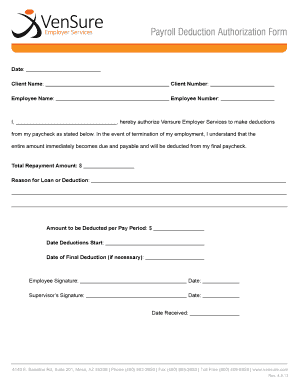
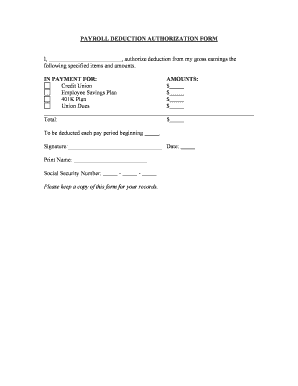
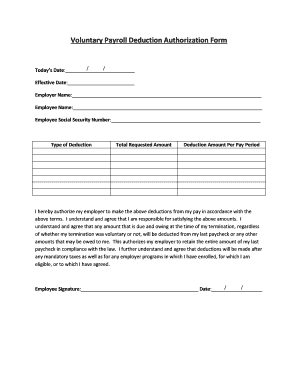
To aid in understanding how to complete the payroll deduction authorization form properly, reviewing a sample can be beneficial. A filled-out form will typically illustrate all necessary fields, including employee details and deduction types. Accurately filling out the form helps guarantee a smooth processing experience, as all required information will be correctly documented.
Achieve Effortless Form Management with pdfFiller
Using pdfFiller for payroll deduction authorization needs significantly enhances the experience. The platform offers capabilities such as editing, eSigning, and sharing documents, all while ensuring a secure handling process with 256-bit encryption. Employees can leverage pdfFiller to access and manage their forms effortlessly, leading to a more streamlined experience in payroll deduction management.
How to fill out the Payroll Deduction Authorization for Other Deductions on Certified Payroll
-
1.Start by accessing pdfFiller and searching for the Payroll Deduction Authorization Form or following the provided link to the form directly.
-
2.Once opened, utilize pdfFiller's interface to navigate through the various fillable fields such as 'Employee’s Name', 'Deduction Amount', and type of deductions.
-
3.Before filling the form, gather necessary information such as your employee details, the deduction amounts, types, and frequencies required for your specific payroll deductions.
-
4.Carefully fill in each field ensuring that all information entered is accurate to avoid any processing delays.
-
5.Make use of pdfFiller’s features like checkboxes for various deduction types and the signature line to authenticate the document.
-
6.After you have completed the form, review all entered details thoroughly to ensure accuracy and completeness.
-
7.Finalize the form by saving it on pdfFiller or selecting the option to download it for your records.
-
8.To submit the form, follow the instructions outlined within pdfFiller to either upload it to your HR department or email it directly if submission options are available.

Who is eligible to use the Payroll Deduction Authorization Form?
The form is designed for employees who wish to authorize their employer to deduct money from their paychecks for specific purposes such as loan payments, retirement contributions, or charitable donations.
What types of deductions can be authorized using this form?
This form can be used to authorize various types of deductions including loan repayments, retirement savings, and contributions to charitable organizations, depending on your employer's options.
How many times do I need to submit the Payroll Deduction Authorization Form?
Typically, you only need to submit the Payroll Deduction Authorization Form once unless you wish to make changes to your deductions, in which case a new form should be completed.
What information do I need to complete this form?
You will need your name, the amount you want deducted, the type of deduction, and the frequency of the deduction. Ensure accurate details to avoid processing issues.
How can I submit the completed form?
Once completed, the form can be submitted via your HR department, or you can email or upload it directly through the system that your employer uses, if applicable.
What are common mistakes to avoid when completing this form?
Common mistakes include not filling in all required fields, entering incorrect deduction amounts, and failing to sign the document before submission.
How long does it take for deductions to begin after submitting the form?
The processing time for deductions to start can vary by employer. Typically, it may take one or two pay cycles for the deductions to begin once the form is submitted and processed.
Related Forms






Related Catalogs
Get the latest insights from our blog


If you believe that this page should be taken down, please follow our DMCA take down process
here
.
This form may include fields for payment information. Data entered in these fields is not covered by PCI DSS compliance.