
Last updated on
Nov 9, 2026

NE DoR 20 2014 free printable template
pdfFiller is not affiliated with any government organization

Fill out
Complete the form online in a simple drag-and-drop editor.

eSign
Add your legally binding signature or send the form for signing.

Share
Share the form via a link, letting anyone fill it out from any device.

Export
Download, print, email, or move the form to your cloud storage.
Why pdfFiller is the best tool for your documents and forms


End-to-end document management
From editing and signing to collaboration and tracking, pdfFiller has everything you need to get your documents done quickly and efficiently.
Accessible from anywhere
pdfFiller is fully cloud-based. This means you can edit, sign, and share documents from anywhere using your computer, smartphone, or tablet.
Secure and compliant
pdfFiller lets you securely manage documents following global laws like ESIGN, CCPA, and GDPR. It's also HIPAA and SOC 2 compliant.
What is NE DoR 20
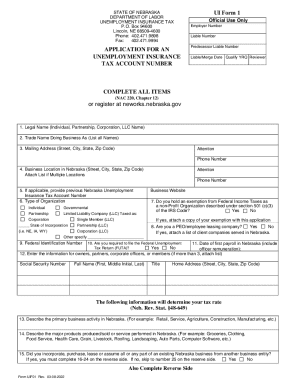
The Nebraska Tax Application 20 is a state document used by individuals and businesses to register for various tax programs in Nebraska.
pdfFiller scores top ratings on review platforms




Who needs NE DoR 20?
Explore how professionals across industries use pdfFiller.

NE DoR 20 is needed by:
-
Business owners looking to obtain a Nebraska ID number for tax purposes
-
Partners and corporate officers registering their business for state tax programs
-
Members of LLCs needing to register for sales and use tax
-
Individuals applying for income tax withholding in Nebraska
-
Companies seeking a Nebraska sales tax permit
-
Entrepreneurs starting new businesses in Nebraska
Comprehensive Guide to NE DoR 20
What is the Nebraska Tax Application 20?
The Nebraska Tax Application 20 is a crucial form designed for businesses and individuals in Nebraska to facilitate tax registration. It plays a primary role in acquiring a Nebraska ID number, essential for various tax obligations. This form covers a range of taxes, including sales/use tax and income tax withholding, making it vital for compliance with state tax regulations.
Purpose and Benefits of the Nebraska Tax Application 20
This form is essential for ensuring compliance with Nebraska's tax requirements. Registering for Nebraska tax programs offers numerous benefits, such as streamlined tax processes for businesses. Proper tax compliance not only simplifies operations but also helps avoid penalties associated with incorrect or late filings.
Who Needs to Complete the Nebraska Tax Application 20?
The Nebraska Tax Application 20 should be filled out by various stakeholders, including business owners and corporate officers. Eligibility typically requires entities engaged in taxable activities in Nebraska. This form is necessary when starting a new business or expanding current operations, ensuring all tax obligations are met from the outset.
How to Fill Out the Nebraska Tax Application 20 Online
To complete the Nebraska Tax Application 20 online, follow these steps:
-
Access the form on the appropriate website.
-
Enter the business name and address accurately.
-
Select the ownership type from the provided options.
-
Fill in the federal employer ID number and other required fields.
-
Review all entered information for accuracy before submission.
Accuracy in filling out this information is crucial to avoid complications later on.
Review and Validation Checklist for the Nebraska Tax Application 20
Before submitting the Nebraska Tax Application 20, applicants should ensure the following critical areas are checked:
-
Signature of the owner, partner, member, or corporate officer is included.
-
The Nebraska ID number is correctly entered.
-
All necessary accompanying documents are prepared for submission.
Common errors that may lead to application rejection include missing information and incorrect entries. To avoid such issues, thorough validation and review of the completed application are recommended.
Submission Methods for the Nebraska Tax Application 20
Applicants can submit the completed Nebraska Tax Application 20 through various methods, including:
-
Online submission via the designated state website.
-
Mailing the form to the appropriate state department.
-
Submitting in person at designated offices.
It is essential to include all necessary accompanying documents and be aware of any deadlines or fees associated with each submission method.
What Happens After You Submit the Nebraska Tax Application 20?
After submission, applicants can expect the following:
-
Processing time may vary based on volume and completeness of the application.
-
Applicants will receive notification regarding the status of their application.
If the application is rejected, it is crucial to identify the cause, such as incorrect information or missing documents, to rectify the issue promptly. Keeping records of submissions and confirmation receipts is vital for future reference.
Security and Compliance for the Nebraska Tax Application 20
When handling the Nebraska Tax Application 20, data security and privacy are paramount. The application process incorporates robust security measures to safeguard user data and complies with applicable regulations. Users are strongly encouraged to utilize secure platforms for submitting sensitive documents, ensuring their information remains protected.
Enhancing Your Experience with pdfFiller for the Nebraska Tax Application 20
Using pdfFiller can significantly enhance the experience of completing the Nebraska Tax Application 20. This platform simplifies the filling, signing, and submitting processes, making it user-friendly and efficient. Additionally, pdfFiller offers features such as document management and secure eSigning, inviting users to leverage its capabilities for a hassle-free application process.
How to fill out the NE DoR 20
-
1.Access the Nebraska Tax Application 20 form on pdfFiller by typing in the form name in the search bar. Once located, click to open it for editing.
-
2.Navigate through the form using pdfFiller's interface, which allows you to click on fields to fill them in directly. Use the tab key to move through sections promptly.
-
3.Before diving into the sections, gather necessary information such as your business name, address, federal employer ID number, and specific tax program details.
-
4.Complete each relevant field, ensuring to provide current and accurate information. Double-check sections that ask for signatures and specific tax-related data.
-
5.Upon finishing the form, review all entries thoroughly using pdfFiller's preview option to make sure everything is correct and complete.
-
6.Finalize the form by signing where indicated, using the signature field smartly provided by pdfFiller.
-
7.Choose to save your completed form in pdfFiller, download it to your device, or submit it directly via email or through the platform as required.

Who must complete the Nebraska Tax Application 20?
Business owners, partners, corporate officers, and members of LLCs in Nebraska must complete this form to register for various tax programs. This registration is crucial for obtaining a Nebraska ID number needed for tax purposes.
What information is required to fill out this form?
You will need your business name, address, federal employer ID number, and details for specific tax programs, including sales tax and income tax withholding. Ensure all information is current and accurate.
Where can I access the Nebraska Tax Application 20 form?
The form can be accessed online through platforms like pdfFiller or state government websites. Simply search for 'Nebraska Tax Application 20' to find it.
How do I submit the completed Nebraska Tax Application 20?
Once completed, you can submit the Nebraska Tax Application 20 by downloading and mailing it to the appropriate Nebraska taxing authority or submitting it electronically if permitted. Ensure you check submission guidelines.
Are there any deadlines for submitting this form?
There may be specific deadlines depending on the type of tax registration you are applying for. Always verify the latest timelines on the Nebraska state tax website or consult a tax professional.
What are common mistakes to avoid while filling out this form?
Common mistakes include incorrect business information, missing signatures, and omitting required details about tax programs. Double-check all entries and ensure every required field is filled.
NE DoR 20 Form Versions
Related Content
Related Forms



Get the latest insights from our blog


If you believe that this page should be taken down, please follow our DMCA take down process
here
.
This form may include fields for payment information. Data entered in these fields is not covered by PCI DSS compliance.