
Last updated on
Oct 2, 2026
NPS DSC CMR & CQC Daily Report 2014 free printable template
We are not affiliated with any brand or entity on this form

Fill out
Complete the form online in a simple drag-and-drop editor.

eSign
Add your legally binding signature or send the form for signing.

Share
Share the form via a link, letting anyone fill it out from any device.

Export
Download, print, email, or move the form to your cloud storage.
Why pdfFiller is the best tool for your documents and forms


End-to-end document management
From editing and signing to collaboration and tracking, pdfFiller has everything you need to get your documents done quickly and efficiently.
Accessible from anywhere
pdfFiller is fully cloud-based. This means you can edit, sign, and share documents from anywhere using your computer, smartphone, or tablet.
Secure and compliant
pdfFiller lets you securely manage documents following global laws like ESIGN, CCPA, and GDPR. It's also HIPAA and SOC 2 compliant.
What is NPS DSC CMR & CQC Daily Report
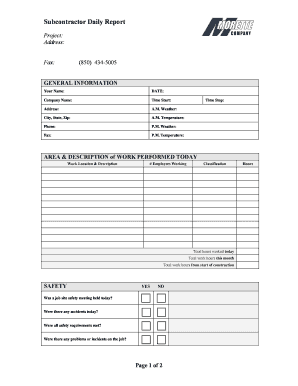
The CMR Daily Diary Report is a business form used by CM Inspectors to document daily construction activities and progress on a project.
pdfFiller scores top ratings on review platforms




Who needs NPS DSC CMR & CQC Daily Report?
Explore how professionals across industries use pdfFiller.

NPS DSC CMR & CQC Daily Report is needed by:
-
Project managers overseeing construction tasks
-
Site engineers tracking daily operations
-
Construction managers ensuring compliance
-
Contractors reporting on project status
-
Subcontractors providing updates
-
Quality assurance personnel monitoring inspections
Comprehensive Guide to NPS DSC CMR & CQC Daily Report
What is the CMR Daily Diary Report?
The CMR Daily Diary Report is an essential documentation tool in construction project management. It plays a vital role in detailing daily activities and maintaining a comprehensive record of events and observations on a construction site. This report functions primarily to assist project stakeholders in tracking progress and managing responsibilities effectively.
The report includes specific sections dedicated to documenting safety inspections, work performed, and critical project milestones. Designated parties such as CM Inspectors, contractors, and subcontractors regularly utilize the report to ensure that all details of construction activities are captured accurately. Common scenarios for its usage encompass daily progress monitoring and compliance checks, making it a fundamental aspect of construction project documentation.
Purpose and Benefits of the CMR Daily Diary Report
The CMR Daily Diary Report serves multiple critical functions that benefit project stakeholders. First and foremost, it enhances accountability by ensuring that daily activities and project progress are documented thoroughly. This documentation supports project managers and teams in identifying issues early, which greatly aids in maintaining safety compliance and addressing roadblocks swiftly.
Another significant benefit of the report lies in its role in formal project reporting. It fosters efficient communication among stakeholders by providing them with a structured overview of the construction process, thus mitigating misunderstandings and enhancing transparency throughout the building phase.
Key Features of the CMR Daily Diary Report
The CMR Daily Diary Report is designed with several key features that improve its usability and accessibility. It includes sections for weather conditions, inspections conducted, equipment used, and a detailed account of work performed. Each section is crucial for ensuring that comprehensive and accurate information is captured, which can be referred to later.
-
Certificates and signatures from authorized personnel validate the report.
-
The design of the form facilitates ease of use for various stakeholders.
-
Important fields include safety comments, unforeseen developments, and construction deficiencies.
-
Blank fields and checkboxes streamline the documenting process.
Who Needs the CMR Daily Diary Report?
The primary users of the CMR Daily Diary Report encompass various roles involved in construction projects. Individuals such as CM Inspectors, contractors, and project managers are responsible for filling out the report to maintain comprehensive records of daily activities and ensure compliance with project standards. Subcontractors also find the diary essential for documenting their work and compliance measures.
Different project scenarios necessitate the use of the Daily Diary Report, especially in larger projects where numerous contractors and subcontractors are involved. This report ensures that all parties are in sync regarding project updates and safety protocols.
How to Fill Out the CMR Daily Diary Report Online (Step-by-Step)
To complete the CMR Daily Diary Report digitally, follow these steps:
-
Access the report template using pdfFiller.
-
Fill in the required fields, paying attention to each section's details.
-
Include specific observations and comments in the designated areas.
-
Review all entries for accuracy and completeness.
-
Save your completed report and share it with relevant stakeholders.
Make sure to include supplemental information wherever necessary to ensure a comprehensive record.
Common Errors and How to Avoid Them When Filling Out the CMR Daily Diary Report
When filling out the CMR Daily Diary Report, users may encounter several common pitfalls. Frequent mistakes include incomplete fields and misreported data, which can lead to significant documentation issues. To avoid these errors, adhere to best practices such as verifying all information before submission and ensuring safety comments are detailed and accurate.
-
Double-check fields for completeness.
-
Be specific in your comments about safety and operations observed.
-
Review the document for any unforeseen developments that may need to be recorded.
-
Consult with team members if unsure about specific entries.
Submission and Record Retention for the CMR Daily Diary Report
Proper submission and record retention of the CMR Daily Diary Report are crucial for compliance and future reference. Users can submit the report to relevant stakeholders through various methods, ensuring that it reaches all necessary parties for review.
Maintaining records of the completed reports is equally important for legal compliance and project management practices. It is recommended to retain these documents for a specific duration, which can be determined based on project policies and legal requirements. Such measures aid in addressing disputes and tracking project histories effectively.
How pdfFiller Enhances the CMR Daily Diary Report Experience
pdfFiller is a powerful tool that improves the experience of completing the CMR Daily Diary Report. Its key features simplify the process of filling out the report while ensuring that sensitive documentation is handled securely. Users can take advantage of fillable form features and eSigning capabilities, making documentation both efficient and reliable.
Additionally, pdfFiller ensures high-level security measures, including 256-bit encryption and compliance with industry standards, which fosters confidence in managing sensitive project data.
Get Started with Your CMR Daily Diary Report Today
Users are encouraged to utilize pdfFiller's resources to complete their CMR Daily Diary Report efficiently. With the platform's straightforward features for form filling and document management, users can streamline their construction project documentation process. Exploring additional functionalities such as editing and sharing further enhances project management capabilities, leading to improved outcomes in construction management.
How to fill out the NPS DSC CMR & CQC Daily Report
-
1.Access the CMR Daily Diary Report by logging into your pdfFiller account and searching for the form name in the template section.
-
2.Open the form in the pdfFiller editor, where you will see multiple fields and sections to fill out.
-
3.Before starting, gather all necessary information, including daily weather data, employee attendance, equipment used, materials delivered, and any safety comments.
-
4.Begin filling out the fields sequentially; enter the report number, date, and all other relevant information as prompted by each section.
-
5.Utilize pdfFiller's user-friendly features, such as dropdown menus for selecting options, checkboxes for quick entries, and text fields for detailed descriptions.
-
6.Double-check each entry for accuracy and completeness, especially in fields that require specific details like safety comments and milestones.
-
7.Once you have filled in all sections, review the entire form for any missing information or errors.
-
8.Finalizing your form can be done by clicking on the review button; make sure you have signed the document as required.
-
9.Save your completed report in pdfFiller by using the download option or submit it directly to the relevant authority via email or other submission methods available on the platform.

Who is eligible to complete the CMR Daily Diary Report?
The CMR Daily Diary Report must be completed by a CM Inspector involved in the construction project, ensuring accurate documentation of daily activities and conditions.
Are there any deadlines for submitting the CMR Daily Diary Report?
It is advisable to submit the CMR Daily Diary Report daily, or at the end of each working day, to maintain consistent records and support project management efforts.
How should I submit the completed CMR Daily Diary Report?
Once completed, the CMR Daily Diary Report can be submitted through pdfFiller via email or by downloading the report and sending it through your preferred communication method.
What supporting documents do I need to include with the form?
Typically, you do not need to attach supporting documents with the CMR Daily Diary Report, but ensure you have all necessary details and records ready for accurate entries.
What are common mistakes to avoid when filling out the report?
Common mistakes include missing required fields, providing inaccurate information, and failing to sign the report. Always double-check entries before submission.
How long does it take to process the CMR Daily Diary Report?
Processing times for the report depend on your organization's internal review procedures; ensure timely submission to facilitate quicker processing.
What information is essential to document on the form?
Essential information includes daily activities, weather conditions, equipment used, employees present, work performed, and any safety issues encountered.
NPS DSC CMR & CQC Daily Report Form Versions
Related Forms






Related Catalogs
Get the latest insights from our blog


If you believe that this page should be taken down, please follow our DMCA take down process
here
.
This form may include fields for payment information. Data entered in these fields is not covered by PCI DSS compliance.