
Last updated on
Oct 29, 2026
CA STD. 268 2007 free printable template
pdfFiller is not affiliated with any government organization

Fill out
Complete the form online in a simple drag-and-drop editor.

eSign
Add your legally binding signature or send the form for signing.

Share
Share the form via a link, letting anyone fill it out from any device.

Export
Download, print, email, or move the form to your cloud storage.
Why pdfFiller is the best tool for your documents and forms


End-to-end document management
From editing and signing to collaboration and tracking, pdfFiller has everything you need to get your documents done quickly and efficiently.
Accessible from anywhere
pdfFiller is fully cloud-based. This means you can edit, sign, and share documents from anywhere using your computer, smartphone, or tablet.
Secure and compliant
pdfFiller lets you securely manage documents following global laws like ESIGN, CCPA, and GDPR. It's also HIPAA and SOC 2 compliant.
What is CA STD. 268
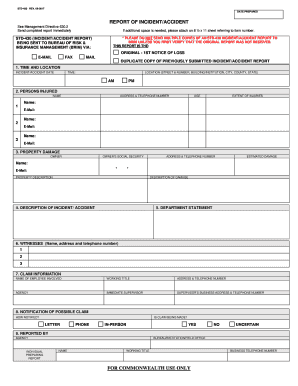
The California Accident Report is a confidential document used by reporting agencies to report non-motor vehicle accidents to the Attorney General's Office.
pdfFiller scores top ratings on review platforms




Who needs CA STD. 268?
Explore how professionals across industries use pdfFiller.

CA STD. 268 is needed by:
-
Reporting agencies in California
-
Employers of injured employees
-
California residents involved in non-motor vehicle accidents
-
Legal representatives for accident victims
-
Insurance companies assessing claims
Comprehensive Guide to CA STD. 268
What is the California Accident Report?
The California Accident Report is a crucial document used to report non-motor vehicle accidents to the Attorney General's Office. This report includes vital information related to the incident and is essential for proper documentation and oversight. One of the key objectives of this report is to ensure that all incidents are recorded accurately and in a timely manner.
Submitting the report promptly is critical not only for adherence to legal requirements but also for safeguarding the rights of those involved. The California incident report form serves as a foundation for future investigations and assessments by appropriate authorities.
Purpose and Benefits of Filing the California Accident Report
Filing a California Accident Report is vital for several reasons, particularly for non-motor vehicle accidents. Reporting these incidents ensures that victims receive the support they need while creating a record that organizations can rely on for oversight and analysis.
The benefits of filing the report extend to various stakeholders: victims can assert their rights, organizations can manage liability effectively, and government bodies can maintain accurate data for public safety. This report can play an essential role in supporting insurance claims, providing victims with a pathway to recover damages.
Who Needs the California Accident Report?
The California Accident Report must be filed by specific individuals and organizations defined by law. Eligible reporting agencies include police departments, public safety agencies, and designated personnel within organizations where incidents occur.
Situations that require reporting include any non-motor vehicle accidents resulting in injury or significant property damage. The Reporting Employee holds the responsibility to ensure the accuracy and completeness of the report before submission.
When and How to File the California Accident Report
Reports must be submitted promptly, with a timeline that stipulates filing within 48 hours of an incident. For serious injuries, the report should be filed within 24 hours to ensure compliance and facilitate necessary actions.
To successfully complete the California Accident Report, follow these steps:
-
Gather all relevant information related to the incident.
-
Complete the report using accurate data concerning injured parties and property damage.
-
Choose an acceptable submission method to send the form (either online or by mail).
How to Fill Out the California Accident Report Online
Filling out the California Accident Report accurately requires following precise instructions to ensure compliance. Begin by accessing the online form, and then follow these step-by-step guidelines:
-
Input all required information in the designated fields.
-
Review each section thoroughly to avoid omissions.
-
Check for common mistakes that could invalidate the report.
Supporting Information Needed for the California Accident Report
Completing the California Accident Report necessitates gathering specific information. This information includes details about the injured parties, property damage, and any witnesses present during the incident.
It’s also essential to gather supporting documentation that may accompany the form. This documentation could consist of photographs, witness statements, or other relevant materials to substantiate the report.
Next Steps After Filing the California Accident Report
Once the California Accident Report has been filed, it is important to track the submission status and confirm that the report has been accepted by the Attorney General's Office. Keeping a record of the submitted report is crucial for future reference.
Should any follow-up actions be required, such as corrections or additional information requests, being aware of these steps will facilitate a smoother process.
Security and Compliance for California Accident Reporting
When handling sensitive information, the security of data submissions is paramount. pdfFiller employs robust security features, including 256-bit encryption, ensuring compliance with standards such as HIPAA and GDPR. These measures protect confidential information during the California Accident Reporting process.
Understanding the importance of data protection will help users feel secure while submitting their reports electronically.
Enhancing Your Experience with pdfFiller for the California Accident Report
Using pdfFiller streamlines the reporting process significantly. The platform offers advantages such as cloud-based access, fillable forms, and electronic signing capabilities, making document management efficient and user-friendly.
By leveraging pdfFiller's features, users can complete the California Accident Report seamlessly, enabling a more organized and effective approach to reporting incidents.
How to fill out the CA STD. 268
-
1.Access the California Accident Report on pdfFiller by entering the relevant URL in your web browser or searching for the document in pdfFiller's search bar.
-
2.Once the form is open, familiarize yourself with the layout, which includes blank fields and checkboxes. Use the toolbar to zoom in for clarity.
-
3.Gather essential information such as the details of the incident, injured parties, property damage, and witness information prior to filling the form to ensure accuracy.
-
4.Begin completing the form by clicking on the relevant fields. Use the text box tools to enter information, and the checkbox for selections.
-
5.Carefully follow the on-screen instructions to fill in each section, starting with 'INJURED PARTY INFORMATION,' then 'PROPERTY DAMAGE/LOSS INFORMATION,' followed by 'WITNESS INFORMATION.'
-
6.Before finalizing the form, review all entered information for completeness and accuracy to avoid common errors.
-
7.Once the form is filled out, proceed to the final review stage, utilizing pdfFiller's 'preview' feature to see the entire document.
-
8.Save your completed California Accident Report by clicking on the 'Save' button. You can download a copy to your device or directly submit it via pdfFiller's sharing options.

Who is required to fill out the California Accident Report?
The California Accident Report must be completed by reporting agencies, businesses involved in the accident, or any individuals representing injured parties resulting from a non-motor vehicle accident.
What is the deadline for submitting the California Accident Report?
The form must be submitted within 48 hours of the incident, with any serious injuries reported within 24 hours to meet legal requirements.
How can I submit the California Accident Report once completed?
After filling out the form on pdfFiller, you can submit it electronically through available sharing options or download and mail a printed copy to the Attorney General's Office.
What supporting documents do I need to attach with the California Accident Report?
Typically, you should include any relevant evidence such as photographs of the scene, witness statements, and medical reports regarding injuries sustained in the accident.
What common mistakes should I avoid when filling out the California Accident Report?
Be sure to double-check all information entered, specifically dates, names, and details of the incident, as errors can delay processing or invalidate your report.
How long does it take for the California Accident Report to be processed?
Processing times can vary, but it often takes several weeks for the Attorney General's Office to review and respond to submitted reports.
Is notarization required for the California Accident Report?
No, notarization is not required for the California Accident Report, making the submission process simpler and quicker for individuals and reporting agencies.
CA STD. 268 Form Versions
Related Content
Related Forms




Related Catalogs
Get the latest insights from our blog



If you believe that this page should be taken down, please follow our DMCA take down process
here
.
This form may include fields for payment information. Data entered in these fields is not covered by PCI DSS compliance.