
Last updated on
Nov 9, 2026
NSF EN-DMPS-215d 2006-2026 free printable template
pdfFiller is not affiliated with any government organization

Fill out
Complete the form online in a simple drag-and-drop editor.

eSign
Add your legally binding signature or send the form for signing.

Share
Share the form via a link, letting anyone fill it out from any device.

Export
Download, print, email, or move the form to your cloud storage.
Why pdfFiller is the best tool for your documents and forms


End-to-end document management
From editing and signing to collaboration and tracking, pdfFiller has everything you need to get your documents done quickly and efficiently.
Accessible from anywhere
pdfFiller is fully cloud-based. This means you can edit, sign, and share documents from anywhere using your computer, smartphone, or tablet.
Secure and compliant
pdfFiller lets you securely manage documents following global laws like ESIGN, CCPA, and GDPR. It's also HIPAA and SOC 2 compliant.
What is NSF EN-DMPS-215d
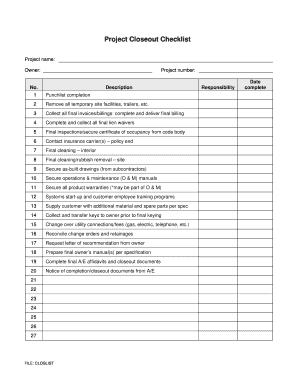
The Project Close Out Checklist is a business form used by contractors and the National Science Foundation (NSF) to ensure all final steps and documentation are completed at the end of a construction project.
pdfFiller scores top ratings on review platforms




Who needs NSF EN-DMPS-215d?
Explore how professionals across industries use pdfFiller.

NSF EN-DMPS-215d is needed by:
-
Contractors managing project finalization
-
Construction project managers overseeing completion tasks
-
National Science Foundation (NSF) representatives verifying compliance
-
Quality assurance teams ensuring project standards
-
Compliance officers reviewing documentation
-
Subcontractors submitting final project deliverables
Comprehensive Guide to NSF EN-DMPS-215d
What is the Project Close Out Checklist?
The Project Close Out Checklist is a vital document aimed at ensuring all steps and documentation are effectively completed at the end of construction projects. It serves a crucial purpose in confirming that contractors and the National Science Foundation (NSF) have met all contractual obligations. This checklist covers key elements such as warranties, as-builts, maintenance agreements, and final project photos.
Utilized primarily by contractors and NSF representatives, the checklist is designed to facilitate the verification process. Key elements ensure that the transition from construction to completion is smooth, minimizing potential risks and ensuring clarity throughout the project's close-out phase.
Purpose and Benefits of the Project Close Out Checklist
The Project Close Out Checklist plays an essential role in ensuring a project's successful completion. By adhering to this form, contractors can be assured that they have met all contractual obligations, thereby reducing risk and enhancing overall project clarity.
Benefits of using the Project Close Out Checklist include:
-
Risk reduction associated with unfulfilled obligations.
-
Enhancements in project documentation management.
-
Improved communication among stakeholders.
Who Needs the Project Close Out Checklist?
The checklist is a necessary tool for various stakeholders involved in construction projects. Primarily, it is utilized by contractors, who are responsible for ensuring that all project aspects are finalized. The NSF also plays a critical role, confirming that necessary evaluation and compliance requirements are met during the closing phase.
Different stakeholders may require the checklist under various circumstances, such as:
-
Final submissions of documentation including warranties and as-builts.
-
Verifying completion of specified tasks.
Both contractors and NSF representatives must sign off on the checklist to validate that all project elements are satisfactorily fulfilled.
Key Features of the Project Close Out Checklist
This checklist includes essential features designed to facilitate the project close-out process. Users will find a variety of functional components, such as fillable fields for detailed information and checkboxes for quick verification.
Key components of the checklist include:
-
Sections for required testing and final submittals.
-
Documentation requirements, including maintenance agreements and warranties.
-
Instructions for completing each section to guide users effectively.
How to Fill Out the Project Close Out Checklist Online
Filling out the Project Close Out Checklist online offers a streamlined approach to ensure accuracy and efficiency. To begin, users should access the form via pdfFiller, an accessible platform that simplifies the entire process.
The steps for completing the form digitally include:
-
Access the checklist using the pdfFiller platform.
-
Edit the form by entering specific project details in the designated fields.
-
Follow field-by-field instructions to ensure all sections are thoroughly filled out.
Using pdfFiller’s features enhances the experience, providing ease of access and clarity during form completion.
Common Errors and How to Avoid Them
While filling out the checklist, users may encounter common errors that can lead to delays or complications. Awareness of these pitfalls can help in mitigating issues during submission.
Frequent mistakes include:
-
Failing to enter complete or accurate information in the fields.
-
Neglecting to check off required items.
Practical tips for avoiding these issues include thorough reviews and validations before final submission to enhance accuracy and completeness.
How to Submit the Project Close Out Checklist
Submitting the completed Project Close Out Checklist involves understanding the various methods available for delivery. Users have the option to submit the form either online or through physical delivery, catering to different preferences.
When submitting, it is important to consider:
-
Any associated fees and deadlines for submission.
-
Processing times and methods for tracking submission status.
Security and Compliance for the Project Close Out Checklist
Handling sensitive documents securely is of utmost importance when utilizing the Project Close Out Checklist. pdfFiller offers robust security measures, ensuring compliance with necessary regulations and guidelines.
Key focus areas regarding security include:
-
Data protection practices to safeguard personal and project information.
-
Record retention requirements that ensure proper documentation handling.
Maintaining security throughout project documentation is essential to protect all involved parties.
Sample of a Completed Project Close Out Checklist
To aid in understanding and usage, a sample completed Project Close Out Checklist can be immensely beneficial. Visuals or descriptions of a filled checklist serve as a valuable reference point for users.
Benefits of reviewing a completed checklist include:
-
Understanding the significance of each section and the details required.
-
Using it as a model for one's own submissions, enhancing effectiveness.
Your Partner in Project Completion: pdfFiller
pdfFiller stands out as a reliable partner for users needing to fill out their Project Close Out Checklist efficiently. The platform’s user-friendly features elevate the experience of creating and managing documents.
Key advantages of utilizing pdfFiller include:
-
Cloud-based accessibility for users from any location.
-
Security features that protect sensitive information throughout the process.
How to fill out the NSF EN-DMPS-215d
-
1.Access and open the Project Close Out Checklist on pdfFiller by entering the platform and locating the document using the search bar.
-
2.Once the form is open, familiarize yourself with the layout, including the fillable fields and checkboxes designed for your inputs.
-
3.Before starting, gather all necessary documentation such as warranties, maintenance agreements, as-built drawings, and project photographs to facilitate accurate completion.
-
4.Begin filling in the required fields, ensuring all entries are clear and accurate as per the gathered information.
-
5.Use pdfFiller’s tools to navigate easily between sections and use the instructions provided in the form for guidance on specific entries.
-
6.Regularly review your inputs for accuracy, ensuring all required fields are completed to prevent delays in processing.
-
7.Once all information is entered, finalize the form by clicking the review button, saving your progress if needed.
-
8.Save the document by choosing the appropriate format (PDF or others) and select the download option for your records.
-
9.Submit the completed checklist via pdfFiller’s submission feature, or download it to submit manually as required by your project guidelines.

Who is eligible to use the Project Close Out Checklist?
The Project Close Out Checklist is primarily for contractors and representatives of the National Science Foundation (NSF) involved in the finalization of construction projects. It's essential for anyone managing project closing to use the form.
What documents do I need to complete this form?
To fill out the Project Close Out Checklist, you will need project-related documents such as warranties, maintenance agreements, as-built drawings, and photographs of the completed project to ensure all information is accurate and complete.
How do I submit the completed checklist?
After completing the Project Close Out Checklist on pdfFiller, you can submit the form either directly through the platform by using the submit option or by downloading and emailing it to the relevant parties as outlined in your project requirements.
Are there any deadlines for submitting this form?
While specific deadlines may vary depending on the project and contractual obligations, it is advisable to submit the Project Close Out Checklist as soon as all final documentation is gathered to ensure timely project closure and compliance.
What are common mistakes to avoid when filling out this checklist?
To avoid delays, ensure all fields are adequately filled without leaving any blank that are required. Double-check that all submitted documentation aligns with project specifications and requirements outlined in the form.
How long does it take to process the Project Close Out Checklist?
Processing time for the Project Close Out Checklist can vary, but typically, it may take several days to a few weeks, depending on the thoroughness of the submission and the review process by the NSF or contracting parties.
Is notarization required for this form?
No, notarization is not required for the Project Close Out Checklist. However, ensure all signatories are completed as required by your contractual agreement.
Related Forms




Related Catalogs
Get the latest insights from our blog


If you believe that this page should be taken down, please follow our DMCA take down process
here
.
This form may include fields for payment information. Data entered in these fields is not covered by PCI DSS compliance.