
Last updated on
Oct 19, 2026
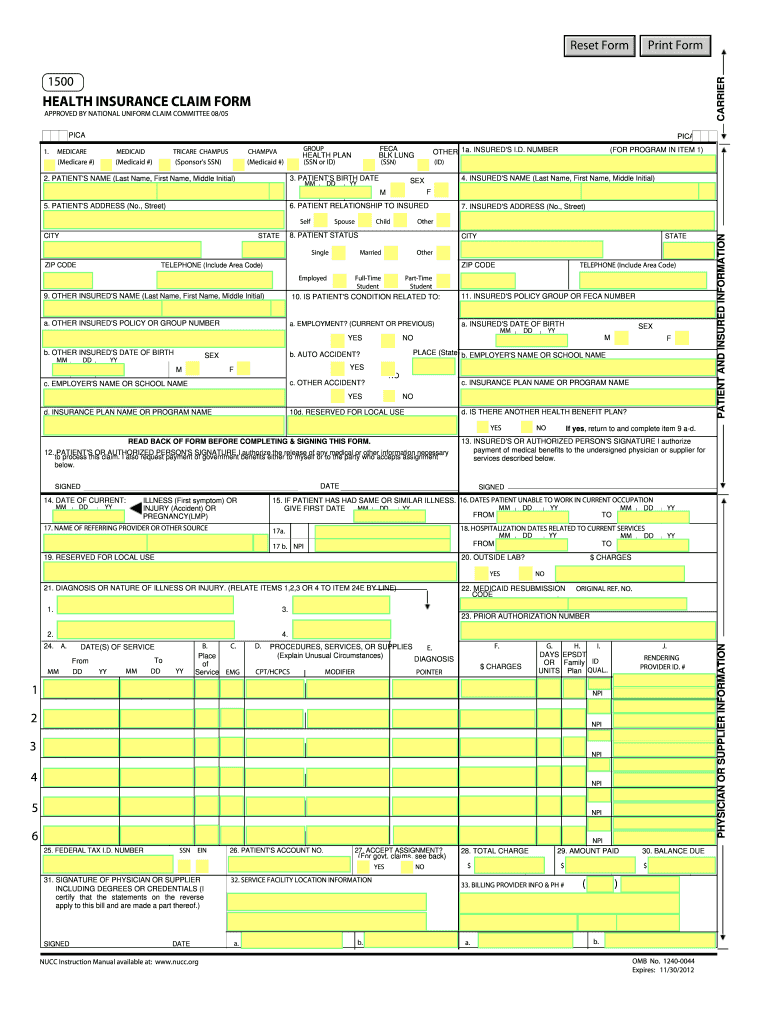
WA Architect of the Capitol OWCP-1500 2005-2026 free printable template
pdfFiller is not affiliated with any government organization

Fill out
Complete the form online in a simple drag-and-drop editor.

eSign
Add your legally binding signature or send the form for signing.

Share
Share the form via a link, letting anyone fill it out from any device.

Export
Download, print, email, or move the form to your cloud storage.
Why pdfFiller is the best tool for your documents and forms


End-to-end document management
From editing and signing to collaboration and tracking, pdfFiller has everything you need to get your documents done quickly and efficiently.
Accessible from anywhere
pdfFiller is fully cloud-based. This means you can edit, sign, and share documents from anywhere using your computer, smartphone, or tablet.
Secure and compliant
pdfFiller lets you securely manage documents following global laws like ESIGN, CCPA, and GDPR. It's also HIPAA and SOC 2 compliant.
What is WA Architect of the Capitol OWCP-1500
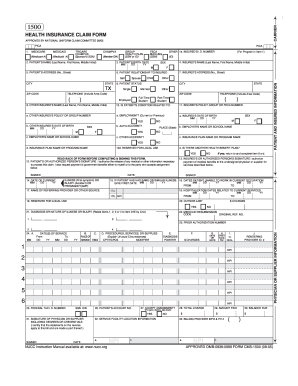
The Health Insurance Claim Form is a healthcare document used by patients, insured individuals, and medical providers to submit claims for reimbursement of medical services under federal programs.
pdfFiller scores top ratings on review platforms




Who needs WA Architect of the Capitol OWCP-1500?
Explore how professionals across industries use pdfFiller.

WA Architect of the Capitol OWCP-1500 is needed by:
-
Patients seeking reimbursement for medical services
-
Insured individuals under FECA, BLBA, or EEOICPA programs
-
Physicians or suppliers billing for medical services
-
Insurance claims adjusters assessing claim validity
-
Healthcare administrators managing patient claims
Comprehensive Guide to WA Architect of the Capitol OWCP-1500
What is the Health Insurance Claim Form?
The Health Insurance Claim Form, also known as the OWCP-1500 form, is essential in the U.S. healthcare system. This form is specifically used for medical billing under programs such as the Federal Employees' Compensation Act (FECA), the Black Lung Benefits Act (BLBA), and the Energy Employees Occupational Illness Compensation Program Act (EEOICPA). Understanding its relevance is crucial for both healthcare providers and patients.
Individuals who need to fill out this form include healthcare providers and insured individuals. Completing this form accurately ensures timely processing of medical claims, which is vital for accessing healthcare benefits and services.
Purpose and Benefits of the Health Insurance Claim Form
The Health Insurance Claim Form serves multiple purposes for both patients and healthcare providers. Timely filing of this form facilitates better access to healthcare services and potential benefits for patients. It streamlines the reimbursement process for providers, allowing them to receive payments more efficiently.
Moreover, using the correct medical claim form ensures compliance with healthcare regulations, ultimately benefiting all parties involved.
Who Needs the Health Insurance Claim Form?
Several key players require the Health Insurance Claim Form to facilitate the healthcare claiming process. Patients, insured individuals, and healthcare providers—including physicians and suppliers—must complete and sign this form to ensure accurate billing and claims processing.
Each role in this process has specific signing requirements that impact how the claim is processed:
-
* Patients must provide their personal details and medical history.
-
* Insured individuals are responsible for verifying their insurance information.
-
* Physicians or suppliers must sign to confirm the authenticity of the services rendered.
How to Fill Out the Health Insurance Claim Form Online (Step-by-Step)
Filling out the Health Insurance Claim Form online is straightforward if you follow these steps:
-
Access the form through a secure PDF editing platform.
-
Carefully fill out Section 1, including patient demographics.
-
Complete Section 2 with details of the insurance coverage.
-
Provide accurate service details in Section 3, including diagnosis codes.
-
Ensure the form is signed by all necessary parties before submission.
Be mindful of common pitfalls, such as missing signatures or incorrect codes, to avoid delays in processing.
Common Errors and How to Avoid Them
When completing the Health Insurance Claim Form, several common errors can occur:
-
* Filling in illegible handwriting, which can lead to misinterpretation.
-
* Omitting required information such as diagnosis codes or procedure dates.
-
* Not having the necessary signatures from patients, insured individuals, or providers.
To minimize these errors, double-check each section for accuracy before submitting the form. Utilizing a digital platform can also eliminate handwriting issues.
Submission Methods for the Health Insurance Claim Form
Submitting the Health Insurance Claim Form can be accomplished through various methods, each with its specific requirements:
-
* Online submission through a designated portal for immediate processing.
-
* Mailing the completed form to the appropriate insurance provider.
-
* Hand-delivering to the provider’s office if necessary.
Be aware of the associated deadlines for submission to ensure timely processing of claims.
What Happens After You Submit the Health Insurance Claim Form?
After submitting the Health Insurance Claim Form, you can expect a specific processing timeline. Generally, confirmations or notifications are sent out by the insurance provider indicating the status of your claim.
Keep an eye on your email for tracking updates, as they will inform you of any required actions on your part if issues arise during processing.
Security and Compliance for the Health Insurance Claim Form
The handling of the Health Insurance Claim Form requires strict adherence to security and compliance measures. These include essential elements such as data encryption and compliance with regulations like HIPAA and GDPR, ensuring your sensitive information is protected.
Understanding these security features reassures users about the safety of their personal data while using the form.
How pdfFiller Can Help You Fill Out the Health Insurance Claim Form
Utilizing pdfFiller can significantly enhance the experience of filling out the Health Insurance Claim Form. This cloud-based platform allows users to easily fill, eSign, and save documents without the need for downloads.
The capabilities of pdfFiller, including document security and accessibility, streamline the filing process, making it more efficient for users managing their healthcare claims.
Sample Completed Health Insurance Claim Form
For those who wish to reference a filled-out version of the Health Insurance Claim Form, a downloadable sample is available. This sample breaks down each section, illustrating how to accurately complete the form.
Users are encouraged to study the sample as they fill out their own forms to ensure accuracy and compliance with required details.
How to fill out the WA Architect of the Capitol OWCP-1500
-
1.To begin, access the Health Insurance Claim Form on pdfFiller by entering the website, navigating to the form section, and searching for the OWCP-1500 template.
-
2.Open the form once you locate it, allowing the interface to load fully in your browser for optimal navigation.
-
3.Gather necessary information such as patient details, insured individual information, diagnosis codes, dates of service, and medical charges before you start filling the form.
-
4.Utilize the toolbar to fill in each blank field, clicking on the specific sections where information is required. Use the created fields to type in the details clearly.
-
5.Use checkboxes and dropdown menus available in the form to select relevant options as instructed. Ensure all selections reflect accurate information.
-
6.Review the completed sections for accuracy and ensure all required fields are filled out correctly to avoid processing delays.
-
7.Finalize the form by confirming that all information is complete, then save your work. You can save the form to your device or a cloud storage solution for future access.
-
8.To submit, use pdfFiller's submission options, which may include emailing directly to the required parties or downloading for manual submission. Consider saving a copy for your records.

Who is eligible to use the Health Insurance Claim Form?
Patients, insured individuals, and healthcare providers involved in submitting claims for medical reimbursements under FECA, BLBA, or EEOICPA are eligible to use this form.
Are there any deadlines for submitting the Health Insurance Claim Form?
While specific deadlines may vary, it's essential to submit the claim as soon as possible after receiving medical services to ensure timely processing and reimbursement.
What are the submission methods for this claim form?
The Health Insurance Claim Form can be submitted electronically through pdfFiller via email or downloaded for postal submission, depending on specific claim requirements.
What documents should accompany the Health Insurance Claim Form?
Typically, you should include supporting documents such as medical records, itemized bills, and any relevant authorization or identification that verifies the patient and insured's information.
What common mistakes should be avoided when filling out this form?
Common errors include leaving required fields blank, incorrect diagnosis codes, and not obtaining all necessary signatures from the patient, insured, and physician, which are crucial for claim approval.
How long does it take for claims to be processed after submission?
Processing times for claims can vary based on the insurer, but typically, it may take several weeks to receive updates or reimbursement after the claim is submitted.
What should I do if I have concerns about my submitted claim?
If you have questions or concerns regarding your claim, contact the claims department of your insurance provider directly for clarification and updates on your submission status.
Related Forms



Get the latest insights from our blog



If you believe that this page should be taken down, please follow our DMCA take down process
here
.
This form may include fields for payment information. Data entered in these fields is not covered by PCI DSS compliance.