
Last updated on
Oct 19, 2026
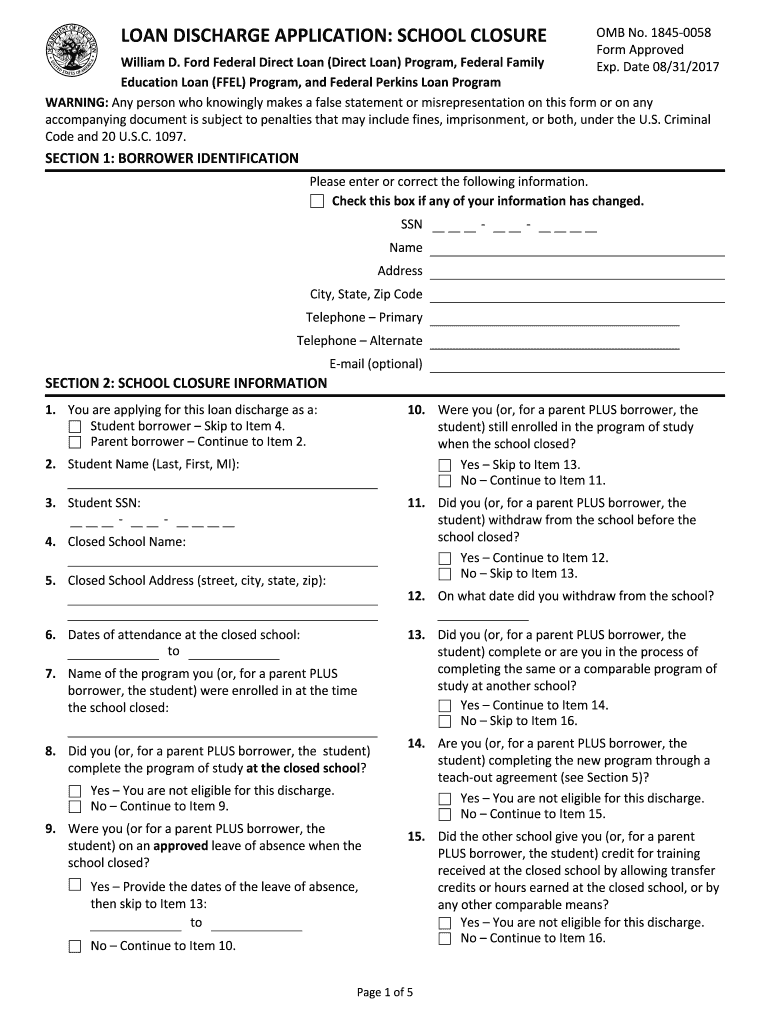
Navient Form free printable template
pdfFiller is not affiliated with any government organization

Fill out
Complete the form online in a simple drag-and-drop editor.

eSign
Add your legally binding signature or send the form for signing.

Share
Share the form via a link, letting anyone fill it out from any device.

Export
Download, print, email, or move the form to your cloud storage.
Why pdfFiller is the best tool for your documents and forms


End-to-end document management
From editing and signing to collaboration and tracking, pdfFiller has everything you need to get your documents done quickly and efficiently.
Accessible from anywhere
pdfFiller is fully cloud-based. This means you can edit, sign, and share documents from anywhere using your computer, smartphone, or tablet.
Secure and compliant
pdfFiller lets you securely manage documents following global laws like ESIGN, CCPA, and GDPR. It's also HIPAA and SOC 2 compliant.
What is Navient Form
The Loan Discharge Application School Closure is a document used by borrowers to request loan discharge due to the closure of their school.
pdfFiller scores top ratings on review platforms




Who needs Navient Form?
Explore how professionals across industries use pdfFiller.

Navient Form is needed by:
-
Students whose school has closed
-
Borrowers of federal student loans
-
Recipients of Perkins loans
-
Individuals applying for loan discharge
-
Educational institutions involved in closures
Comprehensive Guide to Navient Form
What is the Loan Discharge Application School Closure?
The Loan Discharge Application: School Closure is crucial for borrowers seeking to discharge their student loans due to the closure of their educational institution. This application serves to protect borrowers' rights, allowing them to apply for a loan discharge when their school has stopped operating. Eligibility for this form typically extends to those who attended or enrolled in the closed school, emphasizing the importance of this form in safeguarding borrowers' financial well-being.
Why You Need the Loan Discharge Application School Closure
A school closure can significantly impact your student loans, making it essential to file the Loan Discharge Application. By submitting this application, borrowers can obtain financial relief, alleviating the burden of loan repayment. Failing to file promptly or delaying the application may jeopardize your eligibility for discharge and leave you responsible for repaying loans that could otherwise have been forgiven.
Who Should Use the Loan Discharge Application School Closure?
This application is intended for specific borrower groups affected by their school's closure. Individuals who attended a school that has closed or is no longer offering specific educational programs may find themselves eligible for loan discharges. The Loan Discharge Application is particularly relevant for those who meet specific conditions related to their enrollment and the circumstances surrounding the school closure.
Eligibility Criteria for the Loan Discharge Application School Closure
To qualify for the Loan Discharge Application, borrowers must meet several eligibility criteria. Key factors include:
-
Prior enrollment in the closed school
-
Specific circumstances leading to the school's closure
-
Type of loan held by the borrower
Understanding these criteria is crucial as they directly affect eligibility for loan discharge under the law.
How to Fill Out the Loan Discharge Application School Closure Online (Step-by-Step)
Filling out the Loan Discharge Application online involves several key steps:
-
Access the application form through the appropriate platform.
-
Complete all personal information sections, including your name and address.
-
Provide details about the closed school and your enrollment dates.
-
Double-check for accuracy before submission.
Gather necessary information before starting the application to streamline the process and avoid common mistakes.
Common Errors and How to Avoid Them When Filing the Loan Discharge Application School Closure
When submitting the Loan Discharge Application, be aware of frequent mistakes that can delay processing. Common errors include:
-
Incomplete fields or missing information
-
Filing after deadlines
-
Submitting the application without a signature
To mitigate these errors, double-check your application for completeness and accuracy before submission.
How to Submit the Loan Discharge Application School Closure
Submission of the Loan Discharge Application can be done via multiple methods. Options include:
-
Online through designated portals
-
Mailing the completed form to the loan holder
-
Faxing the application, if permitted
Ensure that you are aware of the necessary delivery methods and timelines for submission to avoid delays.
What Happens After You Submit the Loan Discharge Application School Closure?
After submitting your application, several processes begin. Typically, you will enter a review period where the loan holder assesses your information. Tracking your application's status is possible through specified channels.
Expect typical timelines for responses to vary, and familiarize yourself with the possible outcomes following application review.
Security and Privacy Considerations with the Loan Discharge Application School Closure
Handling sensitive borrower information requires strict security measures. pdfFiller employs robust security practices, including 256-bit encryption, to protect your data. Compliance with regulations such as HIPAA and GDPR ensures that all financial documents are processed securely, providing peace of mind throughout the application process.
Utilizing pdfFiller for Your Loan Discharge Application School Closure
Using pdfFiller simplifies the process of completing the Loan Discharge Application. The platform offers user-friendly features such as fillable forms and electronic signing, making it easy to navigate your application. Start leveraging pdfFiller for a seamless and efficient experience in managing your loan discharge application.
How to fill out the Navient Form
-
1.To access the Loan Discharge Application School Closure form on pdfFiller, visit the website and search for the form by its name.
-
2.Once located, click on the form to open it in pdfFiller's editing interface.
-
3.Before starting, gather necessary information such as your Social Security Number, full name, current address, and details about the closed school.
-
4.As you navigate the form, fill out each section carefully by clicking on the text fields and typing your information.
-
5.Use the checkboxes to indicate any relevant conditions or situations as specified in the form.
-
6.Don’t forget to sign the document electronically in the provided signature field, noting the date of your signature.
-
7.Once you have completed the form, review all the entries to ensure accuracy and completeness.
-
8.After verification, save your work or download a copy of the form in your preferred format.
-
9.To submit your application, follow the submission instructions provided by your loan holder, which may include uploading through their website or mailing a physical copy.

Who is eligible to apply for the Loan Discharge Application School Closure?
Eligibility for the Loan Discharge Application School Closure is typically for students whose school has permanently closed while they were enrolled or shortly after their withdrawal. Make sure to check specific criteria based on your loan type.
What is the deadline for submitting this loan discharge application?
It’s important to submit your Loan Discharge Application as soon as possible following the closure of your school. While there may not be a strict deadline, prompt application can ensure timely processing.
How do I submit the Loan Discharge Application after completing it?
Once completed, submission can usually be done by mailing the form to your loan servicer. Check with your loan holder for specific submission methods such as online uploads or mailing addresses.
Are there any required documents to support my loan discharge application?
Yes, typically you may need to provide documentation proving the closure of your school such as official notices. Consult your loan servicer for any additional required materials.
What are common mistakes to avoid when filling out this form?
Common mistakes include omitting required information, miswriting your social security number, and forgetting to sign the application. Make sure all fields are filled out completely and accurately.
How long does it take for my loan discharge application to be processed?
Processing times for loan discharge applications can vary. On average, it may take several weeks to a few months. Check with your loan servicer for estimated timelines specific to your application.
Can multiple loans be discharged with one application?
Generally, each loan may require a separate application, especially if they are held by different servicers. Always verify with your loan holders regarding their specific requirements.
Related Forms



Get the latest insights from our blog


If you believe that this page should be taken down, please follow our DMCA take down process
here
.
This form may include fields for payment information. Data entered in these fields is not covered by PCI DSS compliance.