
Last updated on
Oct 19, 2026

MO MODES-9 2015-2026 free printable template
pdfFiller is not affiliated with any government organization

Fill out
Complete the form online in a simple drag-and-drop editor.

eSign
Add your legally binding signature or send the form for signing.

Share
Share the form via a link, letting anyone fill it out from any device.

Export
Download, print, email, or move the form to your cloud storage.
Why pdfFiller is the best tool for your documents and forms


End-to-end document management
From editing and signing to collaboration and tracking, pdfFiller has everything you need to get your documents done quickly and efficiently.
Accessible from anywhere
pdfFiller is fully cloud-based. This means you can edit, sign, and share documents from anywhere using your computer, smartphone, or tablet.
Secure and compliant
pdfFiller lets you securely manage documents following global laws like ESIGN, CCPA, and GDPR. It's also HIPAA and SOC 2 compliant.
What is MO MODES-9
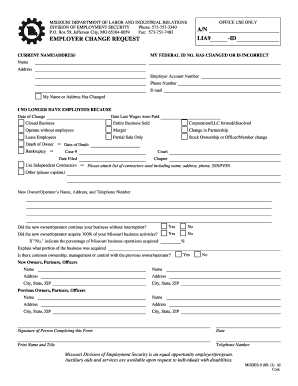
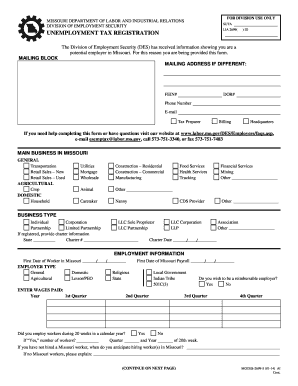
The Missouri Employer Change Request Form is a document used by employers in Missouri to notify the Department of Labor and Industrial Relations of changes in their business status.
pdfFiller scores top ratings on review platforms




Who needs MO MODES-9?
Explore how professionals across industries use pdfFiller.

MO MODES-9 is needed by:
-
Business owners making changes in ownership
-
HR managers updating employment records
-
Employers closing their business operations
-
Employers with changes in operational status
-
Accountants managing employer compliance
-
Legal representatives handling business changes
Comprehensive Guide to MO MODES-9
What is the Missouri Employer Change Request Form?
The Missouri Employer Change Request Form is an essential document utilized by employers to inform the Department of Labor and Industrial Relations about significant business status changes. This form plays a critical role in ensuring compliance with state regulations, which is crucial for maintaining an accurate employment record.
By submitting the form, employers fulfill their responsibility to update any changes, such as ownership changes or business closures. This adherence to requirements is key in avoiding potential compliance issues.
Purpose and Benefits of the Missouri Employer Change Request Form
The primary purpose of the Missouri Employer Change Request Form is to maintain accurate employment records, which is vital for the state’s monitoring of employer status. Using this form offers several advantages, including reducing the risk of penalties associated with non-compliance with labor regulations.
Additionally, the form helps streamline the process of managing changes in employer status, facilitating timely updates to records. This efficiency is crucial for employers who face decisions concerning their operational status.
Who Needs the Missouri Employer Change Request Form?
This form is necessary for various types of employers in Missouri, particularly those undergoing ownership changes, business closures, or significant operational modifications. Specific roles within an organization, such as business owners or designated personnel, are typically responsible for submitting this form.
Employers should recognize when it is appropriate to use the form to ensure compliance with regulatory requirements surrounding employment practices.
Key Features of the Missouri Employer Change Request Form
The Missouri Employer Change Request Form is designed with several important features. It includes multiple fillable fields that require detailed information about the business and the nature of the change being reported.
Instructions provided within the document guide users in completing the form accurately. Furthermore, signatures are required along with any necessary evidence to support the changes, ensuring a robust submission process.
How to Fill Out the Missouri Employer Change Request Form Online (Step-by-Step)
Filling out the Missouri Employer Change Request Form online is straightforward. Follow these steps:
-
Access the form through pdfFiller's platform.
-
Fill in the required fields, ensuring accuracy of all information.
-
Review the details entered for correctness.
-
Sign the form electronically where required.
-
Submit the form as per the outlined submission methods.
This process leverages the user-friendly features of pdfFiller, simplifying the completion of the employer status change form.
Required Documents and Supporting Materials
Before filling out the Missouri Employer Change Request Form, it's crucial to gather the necessary supporting documents. Typical documents may include proof of ownership changes or business closure notices.
Organizing these documents beforehand will streamline the submission process. Here are some specific materials that should be prepared:
-
Proof of ownership change.
-
Business closure documents if applicable.
-
Any other relevant employment records.
Submission Methods and Delivery for the Missouri Employer Change Request Form
Upon completing the Missouri Employer Change Request Form, there are several submission options available. Employers can submit the form online or via traditional mail.
It is essential to be aware of any deadlines for submission to avoid compliance complications. Keeping track of submissions is also vital for confirmation and record-keeping purposes.
Security and Compliance when Handling the Missouri Employer Change Request Form
Ensuring the security and compliance of sensitive information when submitting the Missouri Employer Change Request Form is paramount. pdfFiller employs advanced security measures, including encryption and data protection guidelines to safeguard user information.
Employers can rest assured that their personal data is managed with confidentiality and in compliance with state regulations. This focus on security is particularly important when handling sensitive employer information.
What Happens After You Submit the Missouri Employer Change Request Form?
After submission, the Missouri Employer Change Request Form undergoes a review process. Employers can check the status of their submission to ensure it has been received and is being processed.
Potential outcomes include approval of the change or requests for further information. Staying informed about the status after submission is critical for effective employment record management.
Transform Your Form Experience with pdfFiller
pdfFiller enhances the experience of completing forms like the Missouri Employer Change Request Form. Users benefit from features such as electronic signing and document sharing, which simplifies the entire process.
The platform also ensures that sensitive information is secure, providing peace of mind for users managing their documents. Leveraging pdfFiller’s capabilities can significantly improve form completion efficiency.
How to fill out the MO MODES-9
-
1.To start, access pdfFiller and search for the Missouri Employer Change Request Form using the search bar.
-
2.Once you locate the form, click on it to open in the editing interface.
-
3.Before filling out the form, gather necessary information such as your current and new business details and reasons for the change.
-
4.Use pdfFiller's interface to navigate the form; click on each fillable field to enter your information.
-
5.For the 'Name', 'Address', and 'Date of Change' fields, ensure you enter accurate and updated details as required.
-
6.If a signature is needed, select the appropriate field and use pdfFiller’s signature tool to sign electronically.
-
7.Review each section of the form carefully to ensure all information is complete and accurate.
-
8.Once filled out, go through the preview feature in pdfFiller to check the final output.
-
9.Save your progress frequently to avoid losing any information.
-
10.When satisfied, download the completed form as a PDF or submit it directly through pdfFiller as per your needs.

Who is eligible to use the Missouri Employer Change Request Form?
Any employer operating in Missouri who needs to report a change in their business status is eligible to use the Missouri Employer Change Request Form, including changes in ownership or operational adjustments.
Is there a deadline for submitting this form?
While specific deadlines may vary based on the nature of the changes, it is recommended to submit the Missouri Employer Change Request Form promptly after any significant changes to ensure compliance with state regulations.
How do I submit the Missouri Employer Change Request Form?
You can submit the Missouri Employer Change Request Form by downloading the completed document and mailing it to the appropriate department. Alternatively, if using pdfFiller, you may submit electronically through the platform if the option is available.
What supporting documents are required with this form?
Supporting documents often include proof of business ownership change, closure notices, or any official records that provide context for the changes being reported. Always check with your local Department of Labor for specific requirements.
What common mistakes should I avoid when completing this form?
Common mistakes include providing incorrect or outdated business information, failing to include all required signatures, and overlooking any key details needed in the 'reason for change' section. Always double-check before submission.
How long does it take for changes to be processed after submitting the form?
Processing time can vary, but typically you can expect a response within a few weeks. For urgent matters, contacting the Department of Labor directly may provide more immediate information.
Are there any fees associated with submitting the Missouri Employer Change Request Form?
There are generally no fees for submitting the Missouri Employer Change Request Form itself, but if additional documents or actions are required later, fees may apply. Always verify with the Department of Labor.
MO MODES-9 Form Versions
Related Forms

Get the latest insights from our blog


If you believe that this page should be taken down, please follow our DMCA take down process
here
.
This form may include fields for payment information. Data entered in these fields is not covered by PCI DSS compliance.