
Last updated on
Oct 15, 2026

Get the free Employee TimeSheet
We are not affiliated with any brand or entity on this form

Fill out
Complete the form online in a simple drag-and-drop editor.

eSign
Add your legally binding signature or send the form for signing.

Share
Share the form via a link, letting anyone fill it out from any device.

Export
Download, print, email, or move the form to your cloud storage.
Why pdfFiller is the best tool for your documents and forms


End-to-end document management
From editing and signing to collaboration and tracking, pdfFiller has everything you need to get your documents done quickly and efficiently.
Accessible from anywhere
pdfFiller is fully cloud-based. This means you can edit, sign, and share documents from anywhere using your computer, smartphone, or tablet.
Secure and compliant
pdfFiller lets you securely manage documents following global laws like ESIGN, CCPA, and GDPR. It's also HIPAA and SOC 2 compliant.
What is TimeSheet
The Employee TimeSheet is a time tracking document used by employees to record hours worked during a pay period.
pdfFiller scores top ratings on review platforms




Who needs TimeSheet?
Explore how professionals across industries use pdfFiller.

TimeSheet is needed by:
-
Employees needing to log work hours for payroll.
-
Supervisors verifying and approving employee hours.
-
HR departments managing employee time records.
-
Payroll personnel processing salary payments.
-
Businesses requiring accurate work hour documentation.
Comprehensive Guide to TimeSheet
What is the Employee TimeSheet?
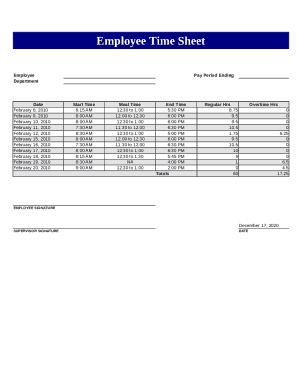
The Employee TimeSheet serves as a critical tool for recording an employee's work hours, ensuring proper tracking and documentation of time spent on tasks. This form plays an essential role in employment by helping manage payroll and attendance accurately.
It includes various fields designed to capture relevant information:
-
Employee Name
-
Department
-
Employee Number
-
Supervisor
-
Date
-
Start Time and End Time
-
Regular Hours and Overtime Hours
-
Total Hours
For the recorded hours to be valid, both the employee and supervisor are required to sign the form, certifying its accuracy.
Purpose and Benefits of the Employee TimeSheet
The primary purpose of the Employee TimeSheet is to facilitate accurate time tracking, which is crucial for payroll processing. Precise records help in ensuring that employees are compensated correctly and that supervisors can evaluate time usage effectively.
Utilizing the Employee TimeSheet provides several benefits:
-
Maintaining clear records of regular and overtime hours worked.
-
Helping to prevent disputes related to hours logged.
-
Enhancing efficiency in processing payroll at the end of the pay period.
Key Features of the Employee TimeSheet
The Employee TimeSheet is designed to be user-friendly and efficient, incorporating several standout features. Notably, it includes fillable fields that simplify data entry, ensuring users can easily record their hours.
Key features of the form include:
-
Fillable sections for start and end times, including total hours worked.
-
Signature lines for both employee and supervisor to affirm the accuracy of the recorded information.
-
Accessibility as a downloadable PDF for convenient print and digital submission.
How to Fill Out the Employee TimeSheet Online (Step-by-Step)
Filling out the Employee TimeSheet online is straightforward. Follow these detailed steps to ensure accurate completion of the form:
-
Enter your Employee Name and Employee Number.
-
Specify your Department and Supervisor’s name.
-
Record the Dates, Start Time, and End Time for each work session.
-
Calculate Regular Hours and Overtime Hours, then input the Total Hours worked.
-
Both you and your Supervisor must provide signatures for certification.
To ensure accuracy, double-check all entries before submission and utilize pdfFiller’s eSigning features for a secure process.
Common Errors and How to Avoid Them
Error prevention is vital for maintaining the integrity of the Employee TimeSheet. Common mistakes include incorrect time entries or omission of required signatures.
To avoid these pitfalls:
-
Double-check all entries for accuracy before finalizing the form.
-
Ensure that both you and your supervisor provide signatures.
-
Implement the use of autofill features within pdfFiller to streamline data entry.
Where and How to Submit the Employee TimeSheet
After filling out the Employee TimeSheet, it’s important to understand how to submit it correctly. You can choose between digital and physical submission methods depending on your organization's requirements.
Key points regarding submission include:
-
Identifying whether to submit the form electronically or in-person.
-
Being aware of deadlines based on your pay schedule.
-
Tracking submissions to confirm receipt and avoid miscommunication.
Security and Compliance for the Employee TimeSheet
When handling the Employee TimeSheet, security and compliance are critical. pdfFiller ensures that sensitive employee data is protected with advanced security measures, including 256-bit encryption.
It is vital for users to be aware of the following compliance aspects:
-
HIPAA and GDPR compliance protects user privacy and data.
-
Secure digital signatures enhance the authenticity of the document.
How pdfFiller Enhances Your Experience with the Employee TimeSheet
pdfFiller significantly improves user interactions with the Employee TimeSheet by providing a convenient platform for editing and customization. Users can enjoy cloud access, enabling quick and efficient form management.
The following features stand out:
-
Easy editing and customization options for the form.
-
Cloud-based storage for accessible form filling.
-
User testimonials showcasing positive experiences with pdfFiller.
Utilize pdfFiller to Simplify Your Time Tracking
By adopting pdfFiller, users can streamline their time tracking processes significantly, making the experience of completing and managing the Employee TimeSheet hassle-free.
It's essential to maintain accurate records for employment and payroll purposes. Start using pdfFiller today to enhance your efficiency and ensure your time tracking is as straightforward as possible.
How to fill out the TimeSheet
-
1.To access the Employee TimeSheet on pdfFiller, navigate to the pdfFiller website and use the search function to find the form.
-
2.Once located, click on the form to open it in the pdfFiller interface.
-
3.Before filling out the form, gather necessary information such as your name, employee number, department, supervisor’s name, and the dates and times you worked.
-
4.Begin completing the form by entering your Employee Name and Employee # in the designated fields.
-
5.Fill in the Department and Supervisor fields accurately to ensure proper routing of the form.
-
6.For each day worked, input the Date, Start Time, End Time, and any Regular or Overtime Hours into the respective fields.
-
7.Double-check that Total Hours are calculated correctly based on your entries.
-
8.Ensure to sign the form in the signature line meant for the Employee, and ask your Supervisor to do the same on their line.
-
9.Review all filled fields to verify accuracy and completeness before finalizing.
-
10.When satisfied, either save your progress, download the completed form in your preferred format, or submit it directly through the pdfFiller platform.

Who is eligible to use the Employee TimeSheet?
The Employee TimeSheet is designed for employees and their supervisors within an organization. Any employee required to track and report work hours can complete this form.
What is the deadline for submitting the Employee TimeSheet?
Submission deadlines for the Employee TimeSheet may vary by employer. Generally, it's due at the end of the pay period or as specified by HR policies, so check your company protocol.
How do I submit the completed Employee TimeSheet?
Once completed, the Employee TimeSheet can be submitted by downloading the file and emailing it to your supervisor or HR department, or through the designated submission method provided by your employer.
What supporting documents are needed with the Employee TimeSheet?
Typically, supporting documents such as attendance records or previous week timesheets may be required. Check with your company’s HR policy for specific requirements.
What common mistakes should I avoid when filling out the Employee TimeSheet?
Common mistakes include incorrect date entries, miscalculating hours worked, neglecting signatures, or failing to fill out all required fields. Always review your entries before submission.
How long does it take to process the submitted Employee TimeSheet?
Processing times can differ based on company policies. Generally, it may take a few days for payroll and HR to review and process your submitted timesheet for payment.
What happens if I forget to sign the Employee TimeSheet?
If you forget to sign, the timesheet may be returned for correction. Always ensure both you and your supervisor sign before submission to avoid processing delays.
Related Forms


Get the latest insights from our blog


If you believe that this page should be taken down, please follow our DMCA take down process
here
.
This form may include fields for payment information. Data entered in these fields is not covered by PCI DSS compliance.