
Last updated on
Oct 19, 2026

Get the free Emergency Firefighter Time Report
We are not affiliated with any brand or entity on this form

Fill out
Complete the form online in a simple drag-and-drop editor.

eSign
Add your legally binding signature or send the form for signing.

Share
Share the form via a link, letting anyone fill it out from any device.

Export
Download, print, email, or move the form to your cloud storage.
Why pdfFiller is the best tool for your documents and forms


End-to-end document management
From editing and signing to collaboration and tracking, pdfFiller has everything you need to get your documents done quickly and efficiently.
Accessible from anywhere
pdfFiller is fully cloud-based. This means you can edit, sign, and share documents from anywhere using your computer, smartphone, or tablet.
Secure and compliant
pdfFiller lets you securely manage documents following global laws like ESIGN, CCPA, and GDPR. It's also HIPAA and SOC 2 compliant.
What is Firefighter Time Report
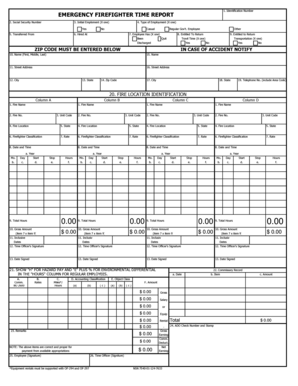
The Emergency Firefighter Time Report is a payroll document used by firefighters to accurately report their hours worked for payroll processing.
pdfFiller scores top ratings on review platforms




Who needs Firefighter Time Report?
Explore how professionals across industries use pdfFiller.

Firefighter Time Report is needed by:
-
Firefighters responsible for reporting work hours
-
Time Officers overseeing payroll submissions
-
Human Resources departments managing employee records
-
Payroll processors handling firefighter payments
-
Administrative personnel in fire departments
Comprehensive Guide to Firefighter Time Report
What Is the Emergency Firefighter Time Report?
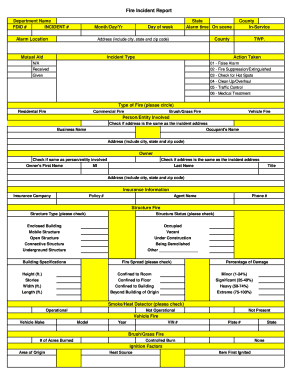
The Emergency Firefighter Time Report serves a crucial role in the payroll processing for firefighters. This form helps ensure accurate compensation by documenting the hours worked and other pertinent details. Featuring a structured layout, it includes designated fields for the firefighter's identification and time logging, making it essential for payroll accuracy.
Key elements like hours worked and hazard pay are emphasized, as they influence the firefighter payroll document's overall validity. Thus, using this firefighter time sheet not only facilitates proper payment but also reinforces accountability within payroll processing.
Purpose and Benefits of the Emergency Firefighter Time Report
This report is vital for both firefighters and time officers, serving as a reliable source of information for payroll processing. Its primary purpose is to ensure that all hours worked are accurately recorded and validated, which protects the rights of the employees to receive correct payment.
Benefits of employing the firefighter payroll form include efficient tracking of firefighter hours, easy calculations for hazard pay, and a simplified audit process for payroll departments. By providing structured data, the report streamlines payroll workflows and minimizes discrepancies.
Key Features of the Emergency Firefighter Time Report
The Emergency Firefighter Time Report boasts several important features that enhance its usability. It includes fillable fields designed for the firefighter's name, total hours worked, and any applicable commissions. Additionally, it necessitates required signatures from both the employee and the time officer to validate the entries.
-
Fillable fields for accurate data entry.
-
Signature areas for employee and time officer.
-
Sections for hazard pay and commission records.
Who Needs to Use the Emergency Firefighter Time Report?
The primary users of this time report include firefighters and time officers who oversee payroll processes. Firefighters use the form to document their hours and any special pay considerations, while time officers are responsible for ensuring the report's accuracy and compliance with payroll standards.
Specific roles within the firefighting department may have unique requirements for filling out the report, reflecting their distinct responsibilities and duties in emergency situations.
How to Fill Out the Emergency Firefighter Time Report Online (Step-by-Step)
Filling out the Emergency Firefighter Time Report online is straightforward. Follow these steps to ensure accuracy:
-
Gather necessary information, including hours worked and fire location details.
-
Access the report and enter your name in the designated field.
-
Document the total hours worked, including any overtime or hazard pay.
-
Add signatures where required, both from the employee and the time officer.
-
Review the completed form for errors before submission.
Common Errors & How to Avoid Them When Completing Your Time Report
Several common mistakes can occur while completing the Emergency Firefighter Time Report. Ensure to avoid these pitfalls:
-
Leaving fields blank, particularly hours worked and signatures.
-
Incorrectly calculating total hours and hazard pay.
-
Failing to review the report before submission.
Tips for review include verifying all entries for accuracy and ensuring that both the employee and time officer signatures are present.
How to Submit Your Emergency Firefighter Time Report
Submitting the completed Emergency Firefighter Time Report can be accomplished through various methods. Check with your fire department for specific submission instructions, as they may vary.
-
Online submission via a designated portal.
-
Emailing the report to the payroll department.
-
Physical drop-off at the appropriate office.
Be aware of any deadlines associated with submission to ensure timely processing of payments.
Tracking Your Submission and What Happens Next
Once the Emergency Firefighter Time Report is submitted, it enters a processing stage. Confirmation of receipt is typically sent, indicating that the report is under review.
To check the status of the report, you can contact the payroll department or utilize any tracking system provided. If corrections are needed, follow the established procedures for amendments to ensure accuracy and compliance.
Security and Compliance When Using the Emergency Firefighter Time Report
When handling the Emergency Firefighter Time Report, security protocols are paramount to protect sensitive information. The document is subject to strict compliance with legal frameworks, such as HIPAA and GDPR, ensuring that all personal data is handled securely.
-
256-bit encryption for data protection.
-
Compliance with SOC 2 Type II standards.
-
Regular audits to ensure adherence to privacy norms.
Enhance Your Experience with pdfFiller: The Ideal Solution for Your Form Needs
Utilizing pdfFiller can simplify the process of filling out the Emergency Firefighter Time Report. This platform provides user-friendly features that assist in managing your forms more effectively.
With capabilities like eSigning and editing options, pdfFiller streamlines the form-filling experience while ensuring your documents are handled securely. This makes it an ideal solution for both employees and time officers involved in payroll processing.
How to fill out the Firefighter Time Report
-
1.Access pdfFiller and search for the 'Emergency Firefighter Time Report' form in the template directory.
-
2.Open the form to view the fillable fields and instructions provided on the document.
-
3.Gather necessary information such as fire location details, hours worked, any hazard pay, and employee identification before starting.
-
4.Begin by entering your name in the designated field, ensuring you include your first, middle, and last names as required.
-
5.Next, fill in the hours worked by entering the total hours in the appropriate field for the reporting period.
-
6.If applicable, include any hazard pay amounts and other compensation precisely in the provided sections.
-
7.Add any necessary details about the fire location, ensuring all information is accurate and thorough.
-
8.Review all filled fields carefully to verify the accuracy of the entered data and ensure you haven't missed any required sections.
-
9.Once complete, sign the form electronically as the employee by using pdfFiller's signature field functionality.
-
10.Ensure the Time Officer signature section is also completed, either by inviting them to sign electronically or by printing the form for their signature.
-
11.Final review should include checking all entries for completeness before proceeding to save the document.
-
12.Save the completed form on pdfFiller by clicking on the 'Save' option, choosing your preferred format.
-
13.Download a copy of the form if needed, or submit directly through pdfFiller's submission options to the payroll department.

Who is eligible to fill out the Emergency Firefighter Time Report?
Firefighters who have worked hours that need to be reported for payroll processing are eligible to complete this form. Approval from a Time Officer is also required.
What is the deadline for submitting this form?
The deadline for submitting the Emergency Firefighter Time Report usually aligns with the payroll calendar of the fire department. It's advisable to check with your Time Officer for specific dates.
How can I submit the filled form?
You can submit the completed Emergency Firefighter Time Report electronically via pdfFiller or print it out to hand it in physically to the payroll department.
What supporting documents should accompany this form?
Typically, no additional documents are required. However, it's wise to keep any relevant records or notes about hours worked or hazard pay for your reference.
What common mistakes should I avoid when filling out the form?
Common errors include entering incorrect hours, missing the required signatures, and providing vague or incomplete location details. Ensure all fields are clearly filled out.
How long does it take to process the Emergency Firefighter Time Report?
Processing times may vary depending on the payroll department's schedule, but it's generally within one payroll cycle after submission.
Is notarization required for the Emergency Firefighter Time Report?
No, notarization is not required for the Emergency Firefighter Time Report. Signatures from the employee and Time Officer are sufficient.
Related Content
Related Forms




Get the latest insights from our blog


If you believe that this page should be taken down, please follow our DMCA take down process
here
.
This form may include fields for payment information. Data entered in these fields is not covered by PCI DSS compliance.