
Last updated on
Oct 31, 2026

Get the free North Carolina Form 19
We are not affiliated with any brand or entity on this form

Fill out
Complete the form online in a simple drag-and-drop editor.

eSign
Add your legally binding signature or send the form for signing.

Share
Share the form via a link, letting anyone fill it out from any device.

Export
Download, print, email, or move the form to your cloud storage.
Why pdfFiller is the best tool for your documents and forms


End-to-end document management
From editing and signing to collaboration and tracking, pdfFiller has everything you need to get your documents done quickly and efficiently.
Accessible from anywhere
pdfFiller is fully cloud-based. This means you can edit, sign, and share documents from anywhere using your computer, smartphone, or tablet.
Secure and compliant
pdfFiller lets you securely manage documents following global laws like ESIGN, CCPA, and GDPR. It's also HIPAA and SOC 2 compliant.
What is NC Form 19
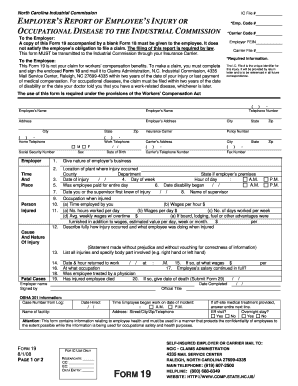
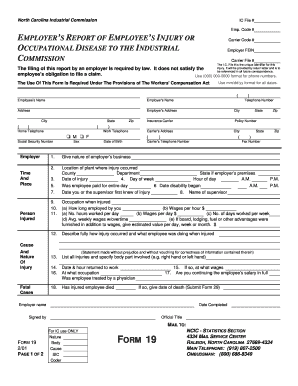
The North Carolina Form 19 is a legal document used by employers to report employee injuries or occupational diseases to the Industrial Commission.
pdfFiller scores top ratings on review platforms




Who needs NC Form 19?
Explore how professionals across industries use pdfFiller.

NC Form 19 is needed by:
-
Employers reporting workplace injuries
-
Supervisors overseeing employee health and safety
-
Human resources personnel managing employee records
-
Insurance carriers processing claims
-
Claims administrators coordinating injury reports
Comprehensive Guide to NC Form 19
What is the North Carolina Form 19?
The North Carolina Form 19 is a crucial legal document used for reporting employee injuries or occupational diseases to the Industrial Commission. This form serves as an essential component of the workers' compensation reporting process, ensuring that claims are properly documented and monitored. Timely submission is critical; employers must submit the form within five days of learning about the incident to comply with legal requirements.
In essence, this employee injury report not only fulfills statutory obligations but also reinforces the employer's commitment to workplace safety and accountability.
Why Employers Need the North Carolina Form 19
Employers are required to utilize the North Carolina Form 19 for reporting workplace injuries and occupational diseases to the Industrial Commission. Submitting this form protects both the employer and employee by documenting workplace incidents that may lead to claims for workers' compensation. Failing to submit the form may result in legal ramifications, including penalties or complications in handling claims.
Accurate and timely reporting enhances workplace safety, promotes transparency, and aids in protecting the rights of employees while allowing employers to manage their liabilities effectively.
Key Features of the North Carolina Form 19
The North Carolina Form 19 includes several essential fields necessary for complete documentation. Key information required on the form encompasses:
-
Employer's Code
-
Social Security Number of the employee
-
The nature of the injury sustained
-
Details regarding the employer's business
-
Direction for completion and submission
These components ensure that all pertinent information is collected efficiently, aiding in the processing of claims. The form also includes specific instructions to guide users in accurately providing the required details.
Who Needs the North Carolina Form 19?
The primary users of the North Carolina Form 19 are employers and supervisors responsible for documenting workplace incidents. This form should be submitted in scenarios such as when an employee sustains a work-related injury or contracts an occupational disease. Legal obligations under the Workers' Compensation Act necessitate that employers provide this report to ensure accurate claims processing and compliance with state laws.
Understanding when to utilize this form is essential for maintaining compliance and protecting employees' rights in the workplace.
How to Fill Out the North Carolina Form 19 Online (Step-by-Step)
To complete the North Carolina Form 19 online through pdfFiller, follow these comprehensive steps:
-
Access the pdfFiller website and log in to your account.
-
Search for the North Carolina Form 19 template in the document repository.
-
Select the template and begin filling out the required fields, such as Emp. Code and Social Security Number.
-
Provide detailed information regarding the nature of the injury and the employer’s business.
-
Review all entries for accuracy before submission.
-
Submit the completed form electronically or save it for future reference.
This user-friendly process saves time and enhances accuracy while ensuring compliance with state regulations.
Submitting the North Carolina Form 19: Guidelines and Methods
When submitting the North Carolina Form 19, employers have several methods to consider:
-
Online submission through the employer's insurance carrier or claims administrator.
-
Mailing a physical copy to the appropriate Industrial Commission office.
Being aware of deadlines is essential, as forms submitted after the five-day window may not be accepted. After submission, a confirmation process ensures that the form has been received and is under review, providing peace of mind for the employer.
Common Mistakes and How to Avoid Them
Employers often encounter typical errors when completing the North Carolina Form 19. Common mistakes include:
-
Omitting required information
-
Filling in incorrect details
-
Failing to sign or date the form
To prevent these errors, it is advisable to use a validation checklist before submission, ensuring that all fields are correctly filled in and compliant with state requirements.
Role of pdfFiller in Completing the North Carolina Form 19
pdfFiller enhances the experience of completing the North Carolina Form 19 by offering useful features designed for users. These features include eSigning capabilities, comprehensive editing tools, and secure document management options. The platform employs advanced security measures, such as 256-bit encryption, to protect sensitive information during the form completion process.
User testimonials and success stories highlight how pdfFiller streamlines the form-filling experience, making it easier for employers to manage their documentation efficiently.
After Submission: What to Expect?
Once the North Carolina Form 19 has been submitted, employers can expect a systematic process. After submission, the next steps include:
-
Confirmation of the form's receipt from the Industrial Commission.
-
Review of the submission and assessment of the claim.
-
Instructions on next steps if any issues arise, such as rejections.
Being informed about the status of the submission helps employers stay on top of their claims and resolve any potential issues swiftly.
Get Started with pdfFiller Today!
Utilizing pdfFiller to fill out the North Carolina Form 19 offers a reliable and efficient solution for employers. The platform emphasizes user-friendliness and robust security features, ensuring sensitive information is handled with care. Start your process with pdfFiller today to streamline your documentation needs and enhance your workplace compliance.
How to fill out the NC Form 19
-
1.To access the North Carolina Form 19, navigate to pdfFiller's website and log in to your account.
-
2.In the search bar, type 'North Carolina Form 19' and select the form from the results to open it for editing.
-
3.Ensure you have the necessary information available, such as the employee's details, the nature of the injury, and your business's information.
-
4.Use pdfFiller's toolbar to fill in the blank fields, including 'Emp. Code __________' and 'Social Security Number'.
-
5.Carefully read each section and utilize the instructions provided on the form for accuracy.
-
6.Once all fields are completed, review the form for any potential mistakes and ensure every question has been answered.
-
7.After reviewing, you can save your progress within pdfFiller or choose to download the completed form.
-
8.To submit the form, either print it for physical submission or check with your insurance carrier for their specific procedures, as it must be submitted through them.

Who should fill out the North Carolina Form 19?
The North Carolina Form 19 should be filled out by employers who are reporting injuries or occupational diseases involving their employees. This includes the employer or designated representatives such as supervisors.
What is the deadline for submitting Form 19?
Form 19 must be submitted within five days of the employer's knowledge of the employee's injury or occupational disease. Timeliness is crucial for compliance with the Workers' Compensation Act.
How can I submit the completed Form 19?
The completed Form 19 should be submitted through the employer's insurance carrier or claims administrator. Ensure you follow their specific submission guidelines to avoid any processing delays.
What information is required to complete Form 19?
You will need details about the employee, such as their Social Security Number and the nature of the injury, along with business information, including the employer's name and location of the incident.
What are common mistakes when filling out Form 19?
Common mistakes include leaving blank fields, misreporting dates, and failing to provide complete employee information. Ensure all questions are answered as required to mitigate processing issues.
How long does it take to process Form 19 once submitted?
Processing times for Form 19 can vary based on the insurance carrier or claims administrator involved. Generally, it can take several days to weeks, depending on their internal procedures.
Is notarization required for Form 19?
No, notarization is not required for the North Carolina Form 19. However, ensure all required fields are accurately completed to avoid complications.
Related Content
Related Forms




Related Catalogs
Get the latest insights from our blog


If you believe that this page should be taken down, please follow our DMCA take down process
here
.
This form may include fields for payment information. Data entered in these fields is not covered by PCI DSS compliance.