
Last updated on
Oct 15, 2026

Get the free Alternate Work Schedule Agreement Request Form
We are not affiliated with any brand or entity on this form

Fill out
Complete the form online in a simple drag-and-drop editor.

eSign
Add your legally binding signature or send the form for signing.

Share
Share the form via a link, letting anyone fill it out from any device.

Export
Download, print, email, or move the form to your cloud storage.
Why pdfFiller is the best tool for your documents and forms


End-to-end document management
From editing and signing to collaboration and tracking, pdfFiller has everything you need to get your documents done quickly and efficiently.
Accessible from anywhere
pdfFiller is fully cloud-based. This means you can edit, sign, and share documents from anywhere using your computer, smartphone, or tablet.
Secure and compliant
pdfFiller lets you securely manage documents following global laws like ESIGN, CCPA, and GDPR. It's also HIPAA and SOC 2 compliant.
What is Work Schedule Request
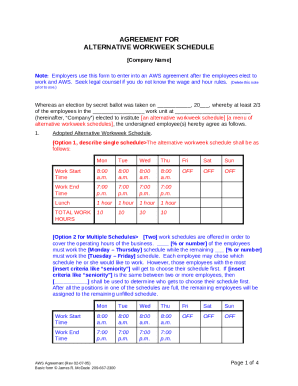
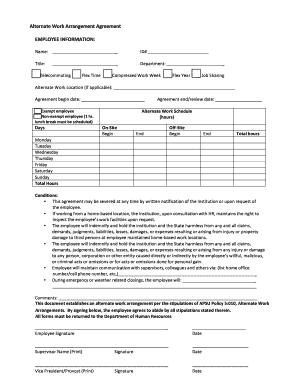
The Alternate Work Schedule Agreement Request Form is an employment document used by employees to request a modified work schedule outside the standard hours.
pdfFiller scores top ratings on review platforms




Who needs Work Schedule Request?
Explore how professionals across industries use pdfFiller.

Work Schedule Request is needed by:
-
Employees seeking flexible work schedules
-
Supervisors approving schedule changes
-
HR personnel managing employee forms
-
Payroll departments processing requests
-
Managers overseeing employee work arrangements
Comprehensive Guide to Work Schedule Request
What is the Alternate Work Schedule Agreement Request Form?
The Alternate Work Schedule Agreement Request Form is designed to assist employees in managing their work schedules effectively. This form allows employees to propose an alternate work schedule that deviates from the standard 8 hours a day, 5 days a week, providing flexibility that can enhance work-life balance. By completing this form, employees can formally communicate their schedule preferences, ensuring both parties are aligned on expectations.
Having an alternate work schedule is crucial for many employees as it accommodates various personal and professional commitments. This agreement not only supports individual needs but also contributes to a more engaged and productive workforce.
Purpose and Benefits of the Alternate Work Schedule Agreement Request Form
The purpose of this form is to facilitate requests for modified work hours and promote work-life balance among employees. An alternate work schedule can offer significant advantages such as flexibility in start and end times, allowing employees to manage personal responsibilities more efficiently. Both employees and supervisors benefit from having a structured approach to work arrangement requests, which enhances clarity and accountability.
Some of the key benefits include:
-
Improved employee satisfaction and morale
-
Enhanced productivity through tailored work hours
How to Fill Out the Alternate Work Schedule Agreement Request Form Online
Completing the Alternate Work Schedule Agreement Request Form online requires careful attention to detail. Follow these steps to ensure accuracy:
-
Enter your total hours worked each day.
-
Specify the times you plan to work.
-
Indicate the length of your lunch period.
-
Sign the form along with your supervisor to validate the agreement.
It is essential to provide accurate entries and ensure all required signatures are obtained before submission to prevent delays in processing.
Common Errors and Solutions When Completing the Form
When filling out the Alternate Work Schedule Agreement Request Form, it is vital to avoid common pitfalls that can delay approval. Frequent errors include:
-
Omitting signatures from either the employee or supervisor
-
Providing incorrect or incomplete dates
To ensure your form is completed correctly, double-check all entries and consider having a colleague review it before submission for accuracy.
Who Needs to Complete the Alternate Work Schedule Agreement Request Form?
The Alternate Work Schedule Agreement Request Form is primarily for employees who wish to request changes to their standard work hours. Eligibility criteria may vary by organization, but generally, all employees seeking to adjust their schedules must complete this form and obtain supervisor approval. Supervisors play a critical role in evaluating these requests and must sign off on the agreement.
When and Where to Submit the Alternate Work Schedule Agreement Request Form
To successfully process your request, it's essential to be aware of the submission timelines and methods. The form must be submitted to DAS Payroll before the designated deadline, which is typically established by the organization. Employees may submit the form through various channels, including:
-
Online submission via the company portal
-
In-person delivery to the HR department
Always check with your supervisor for the preferred submission method to ensure timely processing.
Security and Compliance for the Alternate Work Schedule Agreement Request Form
Protecting sensitive employee information is paramount when handling the Alternate Work Schedule Agreement Request Form. pdfFiller ensures robust security measures are in place, complying with both HIPAA and GDPR. These measures provide users with confidence that their personal data is secure during the submission process.
The platform implements 256-bit encryption and maintains SOC 2 Type II compliance, fostering a safe environment for all document transactions.
What Happens After You Submit the Alternate Work Schedule Agreement Request Form?
Upon submission of the Alternate Work Schedule Agreement Request Form, employees can typically track their submission status through the HR portal. There are a few potential outcomes:
-
Approval of the proposed schedule
-
Request for amendments if additional information is needed
-
Rejection of the request based on organizational needs
Employees should maintain communication with their supervisors to stay informed about the status of their request.
How to Correct or Amend the Alternate Work Schedule Agreement Request Form
If changes are needed after the form has been submitted, it is crucial to act promptly. Here’s how you can correct or amend your form:
-
Identify the sections that require revision.
-
Complete a new form with the corrected information.
-
Obtain all necessary signatures from both parties.
-
Submit the amended form to replace the initial submission.
Timely amendments can help avoid complications regarding work schedules.
Utilizing pdfFiller to Complete Your Alternate Work Schedule Agreement Request Form
pdfFiller is an excellent tool for efficiently completing and managing the Alternate Work Schedule Agreement Request Form. With features such as digital signing, form edits, and secure storage, users can streamline the process significantly. Taking advantage of pdfFiller's capabilities allows employees to focus on their work while ensuring their paperwork is handled securely and efficiently.
How to fill out the Work Schedule Request
-
1.Access the form by navigating to pdfFiller and searching for the 'Alternate Work Schedule Agreement Request Form'. Open the form to view it on your dashboard. Familiarize yourself with the sections available on the form, including areas for personal and schedule information. Before starting, gather necessary information such as your total hours worked each day, times worked, length of lunch period, and the specific dates of your proposed schedule.
-
2.Begin filling in your information in the designated fields starting with the 'Employee’s name' and 'Employee’s ID number'. Move to the 'Date Submitted', then provide your ‘Agency name and division’. Carefully input your proposed schedule details, ensuring to specify total hours and times worked each day. Use checkboxes where applicable to indicate your preferences.
-
3.Review your completed form to ensure accuracy. Confirm that you've filled in every required field and provided appropriate details. Don’t forget to include your signature and the supervisor's signature in the designated areas to validate the form.
-
4.Once finalized, save your work on pdfFiller. To do this, click 'Save' and choose the file format you prefer, such as PDF. You may also select 'Download' to save a copy directly to your device. After saving, submit the completed form to DAS Payroll according to your organization’s submission procedures.

Who is eligible to use the Alternate Work Schedule Agreement Request Form?
All employees who wish to request a modified work schedule outside of the standard hours are eligible to use this form. Supervisors must also be involved to approve any requests before submission.
What information do I need to complete the form?
You will need to provide your name, ID number, total hours worked each day, timeframes for each workday, your desired lunch period, and the start and end dates for the new schedule.
How do I submit the form once completed?
After the form is filled out and signed by both the employee and supervisor, submit it directly to DAS Payroll as per your organization’s procedures. Generally, this can involve emailing or physically delivering the form.
Are there any common mistakes to avoid when completing the form?
Ensure all fields are filled accurately and double-check that both the employee and supervisor have signed the form. Missing signatures or sections can lead to processing delays.
What is the processing time for the submitted form?
Processing times can vary, but typically you should allow a few days to a couple of weeks for DAS Payroll to review and confirm your alternate schedule depending on internal workloads and policies.
Is there any fee associated with this form?
Generally, there is no fee associated with submitting the Alternate Work Schedule Agreement Request Form; however, verify with your HR department for specific policies related to your organization.
Can I make changes to my request after submitting the form?
If you need to modify your request after submission, it is best to contact your supervisor or DAS Payroll immediately to discuss the necessary steps for making adjustments.
Related Content
Related Forms



Related Catalogs
Get the latest insights from our blog


If you believe that this page should be taken down, please follow our DMCA take down process
here
.
This form may include fields for payment information. Data entered in these fields is not covered by PCI DSS compliance.