
Last updated on
Oct 19, 2026

AARP Incident Report 2008-2026 free printable template
We are not affiliated with any brand or entity on this form

Fill out
Complete the form online in a simple drag-and-drop editor.

eSign
Add your legally binding signature or send the form for signing.

Share
Share the form via a link, letting anyone fill it out from any device.

Export
Download, print, email, or move the form to your cloud storage.
Why pdfFiller is the best tool for your documents and forms


End-to-end document management
From editing and signing to collaboration and tracking, pdfFiller has everything you need to get your documents done quickly and efficiently.
Accessible from anywhere
pdfFiller is fully cloud-based. This means you can edit, sign, and share documents from anywhere using your computer, smartphone, or tablet.
Secure and compliant
pdfFiller lets you securely manage documents following global laws like ESIGN, CCPA, and GDPR. It's also HIPAA and SOC 2 compliant.
What is AARP Incident Report
The AARP Tax-Aide Incident Report is a tax-related document used by site leaders and taxpayers to document and report incidents occurring at AARP Tax-Aide sites.
pdfFiller scores top ratings on review platforms




Who needs AARP Incident Report?
Explore how professionals across industries use pdfFiller.

AARP Incident Report is needed by:
-
AARP Tax-Aide site leaders responsible for incident reporting
-
Taxpayers involved in incidents at tax Aide sites
-
AARP coordinators overseeing site operations
-
Tax professionals managing the Tax-Aide program
-
Volunteer staff at AARP tax assistance locations
Comprehensive Guide to AARP Incident Report
What is the AARP Tax-Aide Incident Report?
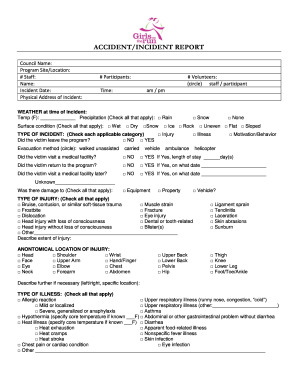
The AARP Tax-Aide Incident Report serves to document and communicate incidents that transpire at AARP Tax-Aide locations. This structured form is integral for site leaders and, when relevant, taxpayers to accurately relay details about various occurrences. According to the form metadata, this report captures essential information such as contact details and specifics of each incident. It is crucial for maintaining transparency and accountability within the tax assistance program.
Purpose and Benefits of the AARP Tax-Aide Incident Report
Documenting incidents accurately is vital for many reasons. Notably, it aids site leaders in understanding and addressing issues effectively. Taxpayers also benefit from having a formal record of incidents, ensuring their concerns are officially acknowledged. Submitting reports promptly—preferably within 24 hours—supports efficient resolution and enhances the overall quality of service provided by AARP Tax-Aide. The AARP Tax-Aide Incident Report ensures that both parties have a clear pathway for addressing grievances and incidents.
Who Needs the AARP Tax-Aide Incident Report?
The AARP Tax-Aide Incident Report should be completed primarily by site leaders and, in some cases, the involved taxpayers. Site leaders play a pivotal role in managing the reporting process, ensuring that all pertinent details are captured. Scenarios warranting this report include accidents, complaints, or any issues impacting the AARP Tax-Aide programs. By clearly defining roles and responsibilities, the process becomes streamlined, allowing for quick remediation of concerns.
How to Fill Out the AARP Tax-Aide Incident Report Online (Step-by-Step)
Completing the AARP Tax-Aide Incident Report online can be an efficient process when following these steps:
-
Access the AARP Tax-Aide Incident Report digitally via the appropriate platform.
-
Enter the 'DATE OF INCIDENT' and other required fields accurately.
-
Fill in contact information for all parties involved.
-
Ensure all relevant details about the incident are included in the description.
-
Review the report for accuracy and completeness before submitting.
By carefully reviewing the information entered, users can prevent common mistakes that may delay the resolution process.
Key Features of the AARP Tax-Aide Incident Report
The AARP Tax-Aide Incident Report includes several important features that enhance its functionality:
-
Multiple fillable fields and checkboxes for comprehensive information capture.
-
Signature requirements for both site leaders and taxpayers ensure accountability.
-
Clear instructions for each section to guide users in providing accurate information.
These features are designed to facilitate accurate reporting and enhance the reliability of the documented incidents.
Submission Methods and Deadlines for the AARP Tax-Aide Incident Report
Upon completion, the AARP Tax-Aide Incident Report can be submitted via various methods, ensuring flexibility for users. It is critical to return the form to the State Coordinator within 24 hours of the incident. Depending on the state, submission variations may apply, so users should be aware of regional requirements when submitting their reports.
Common Errors and How to Avoid Them
When filling out the AARP Tax-Aide Incident Report, several common errors can arise:
-
Omitting signatures from the involved parties, which can invalidate the report.
-
Failing to fill in required fields, leading to incomplete information.
-
Entering incorrect dates or details about the incidents.
To ensure accuracy and completeness, double-check the form before submission, paying special attention to signatures and required information.
Security and Compliance of the AARP Tax-Aide Incident Report
Maintaining confidentiality during the handling of the AARP Tax-Aide Incident Report is of utmost importance. Users can feel secure knowing that platforms like pdfFiller implement strong security measures, such as 256-bit encryption. Furthermore, adherence to compliance standards like HIPAA and GDPR reinforces the safeguarding of sensitive information in tax-related documents. It is crucial for users to be aware of these protections when submitting forms.
How pdfFiller Can Help You Complete the AARP Tax-Aide Incident Report Efficiently
pdfFiller streamlines the process of completing the AARP Tax-Aide Incident Report with various capabilities, including:
-
Editing and annotating documents effortlessly.
-
eSigning features for secure and quick signature collection.
-
Convenient access from any device without the need for downloads.
Utilizing pdfFiller enhances the efficiency of filling out tax forms, allowing users to manage their documents with ease.
Examples of Completed AARP Tax-Aide Incident Report
Providing examples of completed AARP Tax-Aide Incident Reports can be incredibly beneficial. Sample forms demonstrate key fields filled out, giving users a clear understanding of completion expectations. Typical scenarios requiring the form can include incidents such as accidents during tax preparation or client complaints. By referencing filled-out examples, users can learn how to interpret necessary information accurately, ensuring they adhere to reporting standards.
How to fill out the AARP Incident Report
-
1.To access the AARP Tax-Aide Incident Report, visit pdfFiller and search for the form by its name or use a direct link if available.
-
2.Once the form is open, familiarize yourself with the layout, which includes sections for entering incident details, contact information, and signatures.
-
3.Before starting, collect any necessary information such as the date of the incident, names of involved parties, and any witnesses.
-
4.Begin filling out the required fields carefully, ensuring all information is accurate and complete. Use pdfFiller's checkboxes where applicable.
-
5.Make sure to include a detailed description of the incident in the appropriate section, following any specific instructions on the form.
-
6.Once all fields are completed, take a moment to review the entire document for accuracy, checking for spelling errors and missing information.
-
7.If required, gather signatures from involved parties digitally, using pdfFiller’s signature feature or instructing them on the procedure to sign as needed.
-
8.After finalizing the form, save your work by selecting the 'Save' option. You can also download a copy of the filled form to your device.
-
9.If submission is necessary, follow the instructions for submitting the form to the State Coordinator within 24 hours after the incident.

Who is required to fill out the AARP Tax-Aide Incident Report?
The AARP Tax-Aide Incident Report must be completed by the Site Leader and, if applicable, the taxpayer involved in the incident. Both parties need to sign the form.
What is the deadline for submitting the incident report?
The completed incident report must be returned to the State Coordinator within 24 hours of the incident occurring to ensure timely addressing of the situation.
How can I submit the completed incident report?
You can submit the completed incident report by either emailing it to your State Coordinator or delivering a printed copy in person, following any specific submission guidelines they may have.
What information do I need before filling out the form?
Before filling out the AARP Tax-Aide Incident Report, gather details such as the date of the incident, contact information for all involved parties, and a clear description of the incident.
Are digital signatures accepted on the incident report?
Yes, if you are using pdfFiller to complete the AARP Tax-Aide Incident Report, you can utilize its digital signature functionality to collect the necessary signatures from involved parties.
What are the common mistakes to avoid when completing the form?
Common mistakes include leaving fields blank, providing inaccurate information, and failing to secure required signatures. Double-check all entries before submitting the form.
Is there a fee associated with submitting the AARP Tax-Aide Incident Report?
There are typically no fees to submit the AARP Tax-Aide Incident Report; it is an internal form used by AARP staff and volunteers for documentation purposes.
Related Content
Related Forms





Related Catalogs
Get the latest insights from our blog


If you believe that this page should be taken down, please follow our DMCA take down process
here
.
This form may include fields for payment information. Data entered in these fields is not covered by PCI DSS compliance.