
Last updated on
Oct 19, 2026

NC Consent and Acknowledgement for CDL 2009-2026 free printable template
pdfFiller is not affiliated with any government organization

Fill out
Complete the form online in a simple drag-and-drop editor.

eSign
Add your legally binding signature or send the form for signing.

Share
Share the form via a link, letting anyone fill it out from any device.

Export
Download, print, email, or move the form to your cloud storage.
Why pdfFiller is the best tool for your documents and forms


End-to-end document management
From editing and signing to collaboration and tracking, pdfFiller has everything you need to get your documents done quickly and efficiently.
Accessible from anywhere
pdfFiller is fully cloud-based. This means you can edit, sign, and share documents from anywhere using your computer, smartphone, or tablet.
Secure and compliant
pdfFiller lets you securely manage documents following global laws like ESIGN, CCPA, and GDPR. It's also HIPAA and SOC 2 compliant.
What is NC Consent and Acknowledgement for CDL
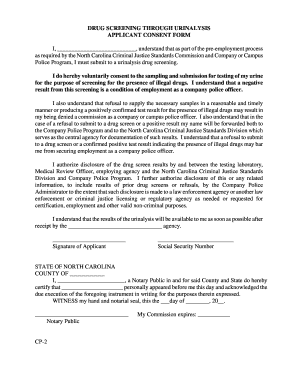
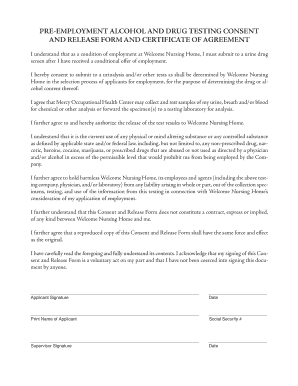
The CDL Drug Test Consent Form is a medical consent document used by CDL applicants to permit drug and alcohol testing as required by North Carolina regulations.
pdfFiller scores top ratings on review platforms




Who needs NC Consent and Acknowledgement for CDL?
Explore how professionals across industries use pdfFiller.

NC Consent and Acknowledgement for CDL is needed by:
-
CDL Applicants seeking employment in North Carolina
-
Human Resources Managers in healthcare settings
-
North Carolina Department of Health and Human Services personnel
-
Employers conducting drug tests for CDL positions
-
Legal advisors overseeing employment compliance
Comprehensive Guide to NC Consent and Acknowledgement for CDL
What is the CDL Drug Test Consent Form?
The CDL Drug Test Consent Form is essential for ensuring compliance with state regulations regarding drug and alcohol testing for CDL applicants in North Carolina. This form plays a crucial role in maintaining workplace safety and legal standards. By signing this form, both applicants and employers acknowledge their responsibilities in the drug testing process.
It is vital for CDL applicants to understand the implications of this consent, as it lays the groundwork for testing protocols mandated by state laws and helps protect the integrity of the workforce.
Purpose and Benefits of the CDL Drug Test Consent Form
This form serves multiple purposes, benefiting both CDL applicants and Human Resources Managers. For applicants, the CDL Drug Test Consent Form outlines the process they agree to, ensuring transparency in what is expected during drug testing. For HR managers, the form provides a documented agreement that safeguards the organization's interests and confirms that all parties understand their roles.
By using this form, stakeholders can minimize misunderstandings related to responsibilities in the drug testing process while upholding best practices in workplace safety. It ensures that both applicants and HR managers are fully informed and prepared for the implications of drug testing.
Who Needs the CDL Drug Test Consent Form?
The CDL Drug Test Consent Form is necessary for a specific set of individuals, primarily CDL applicants seeking employment that requires commercial driving. Additionally, Human Resources managers are required to collect this form to manage the compliance process effectively.
Individuals in these roles must meet eligibility criteria, which typically include being in the recruitment process for commercial driving positions and understanding the regulations surrounding drug testing in North Carolina. This ensures that everyone involved is accountable and aware of the testing requirements.
How to Fill Out the CDL Drug Test Consent Form Online
Filling out the CDL Drug Test Consent Form using pdfFiller is a straightforward process. Follow these steps to complete the form digitally:
-
Visit the pdfFiller website and find the CDL Drug Test Consent Form.
-
Enter the applicant's name in the designated field.
-
Fill in the division/facility/school as required.
-
Provide the social security number accurately.
-
Ensure both the applicant and HR manager sign and date the form where indicated.
Using pdfFiller allows for an efficient and secure filling experience, minimizing the chance of errors.
Field-by-Field Instructions for the CDL Drug Test Consent Form
Each field in the CDL Drug Test Consent Form has specific requirements:
-
Name: Enter the full name of the CDL applicant as it appears on official documents.
-
Division/Facility/School: Specify the facility where the applicant will be employed or trained.
-
Social Security Number: Input the applicant's social security number without mistakes.
Signatures and dates are crucial for both the applicant and HR manager, as they affirm the consent and acknowledge that both parties understand the implications of drug testing.
Common Errors and How to Avoid Them
When filling out the CDL Drug Test Consent Form, applicants often make several common errors. Here are a few typical mistakes to watch out for:
-
Omitting signatures or dates, which can render the form invalid.
-
Misspelling names or inaccuracies in the social security number.
-
Failing to select the correct division or facility.
To avoid these issues, double-check all entries for accuracy before submission. It's also advisable to review the completed form for completeness.
Submission Methods and Requirements for the CDL Drug Test Consent Form
Submitting the CDL Drug Test Consent Form can be performed through various methods. Here are your options:
-
Online via pdfFiller for a quick and secure process.
-
Traditional mail, ensuring it is sent to the correct address for processing.
Be mindful of any deadlines for submission to avoid delays in processing. Checking the specific location for submission is also essential to ensure the form reaches the appropriate department.
Security and Compliance for the CDL Drug Test Consent Form
Data security and compliance with regulations such as HIPAA and GDPR are paramount when handling the CDL Drug Test Consent Form. pdfFiller ensures that all user information remains confidential and secure through advanced 256-bit encryption and adherence to compliance standards.
Understanding the importance of maintaining the integrity of sensitive documents cannot be overstated. Proper handling of this form not only protects individual data but also aligns with workplace regulations.
What Happens After You Submit the CDL Drug Test Consent Form?
After submitting the CDL Drug Test Consent Form, several important next steps follow. Applicants should be prepared to:
-
Track the application status through the respective HR department.
-
Be aware of follow-up requirements, which may include additional testing or paperwork.
It's crucial to understand the implications of a refused or positive drug test result, as this can impact employment opportunities significantly.
Empower Your Form-Filling Experience with pdfFiller
Utilizing pdfFiller for submitting the CDL Drug Test Consent Form can transform the user experience. This platform allows for a streamlined and secure way to manage forms efficiently. Additional features include creating fillable forms and easy document editing, enhancing the overall process of form completion.
pdfFiller is committed to providing a user-friendly service that facilitates managing sensitive documents without compromising on security or simplicity.
How to fill out the NC Consent and Acknowledgement for CDL
-
1.Access pdfFiller and search for 'CDL Drug Test Consent Form' in the search bar to open the form.
-
2.Once the form is open, navigate through the document to locate blank fields for your necessary information.
-
3.Gather required information such as your full name, division/facility/school, and social security number before filling out the form.
-
4.Use pdfFiller's text fields to input your name and other requested information accurately.
-
5.After filling in all fields, review the document for any errors or missing information.
-
6.Both you and the Human Resources Manager must sign and date the form in the designated signature areas.
-
7.Save your filled form in pdfFiller in your account, or use the download button to save it to your device.
-
8.You can submit the completed form by email or print it out as instructed, following your employer's submission guidelines.

Who is eligible to fill out the CDL Drug Test Consent Form?
CDL Applicants seeking to secure employment that requires drug testing in North Carolina are eligible to fill out this form.
What is the deadline for submitting the form?
Submit the CDL Drug Test Consent Form before your employment starts or as directed by your employer's drug testing policy.
How should I submit the completed form?
You can submit the signed form via email to your HR department or by delivering a printed copy in person, based on your employer’s specific instructions.
What documents do I need to complete the form?
You will need your full name, social security number, and potentially additional identification, depending on your employer's requirements.
What common mistakes should I avoid when filling out the form?
Check for inaccuracies in your personal information and ensure both required signatures are completed. Missing fields may cause delays in processing.
How long does it take to process the form after submission?
Processing times may vary, but generally, your HR department will confirm receipt and processing of the CDL Drug Test Consent Form within a few business days.
Is notarization required for this form?
No, notarization is not required for the CDL Drug Test Consent Form, but both signatures must be provided as specified.
NC Consent and Acknowledgement for CDL Form Versions
Related Content
Related Forms





Get the latest insights from our blog


If you believe that this page should be taken down, please follow our DMCA take down process
here
.
This form may include fields for payment information. Data entered in these fields is not covered by PCI DSS compliance.