
Last updated on
Sep 27, 2026

Get the free Purchase Order Form
We are not affiliated with any brand or entity on this form

Fill out
Complete the form online in a simple drag-and-drop editor.

eSign
Add your legally binding signature or send the form for signing.

Share
Share the form via a link, letting anyone fill it out from any device.

Export
Download, print, email, or move the form to your cloud storage.
Why pdfFiller is the best tool for your documents and forms


End-to-end document management
From editing and signing to collaboration and tracking, pdfFiller has everything you need to get your documents done quickly and efficiently.
Accessible from anywhere
pdfFiller is fully cloud-based. This means you can edit, sign, and share documents from anywhere using your computer, smartphone, or tablet.
Secure and compliant
pdfFiller lets you securely manage documents following global laws like ESIGN, CCPA, and GDPR. It's also HIPAA and SOC 2 compliant.
What is Purchase Order
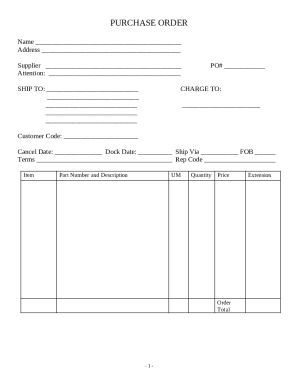
The Purchase Order Form is a business document used by the University of Kansas Medical Center to request materials or services from vendors.
pdfFiller scores top ratings on review platforms




Who needs Purchase Order?
Explore how professionals across industries use pdfFiller.

Purchase Order is needed by:
-
Purchasing Agents at universities
-
Procurement departments in organizations
-
Vendors supplying goods or services
-
Contract managers for businesses
-
Bartenders ordering supplies
-
Suppliers looking for official requests
Comprehensive Guide to Purchase Order
What is the Purchase Order Form?
The Purchase Order Form serves as a crucial document utilized by the University of Kansas Medical Center to facilitate the procurement of materials and services. This form is designed to capture essential fields, including vendor information and detailed service descriptions, necessary for clear communication and efficient transactions. By employing a standard purchase order template, organizations can ensure consistency and minimize misunderstandings regarding orders placed with vendors.
In the Kansas purchase order context, this document aids in formalizing agreements and serves as a record of transactions within the procurement process.
Purpose and Benefits of the Purchase Order Form
The primary purpose of the Purchase Order Form is to streamline procurement processes within organizations like the University of Kansas Medical Center. Utilizing this procurement form enhances clarity in vendor dealings and strengthens financial management through formal vendor agreements.
Moreover, having a structured vendor information form allows organizations to budget more effectively, mitigating risks associated with procurement discrepancies.
Key Features of the Purchase Order Form
Several key features contribute to the effectiveness and user-friendliness of the Purchase Order Form. Blank fields are designated for vendor information, description of materials or services, unit price, and total amounts. The hallmark of this form is the requirement for a signature from the purchasing agent, which validates the order and signifies approval.
Other essential elements include detailed instructions regarding shipping and invoicing, ensuring all parties involved have the necessary information for processing the order.
Who Needs the Purchase Order Form?
The Purchase Order Form is primarily utilized by purchasing agents tasked with its submission. In addition to these agents, various departments may need to draft a Purchase Order under specific circumstances, indicating the form's broad relevance across organizational roles.
For instance, at the University of Kansas Medical Center, the procurement team relies heavily on this form to maintain accurate records when engaging with vendors.
How to Fill Out the Purchase Order Form Online (Step-by-Step)
To fill out the Purchase Order Form online efficiently, users must first gather required information, including vendor details and a thorough description of the services. Below are field-by-field instructions for accurate completion:
-
Enter the vendor's name and address in the vendor information section.
-
Provide a detailed description of the service or materials being ordered.
-
List the unit price and quantity required.
-
Calculate and input the total amount.
-
Ensure the purchasing agent's signature is included for validation.
Common Errors and How to Avoid Them
When filling out the Purchase Order Form, several common errors may occur. Incomplete fields and incorrect vendor information are among the most frequent mistakes. To prevent these pitfalls, users are encouraged to thoroughly double-check all entries before submitting the document.
Additionally, reviewing the completed form for compliance with institutional requirements is vital to ensure a smooth processing experience.
How to Sign the Purchase Order Form
Understanding the signing requirements for the Purchase Order Form is essential. Users should be aware of the differences between digital signatures and wet signatures, as their applicability may vary based on specific situations.
The purchasing agent's signature holds significant importance, as it serves to validate the order and indicate that proper authorization has been granted for the transaction.
Submission Methods for the Purchase Order Form
Submitting the Purchase Order Form correctly is pivotal for ensuring acknowledgment and processing. Accepted methods of submission include online platforms, traditional mail, and fax services. Each method may have specific requirements regarding documentation and tracking submissions.
It is crucial to track the submission to confirm receipt, thereby facilitating effective communication regarding the order status.
Using pdfFiller for Your Purchase Order Form Needs
pdfFiller simplifies the process of completing the Purchase Order Form thanks to its cloud-based PDF editing and form-filling capabilities. Users benefit from the platform's robust security features that protect sensitive information during document handling.
By leveraging pdfFiller, users can enjoy seamless eSigning and sharing functions, making the entire process more efficient and user-friendly.
Next Steps After Submitting the Purchase Order Form
After submitting the Purchase Order Form, users should prepare for processing and approval timelines that may vary. If any issues arise, it’s essential to understand the procedures for correcting or amending the form to ensure compliance with institutional standards.
To stay informed, users should know how to check their application status, keeping the procurement process moving smoothly.
How to fill out the Purchase Order
-
1.To access the Purchase Order Form on pdfFiller, visit the pdfFiller website and log in to your account. Use the search bar to locate 'Purchase Order Form'.
-
2.Once you’ve found the form, click on it to open it in the pdfFiller interface. Familiarize yourself with the layout, including the fields for vendor information and descriptions of materials or services.
-
3.Before filling out the form, gather all necessary information such as vendor details, description of products or services, unit price, and total amount. Ensure you have accurate data ready to input.
-
4.Begin completing the fields by clicking on each blank section in the pdfFiller interface. Input vendor information including name and address, and provide detailed descriptions of the requested materials or services.
-
5.Next, enter the unit price for each item along with the corresponding amount. Double-check that your entries are correct to avoid common mistakes.
-
6.After completing all fields, thoroughly review the entire form for accuracy. Ensure that the purchasing agent’s signature line is left empty for signing after finalization.
-
7.Once you are satisfied with the completed form, you can save it directly to your pdfFiller account. You also have the option to download a PDF version to your device or submit it through the available methods directly within pdfFiller.

Who is eligible to use the Purchase Order Form?
The Purchase Order Form is designed for use by purchasing agents, specifically at the University of Kansas Medical Center, and is appropriate for anyone tasked with ordering materials or services from vendors.
Are there any deadlines for submitting the Purchase Order Form?
There are no specific deadlines mentioned for this form. However, it's advisable to submit it as soon as the purchase need arises to ensure timely processing and delivery of the requested materials or services.
What is the procedure for submitting the Purchase Order Form?
You can submit the Purchase Order Form directly through pdfFiller by following the submission options available after finalizing the form. Alternatively, download it and email it to the appropriate vendor or department as needed.
What supporting documents do I need when submitting the Purchase Order Form?
Typically, you do not need additional supporting documents when submitting the Purchase Order Form. However, if the vendor requires specific documentation, ensure you have those ready to provide upon request.
What common mistakes should I avoid when filling out the Purchase Order Form?
Common mistakes include incorrect vendor information, omitting signatures, or failing to provide accurate unit prices and totals. Always review your entries before submitting.
How long does it take to process a Purchase Order Form?
Processing times for the Purchase Order Form can vary depending on the department's workload and vendor response times. It's best to follow up if you do not receive confirmation within a few business days.
Is notarization required for the Purchase Order Form?
No, notarization is not required for the Purchase Order Form, but it does need to be signed by the purchasing agent to be valid.
Related Content
Related Forms

Related Catalogs
Get the latest insights from our blog


If you believe that this page should be taken down, please follow our DMCA take down process
here
.
This form may include fields for payment information. Data entered in these fields is not covered by PCI DSS compliance.