
Last updated on
Nov 9, 2026
Cigna GB-608066 2010 free printable template
pdfFiller is not affiliated with any government organization

Fill out
Complete the form online in a simple drag-and-drop editor.

eSign
Add your legally binding signature or send the form for signing.

Share
Share the form via a link, letting anyone fill it out from any device.

Export
Download, print, email, or move the form to your cloud storage.
Why pdfFiller is the best tool for your documents and forms


End-to-end document management
From editing and signing to collaboration and tracking, pdfFiller has everything you need to get your documents done quickly and efficiently.
Accessible from anywhere
pdfFiller is fully cloud-based. This means you can edit, sign, and share documents from anywhere using your computer, smartphone, or tablet.
Secure and compliant
pdfFiller lets you securely manage documents following global laws like ESIGN, CCPA, and GDPR. It's also HIPAA and SOC 2 compliant.
What is Cigna GB-608066
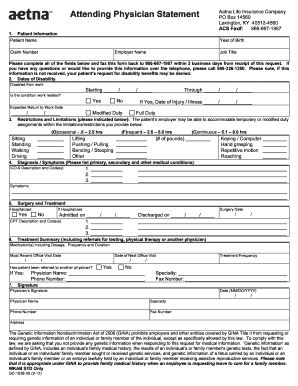
The Physician’s Statement for Disability Insurance is a medical document used by insured individuals to provide necessary documentation supporting their disability insurance claims.
pdfFiller scores top ratings on review platforms




Who needs Cigna GB-608066?
Explore how professionals across industries use pdfFiller.

Cigna GB-608066 is needed by:
-
Patients seeking disability insurance benefits
-
Physicians providing medical assessments
-
Insurance companies reviewing claims
-
Healthcare providers assisting with documentation
-
Legal representatives handling claims
-
HR professionals in organizations managing employee benefits
Comprehensive Guide to Cigna GB-608066
What is the Physician’s Statement for Disability Insurance?
The Physician’s Statement for Disability Insurance is a vital document serving as proof of a medical condition to support disability claims. It plays a crucial role in validating a claim, ensuring that the information is accurate and thorough. This statement typically includes necessary components such as the diagnosis, treatment history, and anticipated recovery dates, which are fundamental for the processing of claims.
Essential keywords associated with this document include physician statement disability insurance and medical disability claim form, which emphasize its importance in the insurance claim process.
Purpose and Benefits of the Physician’s Statement
The primary purpose of the Physician’s Statement is to facilitate the processing of insurance claims. It provides insurance companies with a physician’s assessment, enabling them to make informed decisions regarding a claimant’s eligibility for benefits. This documentation not only assists insurers but also benefits patients by ensuring that they receive the necessary support during their recovery.
Utilizing a disability insurance form template can streamline this process, ensuring that all required information is collected efficiently.
Who Needs the Physician’s Statement for Disability Insurance?
This document is essential for both patients and physicians. Patients are required to provide this statement when submitting a claim, while physicians must complete it to substantiate the medical facts pertaining to the patient’s condition. Understanding the appropriate contexts in which this form is applied is critical for timely and effective claims processing.
Key users of the medical disability claim form include individuals seeking disability benefits and healthcare providers involved in their care.
Key Features of the Physician’s Statement for Disability Insurance
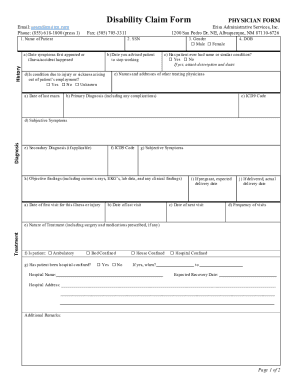
The Physician’s Statement contains several key sections that must be meticulously completed. These sections typically include:
-
Diagnosis and relevant medical history
-
Treatment dates and procedures performed
-
Physical limitations affecting the patient
-
Expected return-to-work date
It is crucial to include accurate and comprehensive information in these sections to prevent delays in the claims process. The physician statement disability insurance form is often available as an insurance disability statement pdf for ease of use.
How to Fill Out the Physician’s Statement for Disability Insurance Online
Completing the Physician’s Statement online can be a straightforward process when following these steps:
-
Access the digital form through a trusted platform.
-
Fill out patient details, ensuring accuracy.'
-
Physician must complete their sections, including diagnosis and limitations.
-
Review all information for completeness before submission.
Knowing how to fill out the disability insurance form efficiently streamlines the submission process and aids in expediting claim approvals.
Field-by-Field Instructions for Completing the Form
Each section of the form requires specific information to be filled accurately:
-
Patient details - Include name, address, and insurance information.
-
Physician verification - Sign and date to confirm accuracy of the provided information.
Ensuring that all necessary information is included will help avoid claim delays and facilitate a smoother process.
Common Errors and How to Avoid Them
When filling out the Physician’s Statement, there are several common mistakes that can arise:
-
Omitting required sections or information
-
Incorrectly filling out dates and treatment history
-
Failure to secure the physician’s signature and date
It is advisable to double-check the form for accuracy before submission to mitigate these issues and ensure a successful claim process.
Submission Methods and Delivery of the Physician’s Statement
There are several methods for submitting the completed Physician’s Statement:
-
Online submission through designated insurance portals
-
Mailing a physical copy to the insurance provider
Be mindful of potential fees associated with submission and the expected timelines for claims processing. Knowing where to submit the physician statement can affect the speed of your disability insurance claim.
What Happens After You Submit the Physician’s Statement?
Upon submission of the physician’s statement, the claims process continues with various steps:
-
Insurance reviewer evaluates the claim based on submitted information
-
Claims adjudication timelines may vary depending on the insurer
It is vital to track the submission status and be aware of common rejection reasons to address any issues proactively.
How pdfFiller Makes It Easy to Complete the Physician’s Statement for Disability Insurance
pdfFiller offers user-friendly tools that simplify the completion of the Physician’s Statement. Features such as e-signing and cloud storage facilitate a seamless experience for users, ensuring that sensitive health information is handled securely. Our platform's compliance with security standards gives users peace of mind while managing their documents.
Start Your Disability Insurance Claim Process Seamlessly with pdfFiller
Utilizing pdfFiller’s platform can enhance the efficiency of your form-filling experience. Our features promote ease of use, document security, and streamline the entire disability insurance claim process, making it easier for users to access the necessary forms and complete their claims accurately.
How to fill out the Cigna GB-608066
-
1.Access the form by visiting pdfFiller and searching for 'Physician’s Statement for Disability Insurance'.
-
2.Once located, open it in the pdfFiller interface to begin completing your form.
-
3.Before starting, gather all necessary medical information, such as diagnosis details, treatment dates, and any relevant physical limitations.
-
4.Begin filling out the form by clicking on the blank fields to enter your information, ensuring you provide accurate and detailed responses.
-
5.Use checkboxes where applicable to indicate conditions or limitations clearly, ensuring the information is easy to understand.
-
6.Review the form thoroughly for any missing information or errors by using pdfFiller's checking tools, ensuring everything is filled out comprehensively.
-
7.Once satisfied with the form’s contents, finalize it by clicking the save option to keep a copy on your device.
-
8.You can download the completed form as a PDF or submit it directly through pdfFiller's submission features, ensuring you follow any specific instructions provided by your insurance company.

Who can fill out the Physician’s Statement for Disability Insurance?
Both the patient/insured and the physician are required to complete the Physician’s Statement for Disability Insurance. This dual input ensures the claim is supported with medical evidence, which is crucial for the approval process.
What information do I need to complete this form?
You will need to provide detailed medical information, including diagnosis, treatment dates, physical limitations, and the physician's assessment of return-to-work status. Gathering this data beforehand will streamline the completion process.
Are there any specific deadlines for submitting this form?
Deadlines for submission can vary by insurance provider and the specific claim being filed. It’s important to check with your insurance company regarding their timelines to avoid any issues with claim processing.
How do I submit the Physician’s Statement for Disability Insurance?
You can submit the completed form via email to the insurance company, upload it through their online portal, or send it through regular mail. Ensure you follow any specific submission instructions provided by your insurer.
What are common mistakes to avoid when filling out this form?
Common mistakes include leaving blank fields, providing inaccurate information, or failing to include necessary medical documents. Ensure that all sections are completed thoroughly and review for accuracy before submission.
Can I save the form for later completion?
Yes, you can save the form on pdfFiller before completion. This allows you to return to the form later without losing any entered information, which is particularly helpful for gathering necessary medical details.
What happens after I submit the Physician’s Statement for Disability Insurance?
Once submitted, the insurance company will review the form alongside your claim. Processing times can vary, so it’s advisable to follow up with them to confirm receipt and any additional steps.
Cigna GB-608066 Form Versions
Related Content
Related Forms

Get the latest insights from our blog


If you believe that this page should be taken down, please follow our DMCA take down process
here
.
This form may include fields for payment information. Data entered in these fields is not covered by PCI DSS compliance.