
Last updated on
Oct 2, 2026

Get the free West Bengal Education Training Application Form
We are not affiliated with any brand or entity on this form

Fill out
Complete the form online in a simple drag-and-drop editor.

eSign
Add your legally binding signature or send the form for signing.

Share
Share the form via a link, letting anyone fill it out from any device.

Export
Download, print, email, or move the form to your cloud storage.
Why pdfFiller is the best tool for your documents and forms


End-to-end document management
From editing and signing to collaboration and tracking, pdfFiller has everything you need to get your documents done quickly and efficiently.
Accessible from anywhere
pdfFiller is fully cloud-based. This means you can edit, sign, and share documents from anywhere using your computer, smartphone, or tablet.
Secure and compliant
pdfFiller lets you securely manage documents following global laws like ESIGN, CCPA, and GDPR. It's also HIPAA and SOC 2 compliant.
What is WB Training Form
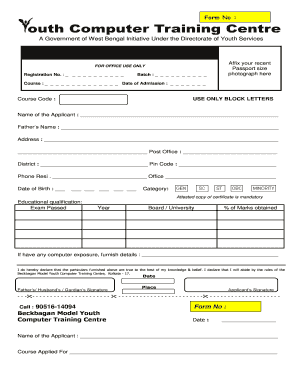
The West Bengal Education Training Application Form is a document used by applicants to enroll in educational and training courses offered by the Youth Computer Training Centre in West Bengal.
pdfFiller scores top ratings on review platforms




Who needs WB Training Form?
Explore how professionals across industries use pdfFiller.

WB Training Form is needed by:
-
Students seeking training in computer education
-
Guardians of applicants filling the form
-
Educational institutions verifying student enrollment
-
Youth service organizations coordinating training programs
-
Individuals pursuing educational advancement in West Bengal
Comprehensive Guide to WB Training Form
What is the West Bengal Education Training Application Form?
The West Bengal Education Training Application Form serves a crucial purpose for those looking to enroll in various educational and training courses available through the Youth Computer Training Centre under the Directorate of Youth Services in West Bengal. It facilitates the application process, ensuring that applicants can access valuable training opportunities tailored to enhance their skills.
This application form holds significant relevance for applicants, integrating their personal and educational information for effective enrollment in programs designed to empower the youth in West Bengal.
Purpose and Benefits of the West Bengal Education Training Application Form
Completing the West Bengal Education Training Application Form opens doors to numerous educational and training courses aimed at skill development. By enrolling through this form, applicants gain access to resources that improve their knowledge and competencies, directly impacting their career trajectories.
Moreover, enhanced skills translate to better job prospects, making this application essential for youth looking to elevate their career opportunities within West Bengal.
Who Needs the West Bengal Education Training Application Form?
The target audience for the West Bengal Education Training Application Form includes both applicants and their guardians. The form is necessary for individuals seeking to enroll in specific programs designed to boost their educational qualifications.
Particularly, this form becomes crucial during the enrollment stages for students looking to apply for educational training that aligns with their career aspirations.
Eligibility Criteria for the West Bengal Education Training Application Form
Applicants must meet general eligibility requirements to complete the West Bengal Education Training Application Form. These include specific educational qualifications and age limits, which may vary depending on the course offered.
Additionally, certain programs may impose prerequisites that applicants must fulfill before applying, ensuring readiness for the training ahead.
How to Fill Out the West Bengal Education Training Application Form Online (Step-by-Step)
Filling out the West Bengal Education Training Application Form online requires careful attention to detail. Follow these steps to ensure a smooth application process:
-
Access the form through your preferred online platform.
-
Enter personal details, including your full name and date of birth.
-
Provide educational qualifications accurately in the designated fields.
-
Ensure guardian signatures are obtained where necessary.
-
Review the completed form for accuracy before submitting.
Utilizing pdfFiller can streamline this process, making it easier to fill out and manage all necessary information effectively.
Common Errors and How to Avoid Them
When completing the West Bengal Education Training Application Form, applicants often make common mistakes that can delay processing. Some of these errors include:
-
Failing to provide complete personal details.
-
Missing signatures from guardians or applicants.
-
Incorrectly filling out educational qualifications.
To avoid these pitfalls, double-check all entries and use a review checklist to ensure the form is complete and accurate.
Required Documents and Supporting Materials
To accompany the West Bengal Education Training Application Form, applicants must submit several essential documents. These typically include:
-
Attested copies of educational certificates.
-
Proof of identity for both the applicant and guardian.
-
Any additional certificates relevant to the specific training program.
Having these documents ready will facilitate a smoother application process and help in avoiding delays.
Submission Methods and Delivery
Submitting the completed West Bengal Education Training Application Form requires attention to detail. Applicants should be aware of how and where to submit their forms along with supporting documents. Submission methods may include:
-
In-person delivery to designated submission centers.
-
Online submission options, if available.
It's essential to be aware of specific deadlines to ensure that applications are processed in a timely manner.
What Happens After You Submit the West Bengal Education Training Application Form?
After submitting the West Bengal Education Training Application Form, applicants can expect to receive a confirmation of their submission. The post-submission process typically includes:
-
Processing of the application by the relevant authorities.
-
Tracking options for applicants to monitor their application status.
-
Timelines for follow-up communication regarding acceptance or required actions.
Understanding the timeline can help manage expectations as applicants await responses from the education services.
Secure Your West Bengal Education Training Application Process with pdfFiller
pdfFiller enhances the experience of completing the West Bengal Education Training Application Form by providing a secure platform for users. Features such as eSigning, document editing, and robust security measures ensure sensitive information is handled with the utmost care.
With pdfFiller, applicants can feel confident in the security of their submissions while efficiently managing their application process.
How to fill out the WB Training Form
-
1.To access the West Bengal Education Training Application Form, visit the pdfFiller website and search for the form name.
-
2.Once you find the form, click on it to open it in pdfFiller's editor.
-
3.Before filling out the form, gather all necessary information, including personal details and educational qualifications, to make the process seamless.
-
4.Start by entering the 'Name of the Applicant' in the designated field, ensuring accuracy and completeness.
-
5.Next, provide the 'Date of Birth' using the format required, paying attention to date formats for consistency.
-
6.Fill in all required fields meticulously, making use of pdfFiller's checkboxes where necessary for options.
-
7.Once all fields are filled, carefully review each entry to confirm the accuracy of the information provided before signing.
-
8.Finalize the form by placing your signature in the designated area; this could be done electronically using pdfFiller's signing feature.
-
9.After completing the form, save your work to prevent loss of information, utilizing the 'Save' button in pdfFiller.
-
10.If required, download a copy of the completed form to your device in your preferred format for your records.
-
11.Submission typically involves printing the form and submitting it in person along with the necessary documents.

What are the eligibility requirements for the West Bengal Education Training Application Form?
Eligibility may include being a resident of West Bengal and meeting age requirements. Applicants should check specific training program criteria as they vary.
What documents are required to submit with the application form?
Required documents usually include attested copies of educational certificates and any additional supporting documents as specified by the training center.
How do I submit the completed application form?
The application form must be submitted in person at the designated Youth Computer Training Centre along with the required documents.
Is there a deadline for submitting the application form?
Deadlines may vary based on the specific courses. It is advisable to check with the Youth Computer Training Centre for the most accurate timeframe.
What common mistakes should I avoid when filling out this form?
Common mistakes include incomplete fields, incorrect signatures, and forgetting to attach supporting documents. Double-check your entries before submitting.
How long does processing of the application take after submission?
Processing times can vary depending on the course and the number of applications submitted, so check with the center for estimated timelines.
Can I edit my submitted application after submission?
Typically, once an application is submitted, it cannot be changed. Contact the training centre for assistance if you need to make alterations.
Related Content
Related Forms






Related Catalogs
Get the latest insights from our blog



If you believe that this page should be taken down, please follow our DMCA take down process
here
.
This form may include fields for payment information. Data entered in these fields is not covered by PCI DSS compliance.