
Last updated on
Sep 29, 2026

Daniel Webster College Transcript Request free printable template
pdfFiller is not affiliated with any government organization

Fill out
Complete the form online in a simple drag-and-drop editor.

eSign
Add your legally binding signature or send the form for signing.

Share
Share the form via a link, letting anyone fill it out from any device.

Export
Download, print, email, or move the form to your cloud storage.
Why pdfFiller is the best tool for your documents and forms


End-to-end document management
From editing and signing to collaboration and tracking, pdfFiller has everything you need to get your documents done quickly and efficiently.
Accessible from anywhere
pdfFiller is fully cloud-based. This means you can edit, sign, and share documents from anywhere using your computer, smartphone, or tablet.
Secure and compliant
pdfFiller lets you securely manage documents following global laws like ESIGN, CCPA, and GDPR. It's also HIPAA and SOC 2 compliant.
What is Daniel Webster College Transcript Request
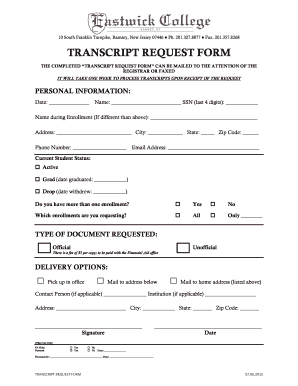
The Transcript Request Form is a document used by applicants to request official high school and college transcripts for admissions at Daniel Webster College.
pdfFiller scores top ratings on review platforms




Who needs Daniel Webster College Transcript Request?
Explore how professionals across industries use pdfFiller.

Daniel Webster College Transcript Request is needed by:
-
High school graduates seeking college admission
-
Current college students applying for transfers
-
Applicants needing to submit transcripts for evaluation
-
Individuals requesting official copies for personal records
-
Educational institutions verifying student records
Comprehensive Guide to Daniel Webster College Transcript Request
What is the Transcript Request Form?
The Transcript Request Form is a crucial document used by applicants to formally request their academic transcripts. Its primary purpose is to facilitate the admissions process at Daniel Webster College by ensuring that prospective students provide required academic records. Requesting transcripts via this official transcript request form is essential for verifying academic history, which is a fundamental part of the admissions transcript request process.
Purpose and Benefits of the Transcript Request Form
Using the Transcript Request Form is essential for various reasons. This form streamlines the admissions process by providing essential academic records that help admissions committees evaluate candidates. Whether you are submitting a college transcript request or a high school transcript request, the education transcript form enables educational institutions to efficiently manage and assess credentials.
Who Needs the Transcript Request Form?
Applicants to Daniel Webster College are the primary audience for this form. Individuals seeking to enroll need this form to request their educational transcripts, whether they are current high school students or college transfers. Eligibility criteria for utilizing the student transcript request and university transcript request processes include being a prospective applicant or existing students looking to continue their education.
How to Fill Out the Transcript Request Form Online
Filling out the Transcript Request Form online is straightforward. Follow these steps:
-
Access the form through a PDF editor.
-
Fill in your NAME, DATES OF ATTENDANCE, and current address accurately.
-
Add your signature as required.
-
Review all fields for accuracy.
Make sure to refer to the transcript request form instructions for any special guidelines or additional steps needed.
Information You'll Need to Gather
Before completing the Transcript Request Form, collect the following necessary information and documents:
-
Name and contact details
-
Date of attendance at all schools attended
-
Social Security number (if required)
-
Signature for authorization
Organizing your documents using a transcript request form checklist will help ensure a smooth application process.
Common Errors and How to Avoid Them
Applicants often make several common mistakes when filling out the Transcript Request Form. To avoid these pitfalls, keep the following tips in mind:
-
Double-check all entries for typos or incorrect information.
-
Ensure that all required fields are completed.
-
Follow the review and validation checklist to confirm completeness.
By paying close attention to details, applicants can minimize common rejection reasons and delays.
Submission Methods and What Happens After Submission
After completing the Transcript Request Form, submit it through the appropriate channels as directed in the instructions. Expect to receive confirmation regarding the processing timeline and application status. Keep an eye on updates to track your submission and to ensure timely processing of your requests.
Security and Compliance for the Transcript Request Form
Handling sensitive information through the Transcript Request Form necessitates robust security measures. It is crucial to protect data privacy and ensure compliance with regulations. pdfFiller implements 256-bit encryption, allowing for secure processing and safeguarding of personal information submitted via the transcript request form.
How pdfFiller Supports Your Transcript Request Process
pdfFiller simplifies the process of filling out and submitting the Transcript Request Form with its user-friendly features. Key capabilities include eSigning, editing capabilities, and options for sharing your completed form. Utilizing pdfFiller for your online Transcript Request Form can enhance your experience and efficiency.
Next Steps After Submitting Your Transcript Request Form
If you need to amend your request post-submission, ensure you follow the appropriate protocol as outlined in the form instructions. Additionally, check back frequently for updates on your application status. For future forms and document management needs, consider using pdfFiller for a seamless experience.
How to fill out the Daniel Webster College Transcript Request
-
1.To begin, access pdfFiller and enter 'Transcript Request Form' in the search bar. Select the form from the search results to open it.
-
2.Once the form is open, navigate to the fillable fields. Click on each field to enter the required information, such as your name, dates of attendance, and current address.
-
3.Before filling out the form, gather necessary information such as your social security number, the dates you attended high school or college, and any relevant contact details.
-
4.Ensure you complete all required fields, particularly your signature and the date of your request. Use the provided instructions within pdfFiller to help guide you through any unclear segments.
-
5.After completing your entries, thoroughly review the entire form for accuracy and completeness. Look for any missing information or errors that may need correcting.
-
6.Once you confirm the form is accurate, you can save your progress or proceed to download it directly to your device. If you're ready, you may submit the form through the available submission options.
-
7.Finally, choose to save the document in your preferred format or submit it directly to Daniel Webster College using pdfFiller's submission features.

Who is eligible to use the Transcript Request Form?
The Transcript Request Form can be used by anyone who has attended high school or college and needs to request official transcripts for admissions to Daniel Webster College or for personal records.
Are there any deadlines for submitting the Transcript Request Form?
While the form itself does not specify deadlines, it is advisable to submit your request as early as possible to ensure your transcripts are received on time for admissions consideration.
How do I submit the completed Transcript Request Form?
You can submit your completed Transcript Request Form through pdfFiller’s submission options or by downloading it and sending it directly to the admissions office of Daniel Webster College.
What documents do I need to provide with my Transcript Request?
Generally, you will need to provide your personal information such as your social security number and dates of attendance. Check with the admissions office for any additional documentation they may require.
What are some common mistakes to avoid when filling out the form?
Ensure you enter all required fields accurately, particularly personal information and signature. Avoid incomplete submissions, which may delay processing your request.
How long does it take to process the Transcript Request Form?
Processing times can vary, but it generally takes several business days to a couple of weeks. Check with the admissions office if you need specific timelines.
Is there a fee associated with requesting a transcript?
Yes, transcript requests may involve a processing fee, depending on the institution. Be sure to inquire about any potential fees when submitting your request.
Related Content
Related Forms




Related Catalogs
Get the latest insights from our blog


If you believe that this page should be taken down, please follow our DMCA take down process
here
.
This form may include fields for payment information. Data entered in these fields is not covered by PCI DSS compliance.