
Last updated on
Nov 9, 2026

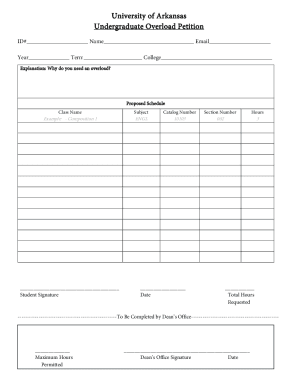
North Central College Overload Request Form 2008-2026 free printable template
pdfFiller is not affiliated with any government organization

Fill out
Complete the form online in a simple drag-and-drop editor.

eSign
Add your legally binding signature or send the form for signing.

Share
Share the form via a link, letting anyone fill it out from any device.

Export
Download, print, email, or move the form to your cloud storage.
Why pdfFiller is the best tool for your documents and forms


End-to-end document management
From editing and signing to collaboration and tracking, pdfFiller has everything you need to get your documents done quickly and efficiently.
Accessible from anywhere
pdfFiller is fully cloud-based. This means you can edit, sign, and share documents from anywhere using your computer, smartphone, or tablet.
Secure and compliant
pdfFiller lets you securely manage documents following global laws like ESIGN, CCPA, and GDPR. It's also HIPAA and SOC 2 compliant.
What is North Central College Overload Request Form
The Student Overload Request Form is an academic document used by students to request permission for exceeding the standard credit hour limits during an academic term.
pdfFiller scores top ratings on review platforms




Who needs North Central College Overload Request Form?
Explore how professionals across industries use pdfFiller.

North Central College Overload Request Form is needed by:
-
Current university students seeking to overload credit hours
-
Academic advisors assisting students with course enrollment
-
Associate Academic Deans reviewing overload requests
-
Enrollment staff managing course capacity and regulations
-
Registrar's office personnel for record-keeping and approvals
Comprehensive Guide to North Central College Overload Request Form
What is the Student Overload Request Form?
The Student Overload Request Form is a vital document for students who wish to exceed the standard credit hour limits within an academic term. This form facilitates the process of obtaining approval to take more than 12 credit hours during a regular term or over 5 credit hours during Interim. Students must collaborate with their academic advisor and gain the endorsement of the Associate Academic Dean to approve their request.
This form plays an essential role in academic planning, allowing students to tailor their coursework according to their educational goals while ensuring they remain compliant with institutional policies.
Why Use the Student Overload Request Form?
Using the Student Overload Request Form is crucial for students intending to undertake additional credit hours. It helps avoid potential consequences associated with exceeding credit limits without formal approval. Gaining authorization through this form allows for flexible academic planning and can significantly enhance the student's educational experience.
Engaging with the overload request process ensures students can manage their academic responsibilities effectively, leading to a more enriching university experience.
Who Needs to Complete the Student Overload Request Form?
This form is specifically designed for students who wish to request an overload of credit hours. Eligible students must submit the form and seek necessary approvals to proceed with their academic plans. The process involves obtaining signatures from both their academic advisor and the Associate Academic Dean.
It is essential for students to understand the involvement of these key roles in the approval process to ensure their requests are duly considered.
Eligibility Criteria for the Student Overload Request Form
Students must meet specific eligibility criteria to use the Student Overload Request Form. Common conditions include maintaining a minimum GPA, which varies by institution. Such policies are designed to ensure that only academically prepared students can pursue additional credit hours.
-
Meeting GPA requirements set by the institution.
-
Compliance with any relevant academic policies regarding course overloads.
How to Fill Out the Student Overload Request Form Online (Step-by-Step)
Filling out the Student Overload Request Form online requires attention to various fields. Follow these steps to ensure complete and accurate submission:
-
Begin with the 'NAME' field to enter your full name.
-
Provide your contact information, including 'PHONE'.
-
Enter your unique 'STUDENT ID#'.
-
Clearly state your 'REASON' for requesting the overload.
Be mindful of common errors, such as leaving critical fields blank or misplacing signatures, to facilitate smoother processing of your request.
Form Submission Process and Requirements
After completing the Student Overload Request Form, students must submit it according to specified processes and deadlines. The options for submission may include in-person delivery or electronic submission via university portals.
Students should also be aware of any required supporting documents and potential fees associated with submitting the form.
-
Check for submission deadlines to avoid delays.
-
Ensure all required signatures are obtained before submission.
What Happens After You Submit the Student Overload Request Form?
Once the Student Overload Request Form has been submitted, students will receive confirmation of their request. They can track the status of their submission through designated channels provided by the institution.
In case of denial, students should be aware of potential avenues to appeal the decision and the common reasons for rejection.
Security and Compliance When Handling Your Student Overload Request Form
Students can rest assured that their Student Overload Request Form is handled securely. Features such as encryption and compliance with regulations like HIPAA ensure that sensitive data is protected throughout the submission process.
This commitment to privacy measures is critical when dealing with academic forms, providing peace of mind during document processing.
Additional Resources for the Student Overload Request Form
To assist students further, a variety of resources are available that provide guidance on filling out the Student Overload Request Form. These include sample forms and FAQs that address common concerns regarding academic policies.
-
Access to example forms for reference.
-
Links to university policies on academic overload.
Empower Your Academic Journey with pdfFiller
Utilizing pdfFiller can significantly streamline your process of completing the Student Overload Request Form. This platform allows for seamless filling, signing, and submitting of forms, ensuring a hassle-free experience in your document management.
Embrace the efficient, user-friendly features of pdfFiller today to enhance your academic journey.
How to fill out the North Central College Overload Request Form
-
1.To access the Student Overload Request Form, visit the pdfFiller website and log in or create an account. Once logged in, use the search bar to find the form by entering its name.
-
2.After locating the form, click on it to open it within the pdfFiller interface. You will see various fillable fields where you need to enter information.
-
3.Before you begin filling out the form, gather necessary details including your name, phone number, Student ID#, the course details for which you’re requesting overload, and the reason for your request.
-
4.Start by entering your personal information in the designated fields labeled 'NAME', 'PHONE', and 'Student ID#'. Make sure all entries are accurate to prevent delays.
-
5.Next, specify the details of the courses you wish to overload. Use the 'Reason' section to indicate why you are requesting this overload using the checkboxes provided.
-
6.After filling in all required fields, carefully review the form to ensure that all information is complete and correct. Make sure to have both your advisor and the Associate Academic Dean sign the form as required.
-
7.Once reviewed, you can save the form within pdfFiller to ensure you do not lose any entered information. Choose to download a copy for your records, or directly submit it according to your institution's guidelines.

Who is eligible to use the Student Overload Request Form?
The Student Overload Request Form is intended for current students who wish to take more than the standard credit hours allowed in a single academic term or Interim session.
What is the deadline for submitting an overload request?
Deadline varies by institution, but students should aim to submit the overload request form well before the start of the term to ensure adequate review time by their advisor and Associate Academic Dean.
How do I submit the Student Overload Request Form?
After completing the form, you can submit it through your academic department or registrar's office as per your university's submission guidelines. Options may include email, in-person drop-off, or online submission via the university portal.
Are there any supporting documents required with the form?
Typically, no additional documents are required; however, students may need to provide a justification for the overload in the 'Reason' section, and approvals must be secured from specified staff.
What are common mistakes to avoid when filling out the form?
Common mistakes include missing signatures, incomplete fields, or failing to provide adequate justification for the overload request. Always double-check your entries before submission.
How long does it take for an overload request to be processed?
Processing times can vary, usually taking a few days to a few weeks, depending on the volume of requests and the specific processes of your institution. It is advisable to follow up with the registrar’s office.
What fees are associated with credit hour overload?
Overload fees typically apply when enrolling in more than 12 credit hours for a term. The exact fee structure can vary by institution. Be sure to check with your university's academic policies.
Related Content
Related Forms





Get the latest insights from our blog


If you believe that this page should be taken down, please follow our DMCA take down process
here
.
This form may include fields for payment information. Data entered in these fields is not covered by PCI DSS compliance.