
Last updated on
Nov 6, 2026

Canada WorkSafeBC 83D219 2016 free printable template
We are not affiliated with any brand or entity on this form

Fill out
Complete the form online in a simple drag-and-drop editor.

eSign
Add your legally binding signature or send the form for signing.

Share
Share the form via a link, letting anyone fill it out from any device.

Export
Download, print, email, or move the form to your cloud storage.
Why pdfFiller is the best tool for your documents and forms


End-to-end document management
From editing and signing to collaboration and tracking, pdfFiller has everything you need to get your documents done quickly and efficiently.
Accessible from anywhere
pdfFiller is fully cloud-based. This means you can edit, sign, and share documents from anywhere using your computer, smartphone, or tablet.
Secure and compliant
pdfFiller lets you securely manage documents following global laws like ESIGN, CCPA, and GDPR. It's also HIPAA and SOC 2 compliant.
What is Canada WorkSafeBC 83D219
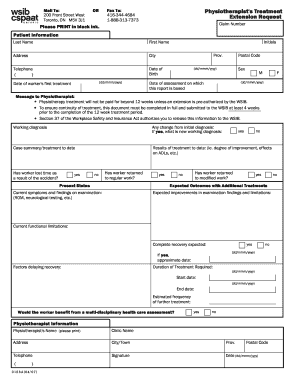
The Physiotherapy Extension Request Report is a healthcare form used by workers in British Columbia to request an extension for physiotherapy treatment under a WorkSafeBC claim.
pdfFiller scores top ratings on review platforms




Who needs Canada WorkSafeBC 83D219?
Explore how professionals across industries use pdfFiller.

Canada WorkSafeBC 83D219 is needed by:
-
Workers seeking physiotherapy extensions
-
Attending physicians completing treatment recommendations
-
Physical therapists verifying treatment goals
-
Healthcare administrative staff processing claims
-
Insurance providers evaluating treatment needs
Comprehensive Guide to Canada WorkSafeBC 83D219
What is the Physiotherapy Extension Request Report?
The Physiotherapy Extension Request Report is a critical document used in British Columbia to facilitate extensions for physiotherapy treatment under WorkSafeBC claims. This report is essential for the recovery process of workers by ensuring necessary information is formally communicated among healthcare providers. It requires signatures from key stakeholders including the worker, attending physician, and physical therapist, with the latter's signature being mandatory for submission. Understanding this form's significance is vital for effective treatment planning.
Purpose and Benefits of the Physiotherapy Extension Request Report
The completion of the Physiotherapy Extension Request Report serves multiple purposes that benefit workers and their healthcare providers significantly. Requesting an extension for physiotherapy treatment is crucial in aiding a worker's recovery, alleviating complications during rehabilitation, and optimizing their return-to-work timeline. This form fosters enhanced communication among medical professionals, ensuring that all parties remain aligned on the worker's treatment plan and needs.
Key Features of the Physiotherapy Extension Request Report
This form encompasses several important components designed to streamline the extension request process. Among the primary features are fillable fields requiring the worker's last name, date of service, and WorkSafeBC claim number. The report includes sections for detailed explanations, checkbox responses for specific inquiries, and designated areas needing signatures that validate the information provided.
Who Needs the Physiotherapy Extension Request Report?
Several individuals play critical roles in the utilization of the Physiotherapy Extension Request Report. Workers seeking to extend their physiotherapy treatment are the primary users of this form. Additionally, attending physicians responsible for providing medical assessments and physical therapists who must complete and sign the report are all essential contributors in this process.
How to Fill Out the Physiotherapy Extension Request Report Online (Step-by-Step)
To complete the Physiotherapy Extension Request Report accurately, follow these steps:
-
Gather all necessary information, including patient details and treatment history.
-
Access the form and fill in each section carefully.
-
Pay special attention to required fields like the WorkSafeBC claim number.
-
Ensure that all relevant parties review the information provided.
-
Collect necessary signatures before submitting the form.
Taking time to prepare and verify the information can significantly reduce errors.
Submission Methods and Delivery of the Physiotherapy Extension Request Report
Submitting the completed Physiotherapy Extension Request Report can be done through various methods to suit user preferences. Options include submitting the form online, mailing it, or delivering it in person. To ensure smooth processing, pay attention to submission confirmation and tracking information. It's important to meet deadlines to avoid any delays in extending treatment approvals.
Common Errors and How to Avoid Them
When completing the Physiotherapy Extension Request Report, several common errors can impede the submission process:
-
Leaving required fields blank or filling them out incorrectly.
-
Failing to gather the necessary signatures before submitting.
-
Neglecting to review the information for accuracy prior to submission.
Reviewing the entire form thoroughly can help prevent these mistakes and ensure a smoother approval process.
Security and Compliance When Filing the Physiotherapy Extension Request Report
Handling sensitive information requires stringent security measures. pdfFiller incorporates advanced protection features, including 256-bit encryption and adherence to HIPAA compliance regulations. These systems are designed to guarantee the safe storage and management of personal health information, reinforcing the importance of confidentiality throughout the filing process.
Optimize Your Experience with pdfFiller
Utilizing pdfFiller's features can improve the experience of filling out the Physiotherapy Extension Request Report. The platform offers capabilities like editing, eSigning, and the secure storage of documents, enhancing user convenience. Features such as customizable templates and straightforward online submission facilitate easy form management for users, making the extension request process efficient.
How to fill out the Canada WorkSafeBC 83D219
-
1.To access the Physiotherapy Extension Request Report on pdfFiller, start by visiting the pdfFiller website and logging into your account. If you don’t have an account, you can create one for free.
-
2.Once logged in, use the search bar at the top of the page to find the specific form. Type 'Physiotherapy Extension Request Report' and select it from the search results.
-
3.After opening the form, review the sections available for completion. You can navigate using the scroll bar or left menu to jump to sections corresponding to the worker's information.
-
4.Gather the necessary information before starting to complete the form. This includes the worker's last name, date of service, WorkSafeBC claim number, and details about treatment objectives.
-
5.Start filling in the required fields identified clearly on the form. Use the filling tools provided by pdfFiller, such as text boxes, checkboxes, and signature fields for the physical therapist.
-
6.As you complete the form, ensure all details are accurate and thorough. Make use of pdfFiller’s options to add comments or explanations where required.
-
7.Once all fields are filled, review the entire form using pdfFiller’s preview feature, ensuring all necessary signatures are acquired, especially from the physical therapist.
-
8.To finalize the process, click on the 'Save' option to store your completed form. You can also choose to download the document for offline records.
-
9.If you’re ready to submit, pdfFiller provides options to share the form via email or directly to the appropriate WorkSafeBC office or physician's office from the platform.

Who is eligible to fill out the Physiotherapy Extension Request Report?
Workers currently undergoing physiotherapy treatment under a WorkSafeBC claim are eligible. Attending physicians and physical therapists also need to provide information and signatures to complete the form.
What is the deadline for submitting the Physiotherapy Extension Request Report?
While specific deadlines can vary, it is generally recommended to submit the request as soon as the need for an extension is identified, to avoid treatment interruptions and ensure continuity of care.
How can I submit the completed Physiotherapy Extension Request Report?
The form can be submitted electronically through pdfFiller, or printed and sent via mail or fax to the appropriate WorkSafeBC office. Ensure to follow the chosen submission method's guidelines.
What supporting documents are required with this report?
Typically, the form may require documentation related to the worker’s injury and ongoing treatment, including prior treatment reports and collaboration notes from the attending physician.
What common mistakes should I avoid when completing this report?
Common mistakes include missing required signatures, incomplete sections, and forgetting to provide the WorkSafeBC claim number. Carefully review all sections before submission to ensure accuracy.
How long does it take to process the Physiotherapy Extension Request Report?
Processing times for the form will depend on the WorkSafeBC office and current workload. Generally, allow 2-4 weeks for processing and follow up if confirmation is not received.
Are there any fees associated with submitting the Physiotherapy Extension Request Report?
There are typically no direct fees for filing the form, but it's essential to check with WorkSafeBC or your insurance provider for any applicable costs related to physiotherapy treatments.
Canada WorkSafeBC 83D219 Form Versions
Related Forms


Get the latest insights from our blog


If you believe that this page should be taken down, please follow our DMCA take down process
here
.
This form may include fields for payment information. Data entered in these fields is not covered by PCI DSS compliance.