
Last updated on
Oct 2, 2026

Get the free Special Power of Attorney
We are not affiliated with any brand or entity on this form

Fill out
Complete the form online in a simple drag-and-drop editor.

eSign
Add your legally binding signature or send the form for signing.

Share
Share the form via a link, letting anyone fill it out from any device.

Export
Download, print, email, or move the form to your cloud storage.
Why pdfFiller is the best tool for your documents and forms


End-to-end document management
From editing and signing to collaboration and tracking, pdfFiller has everything you need to get your documents done quickly and efficiently.
Accessible from anywhere
pdfFiller is fully cloud-based. This means you can edit, sign, and share documents from anywhere using your computer, smartphone, or tablet.
Secure and compliant
pdfFiller lets you securely manage documents following global laws like ESIGN, CCPA, and GDPR. It's also HIPAA and SOC 2 compliant.
What is Special Power of Attorney
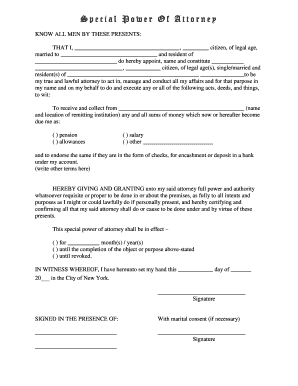
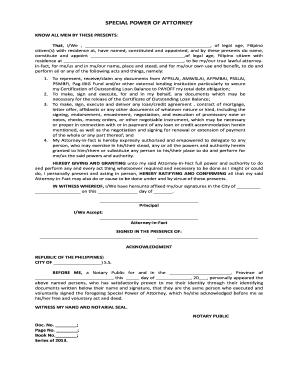
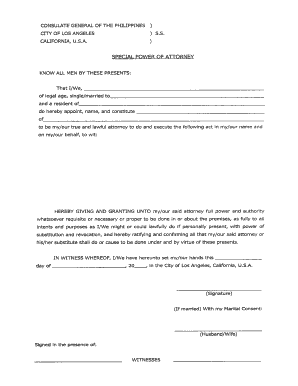
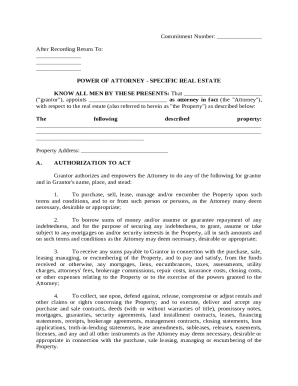
The Special Power of Attorney is a legal document used by individuals to grant authority to someone else to manage specific legal and financial matters related to property on their behalf.
pdfFiller scores top ratings on review platforms




Who needs Special Power of Attorney?
Explore how professionals across industries use pdfFiller.

Special Power of Attorney is needed by:
-
Individuals needing to assign legal authority for property matters
-
People managing financial transactions for someone unable to do so
-
Estate planners requiring documentation for property management
-
Families supporting elderly relatives with legal responsibilities
-
Real estate agents handling transactions on behalf of clients
-
Business owners delegating authority for decision-making
Comprehensive Guide to Special Power of Attorney
What is the Special Power of Attorney?
The Special Power of Attorney (POA) is a legal document that authorizes an individual to act on behalf of another in specific matters. Unlike a General Power of Attorney, which grants broad powers, the Special POA is limited to particular tasks, such as handling real estate transactions or financial dealings. This specificity is significant, as it delineates the authority granted to the attorney-in-fact, ensuring they can only act within the defined parameters.
Key powers granted under a Special Power of Attorney may include managing real estate, handling banking transactions, or making health care decisions. To construct this document, individuals often refer to resources like a special power of attorney template or a Hawaii power of attorney form.
Purpose and Benefits of Using the Special Power of Attorney
Creating a Special Power of Attorney can be advantageous in various situations, particularly when an individual is unable to manage their affairs due to illness, travel, or other reasons. This document provides significant legal and financial benefits, as it enables a trusted individual to step in and manage essential matters efficiently.
Having a Special POA also gives peace of mind to both the grantor and the attorney-in-fact, knowing that responsibilities are handled by someone they trust. Additionally, utilizing a notarized power of attorney streamlines various processes and can prevent complications within legal or financial contexts, such as those encountered when dealing with a property power of attorney document.
Key Features of the Special Power of Attorney Form
The Special Power of Attorney form includes several essential features that facilitate its use. Required fields in the document typically include the names of the grantor and the attorney-in-fact, ensuring clear identification of all parties involved. Important components, such as specific details related to property and financial transactions, should be clearly outlined to avoid any ambiguity.
-
Notarization is crucial; the document must be signed in the presence of a notary public.
-
Signature requirements need to be fulfilled to validate the form.
-
Other specific instructions regarding the powers granted should be detailed within the form.
For reference, individuals may seek a Hawaii power of attorney form or utilize a general power of attorney PDF to understand the common elements and requirements.
Who Needs the Special Power of Attorney?
Individuals who may require a Special Power of Attorney include those needing assistance in managing their legal and financial affairs. This need often arises for individuals who are elderly, incapacitated, or frequently traveling.
Family members, caregivers, or business partners often serve as the attorney-in-fact, granting them the authority to make decisions on behalf of the grantor. In scenarios such as managing property transactions or financial obligations, a Special POA becomes essential.
Using a special power of attorney template can help streamline the process for those looking to establish this important legal document, while a notarized power of attorney ensures validity in its execution.
How to Fill Out the Special Power of Attorney Form Online
To complete the Special Power of Attorney form using pdfFiller, follow these detailed instructions:
-
Start by entering the grantor's name and details into the required fields.
-
Clearly specify the powers being granted to the attorney-in-fact.
-
Review all entries for accuracy to prevent errors that could invalidate the document.
-
Utilize pdfFiller's tools, such as digital signing and saving options, for ease of completion.
This streamlined process allows users to fill out the special power of attorney efficiently while ensuring all necessary information is accurately recorded.
Signing and Notarizing the Special Power of Attorney
The signing process for the Special Power of Attorney involves specific requirements that must be adhered to. Users should be aware that both digital and wet signatures can be accepted, depending on state laws. However, notarization is a critical step that cannot be overlooked.
To fulfill notarization requirements, locating a notary public in Hawaii or the relevant jurisdiction is vital. Proper notarization adds a layer of security and legitimacy to the document, ensuring that the grantor's intentions are clear and legally binding.
Potential signers should understand the necessary steps prior to signing, ensuring compliance with both state regulations and personal preferences.
Where and How to Submit the Special Power of Attorney
Once completed, the Special Power of Attorney document must be submitted to the appropriate parties or institutions. Recommended submission locations include legal offices, courts, or financial institutions where the attorney-in-fact will need to exercise the granted powers.
Individuals can choose from various submission methods, including in-person, online, or via mail, depending on their preferences and the requirements of the receiving entity. It's also crucial to be aware of processing times and any potential fees associated with submitting the form.
Utilizing a Hawaii power of attorney form ensures a smooth submission process.
Common Errors and How to Avoid Them
Completing the Special Power of Attorney form can be straightforward, yet users often encounter common pitfalls. Frequent errors may include missing signatures, incomplete fields, or vague descriptions of powers granted.
-
Double-check all entries for completeness before submission.
-
Ensure that both the grantor and attorney-in-fact's names are correct and clearly stated.
By taking time to review the form carefully, individuals can avoid errors that may lead to complications in the future. Referring to a general power of attorney PDF can help in understanding proper formatting.
Security and Compliance Considerations
Handling sensitive documents, such as the Special Power of Attorney, necessitates a focus on security. Utilizing pdfFiller not only aids in completing forms but also provides robust security features, including 256-bit encryption and compliance with HIPAA and GDPR guidelines.
Best practices for managing sensitive information include ensuring that documents are securely stored and transmitted. Users should be diligent in safeguarding their personal information when filling out and submitting legal documents.
Adopting these principles fosters a secure environment for handling personal legal matters, reinforcing the importance of confidentiality.
Experience Hassle-Free Form Completion with pdfFiller
pdfFiller offers a user-friendly interface that simplifies the process of completing the Special Power of Attorney form. With various tools available for editing and eSigning, users can efficiently manage their documents online.
This platform ensures a secure environment for document management, allowing individuals to focus on their legal needs without concern over information security.
Start your hassle-free form completion today and take advantage of the convenience afforded by pdfFiller.
How to fill out the Special Power of Attorney
-
1.Start by accessing pdfFiller and searching for the 'Special Power of Attorney' form.
-
2.Open the form in the pdfFiller interface; you will see editable fields.
-
3.Gather the necessary information: the grantor's full name, the attorney-in-fact's name, and specific details about the property involved.
-
4.Begin filling in the required information. Click on the first blank field to enter the grantor's name. Use the placeholder text to guide you.
-
5.Proceed to fill in the attorney-in-fact's name next. Ensure accuracy to avoid issues later on.
-
6.Next, fill in the details of the property and any specific financial transactions by following the prompts.
-
7.Double-check the information entered for accuracy and completeness.
-
8.Refer to the explicit instructions included in the document to make certain all necessary fields are populated correctly.
-
9.Once all information is filled, review the final document to ensure no fields are left blank.
-
10.Save your changes in pdfFiller and consider downloading a copy for your records. You can also submit the form directly from the platform if required.

Who is eligible to use the Special Power of Attorney?
Any adult individual wishing to grant authority to another person for handling specific property-related affairs can use the Special Power of Attorney. It's important that both parties are in a sound state of mind.
Is notarization required for this form?
Yes, notarization is required for the Special Power of Attorney. The grantor must sign the document in front of a notary public to validate its authenticity.
What information do I need before filling out the form?
Before starting, gather information such as the names of both the grantor and attorney-in-fact, details regarding the property, and any specific actions you wish the attorney-in-fact to take.
How do I submit the completed Special Power of Attorney form?
You can submit the completed form by downloading it from pdfFiller and delivering it to the relevant authority, such as a court or financial institution, depending on your specific needs.
What common mistakes should I avoid when filling out this form?
Common mistakes include forgetting to provide all required information, not notarizing the form, and failing to review the document for accuracy. Take your time to ensure all fields are completed correctly.
Are there any processing times for using this form?
Processing times can vary based on the institution that receives the Special Power of Attorney. Generally, it should be effective immediately upon notarization unless stated otherwise.
Can the Special Power of Attorney be revoked after it is signed?
Yes, the grantor can revoke the Special Power of Attorney at any time as long as they are of sound mind. A written revocation should be provided to the attorney-in-fact and any relevant parties.
Related Content
Related Forms




Get the latest insights from our blog


If you believe that this page should be taken down, please follow our DMCA take down process
here
.
This form may include fields for payment information. Data entered in these fields is not covered by PCI DSS compliance.