
Last updated on
Nov 6, 2026

Canada Memorial University of Newfoundland Tender Evaluation Form 2005-2026 free printable template
We are not affiliated with any brand or entity on this form

Fill out
Complete the form online in a simple drag-and-drop editor.

eSign
Add your legally binding signature or send the form for signing.

Share
Share the form via a link, letting anyone fill it out from any device.

Export
Download, print, email, or move the form to your cloud storage.
Why pdfFiller is the best tool for your documents and forms


End-to-end document management
From editing and signing to collaboration and tracking, pdfFiller has everything you need to get your documents done quickly and efficiently.
Accessible from anywhere
pdfFiller is fully cloud-based. This means you can edit, sign, and share documents from anywhere using your computer, smartphone, or tablet.
Secure and compliant
pdfFiller lets you securely manage documents following global laws like ESIGN, CCPA, and GDPR. It's also HIPAA and SOC 2 compliant.
What is Canada Memorial University of Newfoundland Tender Evaluation Form
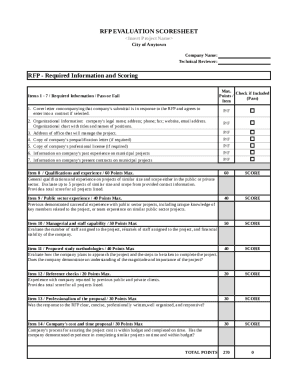
The Memorial University Tender Evaluation Form is a procurement document used by Memorial University to evaluate and document bids received during the tender process.
pdfFiller scores top ratings on review platforms




Simple to work with & lots of useful features.
Excellent tool for people who handle lot of documents
Who needs Canada Memorial University of Newfoundland Tender Evaluation Form?
Explore how professionals across industries use pdfFiller.

Canada Memorial University of Newfoundland Tender Evaluation Form is needed by:
-
University procurement officers
-
Tender evaluation committees
-
Bidders submitting proposals
-
Administrative staff overseeing procurement processes
-
Compliance officers ensuring adherence to evaluation standards
Comprehensive Guide to Canada Memorial University of Newfoundland Tender Evaluation Form
What is the Memorial University Tender Evaluation Form?
The Memorial University Tender Evaluation Form is a crucial document utilized within the procurement processes at Memorial University to evaluate tenders. It plays a vital role in ensuring transparency and fairness during bid evaluations. The form provides a standardized method for assessing bids, which helps maintain the integrity of the decision-making process.
This document is essential for documenting the evaluation process and includes necessary fields for tender details, ensuring that all necessary information is collected systematically. Such clarity fosters accountability by keeping a record of evaluation criteria and outcomes.
Purpose and Benefits of the Memorial University Tender Evaluation Form
Using the Memorial University Tender Evaluation Form offers numerous advantages to the university and its stakeholders. Primarily, it aids in standardizing the evaluation process, which is crucial for fairness and consistency in bid assessments. This standardization not only simplifies evaluations but also reduces the potential for errors.
An important aspect of the form is its capability to document reasons for disqualifying bids. This provides both the university and bidders with clear accountability. Such documentation can help in maintaining a transparent process and can be invaluable in case of disputes or audits.
Key Features of the Memorial University Tender Evaluation Form
The Memorial University Tender Evaluation Form includes several essential components designed to facilitate effective evaluations. Key fields on the form include:
-
Tender number
-
Bidder information
-
Bid amounts
-
Disqualification reasons
Furthermore, the form requires signatures from two critical roles: Prepared by and Approved by. This ensures proper review and validation of the evaluation process. It also references necessary attachments such as original bids and lists of attendees, which may be required for comprehensive documentation.
Who Needs the Memorial University Tender Evaluation Form?
The primary users of the Memorial University Tender Evaluation Form consist of procurement officers and evaluation committees who are directly involved in the tender process. Additionally, other stakeholders such as bidders and auditors may need access to the form to understand the evaluation and decision outcomes.
This broad accessibility ensures that all parties are informed and can participate effectively in the procurement process.
How to Fill Out the Memorial University Tender Evaluation Form Online (Step-by-Step)
Filling out the Memorial University Tender Evaluation Form online can be streamlined through pdfFiller. Follow these steps to complete the form:
-
Access the form within pdfFiller.
-
Enter the required information into the specified fields, focusing on tender details and bidder information.
-
Carefully complete the disqualification section, providing accurate reasons where applicable.
-
Ensure to save the document regularly while filling it out.
This user-friendly process simplifies documentation for both procurement officers and evaluators.
Common Errors and How to Avoid Them
While filling out the form, several common errors can occur. One of the main mistakes includes failing to document necessary details accurately, which can lead to misunderstandings or disputes.
Additionally, it’s crucial to check that all required signatures are appropriately included. Maintaining a checklist of best practices can also enhance accuracy, such as verifying all data entries and ensuring compliance with signature requirements.
How to Sign the Memorial University Tender Evaluation Form
Signing the Memorial University Tender Evaluation Form is essential and can be completed in a few different ways. Users can opt for either digital signatures or traditional wet signatures depending on their preference and requirements.
To eSign the form using pdfFiller's tools, simply follow the provided steps for digital signatures, ensuring compliance with the legal requirements for signatures in tender evaluations.
Submission Methods and Delivery of the Memorial University Tender Evaluation Form
Once completed, the Memorial University Tender Evaluation Form can be submitted using various methods. Available options include online submissions through pdfFiller or delivering the form in person to the designated procurement office.
Users should also be mindful of deadlines and processing times associated with tender evaluations to ensure timely submissions.
Supporting Materials for the Memorial University Tender Evaluation Form
When submitting the Memorial University Tender Evaluation Form, it may require additional documents to accompany it. Necessary attachments can include:
-
Original bid documents
-
Lists of attendees
Maintaining organized records of these materials can help ensure compliance, facilitating a smooth procurement process.
Enhance Your Form Experience with pdfFiller
Utilizing pdfFiller enhances the experience of filling out the Memorial University Tender Evaluation Form. The platform offers a suite of capabilities including editing, signing, and managing PDF forms seamlessly from any browser.
Moreover, pdfFiller incorporates strong security measures, employing 256-bit encryption and compliance with regulations such as HIPAA and GDPR, to protect sensitive information during the form-filling process. With its user-friendly interface, pdfFiller allows for easy access and sharing of documents, making it an invaluable tool for tender evaluations.
How to fill out the Canada Memorial University of Newfoundland Tender Evaluation Form
-
1.To access the Memorial University Tender Evaluation Form on pdfFiller, visit the platform and use the search bar to locate the form by its name.
-
2.Once you find the form, click on it to open the document in the pdfFiller interface.
-
3.Before you begin filling out the form, ensure you have all necessary information, including tender numbers, bidder details, and bid amounts ready for entry.
-
4.Start by clicking on the relevant fields to enter information such as tender number and bidder information. Use the tab key to navigate through the fields smoothly.
-
5.For each bid, input amounts and select checkboxes for either 'Acceptable' or 'Disqualified', making sure to provide a reason for disqualification if applicable.
-
6.If you need to attach any supporting documents, such as the original bids or attendance lists, utilize the attachment feature within pdfFiller to add these files.
-
7.Review all fields to ensure accuracy and completeness, making edits as necessary to align with the tender evaluation criteria.
-
8.Once satisfied with the completed form, click on the save option to store your work. Consider downloading a copy for your records.
-
9.Lastly, submit the finalized form by selecting the submit option within pdfFiller. Ensure that both the 'Prepared by' and 'Approved by' sections have been signed.

Who is eligible to use the Memorial University Tender Evaluation Form?
The Memorial University Tender Evaluation Form is intended for university procurement officers, evaluation committees, and administrative staff who assess tenders and bids for procurement processes.
What documents are required alongside this form?
Along with the Memorial University Tender Evaluation Form, you may need to attach original bids, purchase orders, and a list of attendees from the tender review meeting for comprehensive documentation.
What are the common mistakes to avoid when completing the form?
Common mistakes include failing to fill all required fields, mismatching signatures for 'Prepared by' and 'Approved by', and not providing adequate reasons for disqualification when applicable.
How should the completed form be submitted?
Once the Memorial University Tender Evaluation Form is filled out and signed, it should be submitted via pdfFiller using the 'Submit' option available in the interface to ensure proper processing.
Is there a deadline for submitting the evaluation form?
Specific deadlines for submitting the Memorial University Tender Evaluation Form may vary based on tender timelines, so always verify against the tender document or procurement schedule.
What are the processing times for evaluation submissions?
Processing times for evaluation submissions can vary; it's advisable to consult with your procurement department regarding typical turnaround times for evaluated tender documents.
Does this form require notarization?
No, the Memorial University Tender Evaluation Form does not require notarization, simplifying the completion and submission process for users.
Related Forms

Related Catalogs
Get the latest insights from our blog


If you believe that this page should be taken down, please follow our DMCA take down process
here
.
This form may include fields for payment information. Data entered in these fields is not covered by PCI DSS compliance.