
Last updated on
Oct 31, 2026

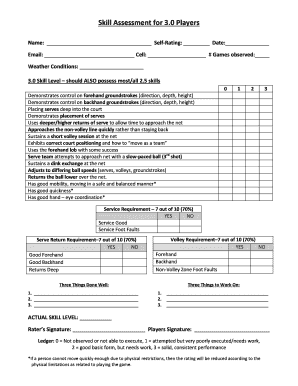
USA Pickleball Skill Assessment for 3.0 Players 2015 free printable template
We are not affiliated with any brand or entity on this form

Fill out
Complete the form online in a simple drag-and-drop editor.

eSign
Add your legally binding signature or send the form for signing.

Share
Share the form via a link, letting anyone fill it out from any device.

Export
Download, print, email, or move the form to your cloud storage.
Why pdfFiller is the best tool for your documents and forms


End-to-end document management
From editing and signing to collaboration and tracking, pdfFiller has everything you need to get your documents done quickly and efficiently.
Accessible from anywhere
pdfFiller is fully cloud-based. This means you can edit, sign, and share documents from anywhere using your computer, smartphone, or tablet.
Secure and compliant
pdfFiller lets you securely manage documents following global laws like ESIGN, CCPA, and GDPR. It's also HIPAA and SOC 2 compliant.
What is USA Pickleball Skill Assessment for 3.0 Players
The 3.0 Player Skill Assessment Form is a personal form used by tennis players and raters to evaluate a player's skills at the 3.0 level.
pdfFiller scores top ratings on review platforms




Who needs USA Pickleball Skill Assessment for 3.0 Players?
Explore how professionals across industries use pdfFiller.

USA Pickleball Skill Assessment for 3.0 Players is needed by:
-
Tennis players seeking a formal skill assessment
-
Coaches aiming to evaluate player abilities
-
Tournament organizers requiring skill classifications
-
Raters involved in official player evaluations
-
Sports associations focusing on player ratings
-
Parents of junior players wishing to assess skills
Comprehensive Guide to USA Pickleball Skill Assessment for 3.0 Players
What is the 3.0 Player Skill Assessment Form?
The 3.0 Player Skill Assessment Form is a crucial tool used in evaluating the skills of tennis players at the 3.0 level. This form serves to collect personal information and facilitate a comprehensive skill assessment. The significance of the 3.0 level lies in its role as a benchmark for player capabilities, which plays a vital part in tournament eligibility and league placement.
Key components of the form include sections for personal details and skill evaluations that cover essential areas such as groundstrokes, serves, and volleys. Additionally, signatures from both the player and the rater are required, ensuring accountability and validation of the assessment process.
Purpose and Benefits of the 3.0 Player Skill Assessment Form
The 3.0 Player Skill Assessment Form is essential as it aids in the accurate evaluation of player skills at this specific level. By providing a structured pathway for assessing fundamental tennis skills, it promotes an objective approach to player ratings.
-
Provides reliable evaluations of skills, including serves and groundstrokes.
-
Facilitates objective assessments for accurate official ratings.
-
Helps coaches and clubs make informed decisions regarding player placements.
Key Features of the 3.0 Player Skill Assessment Form
This assessment form incorporates user-friendly features designed to streamline the evaluation process. With fillable fields and checkboxes, users can easily input data, enhancing both efficiency and accuracy.
Moreover, the form includes step-by-step instructions tailored for both players and raters, which guide users through the evaluation process. One standout feature is the instant electronic submission capability, allowing for quick processing and review.
Who Should Use the 3.0 Player Skill Assessment Form?
The target audience for the 3.0 Player Skill Assessment Form includes players who are classified at the 3.0 skill level. Raters, such as coaches or certified professionals, play a pivotal role in conducting the assessments accurately.
Various stakeholders can benefit from the insights gained through the form, including tennis clubs, league organizers, and training facilities. These groups rely on comprehensive assessments to guide player development and placement decisions.
How to Fill Out the 3.0 Player Skill Assessment Form Online
Completing the 3.0 Player Skill Assessment Form online is straightforward when following these steps:
-
Access the form through the designated platform.
-
Fill out personal information and skill evaluation sections as prompted.
-
Review the information for accuracy before submission.
Field-by-field guidance ensures all necessary information is provided, while tips are available to help users avoid common submission errors.
How to Sign the 3.0 Player Skill Assessment Form
Signing the 3.0 Player Skill Assessment Form is necessary for both players and raters to affirm the validity of the assessment. There are two signature options available: digital signatures and traditional wet signatures.
-
Digital signatures can be added using pdfFiller, ensuring convenience.
-
Wet signatures require printing the form for manual signing.
It is crucial that both parties sign the form to validate the assessment process.
Submission Methods for the 3.0 Player Skill Assessment Form
Once the 3.0 Player Skill Assessment Form is completed, it can be submitted through various methods. Users can choose to send the form via email or opt for online submission directly through the platform.
Following submission, it’s advisable to confirm receipt of the form to ensure it has been processed correctly. Users can also check the status of their submission for peace of mind.
Security and Privacy for Completing the 3.0 Player Skill Assessment Form
Security is paramount when filling out the 3.0 Player Skill Assessment Form, especially regarding the handling of personal information. pdfFiller employs advanced security measures including 256-bit encryption and compliance with regulations such as HIPAA and GDPR to safeguard user data.
Users can trust that their personal information remains confidential and secure throughout the assessment process.
How pdfFiller Simplifies the Process of Using the 3.0 Player Skill Assessment Form
pdfFiller enhances the experience of completing the 3.0 Player Skill Assessment Form with its robust features designed for ease of use. Users can edit text, sign, and share the form seamlessly.
The user-friendly interface is beneficial for both raters and players, simplifying the documentation process and improving overall efficiency. Additionally, pdfFiller offers significant support with document management and storage, making everyday tasks more manageable.
Getting Started with the 3.0 Player Skill Assessment Form
Getting started with the 3.0 Player Skill Assessment Form is a simple process. Users can easily access the form and begin the completion process, taking advantage of the intuitive design offered by pdfFiller.
Emphasizing ease of use and the supportive resources available, users are encouraged to take the first step towards obtaining an accurate assessment. Accurate skill evaluation significantly benefits players and their progression in the sport.
How to fill out the USA Pickleball Skill Assessment for 3.0 Players
-
1.Access the form by navigating to pdfFiller and searching for the '3.0 Player Skill Assessment Form' in the templates section.
-
2.Click on the form to open it in the pdfFiller editor interface where you can view all fields and sections.
-
3.Before filling out the form, gather necessary personal information such as the player’s name, contact information, and skill levels for groundstrokes, serves, and volleys.
-
4.Begin by entering the player's personal information in the designated fields. Ensure accuracy for proper record-keeping.
-
5.Next, sections are provided for the rater to assess various skills. Use the checkboxes and fillable fields to indicate the player's proficiency in each skill.
-
6.Once all fields are completed, review the form thoroughly. Ensure all information is correct, and no sections are left blank.
-
7.If applicable, both the player and the rater must provide signatures where indicated to authenticate the form.
-
8.After finalizing the entries, save the form by clicking on the save option in pdfFiller. You can also choose to download the completed form to your computer.
-
9.To submit the form, follow the submission instructions in pdfFiller. You may need to email it or submit it directly through the platform as required.

Who is eligible to use the 3.0 Player Skill Assessment Form?
The form is designed for tennis players at the 3.0 skill level and raters involved in skill evaluation. Players seeking official assessments should use this form.
What is the deadline for submitting this form?
Deadlines can vary based on the organization or event requiring the form. Check with the specific tournament or league for any submission timelines.
How can I submit the completed 3.0 Player Skill Assessment Form?
Completed forms can typically be submitted via email or through the organizing body’s submission portal. Ensure you follow the submission methods provided by your tournament or league.
What supporting documents do I need to submit with the form?
Usually, supporting documents may not be required with this form. However, check with the issuing organization for any specific requirements they might have.
What are common mistakes to avoid when filling out the form?
Common issues include incomplete fields, incorrect information, and failure to include signatures. Always double-check all entries before submission.
How long does it take to process the skill assessments from this form?
Processing times depend on the reviewing body. Generally, allow a few days to a couple of weeks for the assessment results to be finalized.
What specific skills does this form evaluate?
The form evaluates skills including groundstrokes, serves, volleys, and overall mobility of the player to provide a comprehensive skill assessment.
USA Pickleball Skill Assessment for 3.0 Players Form Versions
Related Forms




Get the latest insights from our blog



If you believe that this page should be taken down, please follow our DMCA take down process
here
.
This form may include fields for payment information. Data entered in these fields is not covered by PCI DSS compliance.