
Last updated on
Oct 31, 2026

OK Greater Tulsa Association Residential Property Data Form 2015 free printable template
pdfFiller is not affiliated with any government organization

Fill out
Complete the form online in a simple drag-and-drop editor.

eSign
Add your legally binding signature or send the form for signing.

Share
Share the form via a link, letting anyone fill it out from any device.

Export
Download, print, email, or move the form to your cloud storage.
Why pdfFiller is the best tool for your documents and forms


End-to-end document management
From editing and signing to collaboration and tracking, pdfFiller has everything you need to get your documents done quickly and efficiently.
Accessible from anywhere
pdfFiller is fully cloud-based. This means you can edit, sign, and share documents from anywhere using your computer, smartphone, or tablet.
Secure and compliant
pdfFiller lets you securely manage documents following global laws like ESIGN, CCPA, and GDPR. It's also HIPAA and SOC 2 compliant.
What is OK Greater Tulsa Association Residential Property Data Form
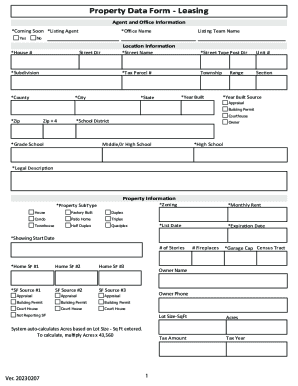
The Residential Property Data Form is a type of document used by real estate agents to collect detailed information about residential properties for listing purposes.
pdfFiller scores top ratings on review platforms




Who needs OK Greater Tulsa Association Residential Property Data Form?
Explore how professionals across industries use pdfFiller.

OK Greater Tulsa Association Residential Property Data Form is needed by:
-
Real estate agents needing to create property listings
-
Real estate offices managing multiple property listings
-
Property owners looking to sell or rent their homes
-
Real estate developers documenting new residential projects
-
Property managers handling rental properties
-
Investors assessing potential residential acquisitions
Comprehensive Guide to OK Greater Tulsa Association Residential Property Data Form
What is the Residential Property Data Form?
The Residential Property Data Form is a vital document used in the real estate industry to collect comprehensive information about residential properties. Its primary purpose is to streamline the listing process, ensuring that all necessary property details are captured accurately. By standardizing property information, it benefits both buyers and renters, making it easier for them to compare properties and make informed decisions.
Purpose and Benefits of the Residential Property Data Form
Gathering detailed property information is crucial for effective real estate transaction processes. This form assists real estate agents in marketing properties more efficiently by providing a structured way to present key property characteristics. For potential buyers and renters, having access to complete information promotes confidence in their decision-making, ultimately leading to greater satisfaction.
The use of a property disclosure form can significantly reduce the risk of misunderstandings during transactions, making it an indispensable tool for all parties involved in real estate dealings.
Key Features of the Residential Property Data Form
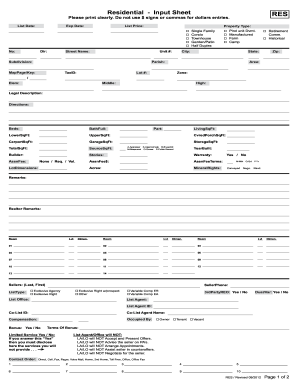
The Residential Property Data Form includes several important components, such as:
-
Agent and office information
-
Property characteristics, including size and location
-
Additional feature checkboxes with instructions for clarity
Its fillable format enhances usability, allowing agents to customize the document easily to meet specific property needs.
Who Needs the Residential Property Data Form?
This form is essential for various stakeholders in the real estate sector, including:
-
Real estate agents who list properties
-
Real estate offices managing property listings
-
Homeowners looking to sell or rent their properties
Common scenarios necessitating this form include preparing a new listing, updating existing property details, or complying with local real estate regulations.
How to Fill Out the Residential Property Data Form Online (Step-by-Step)
Filling out the Residential Property Data Form online is straightforward. Follow these steps:
-
Access the form via a reliable platform such as pdfFiller.
-
Complete the agent and office sections with accurate details.
-
Calculate acres and property area by multiplying Acres by 43,560.
-
List key property characteristics ensuring all relevant fields are filled.
-
Review any additional features by checking corresponding boxes.
Using pdfFiller simplifies this process, making form completion efficient and user-friendly.
Common Errors and How to Avoid Them
When filling out the Residential Property Data Form, several common errors can arise, including:
-
Inaccurate measurement entries for property size
-
Omitting important details about the property
-
Incorrect agent or office information
To avoid these pitfalls, double-check all entries before submission and prioritize validating critical fields to ensure compliance and accuracy.
How to Submit the Residential Property Data Form
Submitting the Residential Property Data Form can be done through various methods:
-
Online submission via platforms like pdfFiller
-
Faxing or mailing printed copies as per your local regulations
Be aware of processing times, and look for submission confirmations to ensure the form has been received. Additionally, check for state-specific rules or guidelines that may affect submission procedures.
Privacy and Security Considerations
When handling sensitive property information, it is crucial to consider privacy and security. pdfFiller is committed to secure document handling, ensuring that users' data is protected under strict protocols. Compliance with regulations such as HIPAA and GDPR demonstrates the platform's dedication to safeguarding user information during transactions.
Real Estate Agency Solutions with pdfFiller
pdfFiller offers various features that support real estate agents in efficiently using the Residential Property Data Form, including:
-
Easy editing capabilities for quick adjustments
-
eSigning options to streamline the signing process
-
Cloud-based access for convenient document management
Leveraging these capabilities can significantly enhance the efficiency of form handling in real estate transactions.
Ready to Simplify Your Property Listings?
Utilizing pdfFiller to complete the Residential Property Data Form online streamlines the entire process for agents and homeowners alike. The advantages of using this reliable, cloud-based solution encompass improved organization and ease of use, making real estate transactions smoother and more efficient.
How to fill out the OK Greater Tulsa Association Residential Property Data Form
-
1.To complete the Residential Property Data Form on pdfFiller, first access the platform and search for the form by title or category.
-
2.Once you find the form, click to open it in the pdfFiller editor, where you can view all form fields and instructions.
-
3.Collect necessary information before filling out the form, including property details like address, characteristics, and agent information.
-
4.Use your mouse or keyboard to navigate the form, clicking on text fields to enter information or checkboxes to make selections.
-
5.Refer to any specific instructions provided within the form, such as calculations for area or other notable details.
-
6.After completing all required fields, take a moment to review the information for accuracy and completeness.
-
7.If needed, utilize pdfFiller's tools to make edits or use the 'Undo' option to revert any unintended changes.
-
8.Once satisfied with the completed form, use the 'Save' feature to store your progress, or click 'Download' to save the document to your device.
-
9.If submission is required, choose the appropriate submission method, whether emailing directly from pdfFiller or printing the form for manual submission.

Who can use the Residential Property Data Form?
The Residential Property Data Form is intended for real estate agents, property owners, and real estate offices needing to gather detailed information on residential properties for listing or disclosure purposes.
What information do I need to fill out this form?
Before filling out the form, gather relevant property details including the address, property features, agent and office information, and any additional characteristics that potential buyers or renters might need.
How do I submit the completed Residential Property Data Form?
You can submit the completed form via email directly through pdfFiller or print it for mailing or in-person submission, depending on your specific needs and the requirements of your agency.
What are common mistakes to avoid when filling out this form?
Common mistakes include leaving required fields blank, providing inaccurate information, or failing to double-check calculations, such as area measurements. Ensure all entries are clear and correct before submission.
How long does it take to process or submit this form?
Processing times can vary based on the submission method and the authority receiving the form. However, it’s best to allow several working days for processing after submission.
Is notarization required for this form?
No, the Residential Property Data Form does not require notarization, making it easier for real estate agents to use it for property listings without additional formalities.
Can I edit the form after saving it?
Yes, after saving your form on pdfFiller, you can reopen it and make edits as needed. Be sure to save any changes before downloading or submitting.
OK Greater Tulsa Association Residential Property Data Form Form Versions
Related Forms




Get the latest insights from our blog


If you believe that this page should be taken down, please follow our DMCA take down process
here
.
This form may include fields for payment information. Data entered in these fields is not covered by PCI DSS compliance.