
Last updated on
Nov 17, 2026
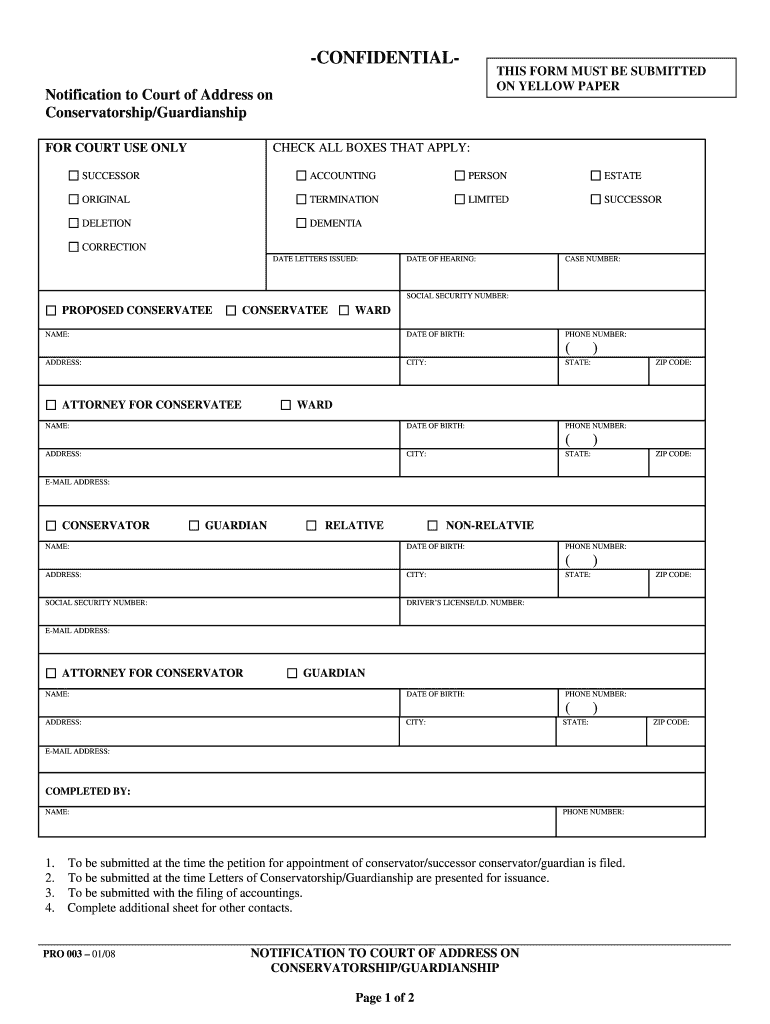
CA PRO 003 2008 free printable template
pdfFiller is not affiliated with any government organization

Fill out
Complete the form online in a simple drag-and-drop editor.

eSign
Add your legally binding signature or send the form for signing.

Share
Share the form via a link, letting anyone fill it out from any device.

Export
Download, print, email, or move the form to your cloud storage.
Why pdfFiller is the best tool for your documents and forms


End-to-end document management
From editing and signing to collaboration and tracking, pdfFiller has everything you need to get your documents done quickly and efficiently.
Accessible from anywhere
pdfFiller is fully cloud-based. This means you can edit, sign, and share documents from anywhere using your computer, smartphone, or tablet.
Secure and compliant
pdfFiller lets you securely manage documents following global laws like ESIGN, CCPA, and GDPR. It's also HIPAA and SOC 2 compliant.
What is CA PRO 003
The Notification to Court of Address on Conservatorship/Guardianship is a legal document used by individuals to inform the court of updates regarding conservatorship or guardianship cases.
pdfFiller scores top ratings on review platforms




Who needs CA PRO 003?
Explore how professionals across industries use pdfFiller.

CA PRO 003 is needed by:
-
Guardians or conservators managing someone's affairs
-
Attorneys representing guardianship cases
-
Individuals involved in conservatorship legal proceedings
-
Court investigators assessing conservatorship cases
-
Social workers handling guardianship issues
-
Family members of conservatees or wards
Comprehensive Guide to CA PRO 003
Understanding the Notification to Court of Address on Conservatorship/Guardianship
The Notification to Court of Address on Conservatorship/Guardianship is a vital legal form used to inform the court about any changes in a conservatorship or guardianship case. This notification ensures that the court has updated contact information for all relevant parties involved, including the conservator, guardian, and the individual being cared for. Its submission is crucial within the legal context to maintain clear and efficient communication between the court and the individuals involved in these proceedings.
Filing this form on distinct yellow paper denotes its importance in the conservatorship and guardianship process. By notifying the court of any address changes, the parties involved can avoid potential complications that may arise from outdated contact information.
Purpose and Benefits of the Notification to Court of Address on Conservatorship/Guardianship
This notification plays a crucial role in ensuring that legal proceedings are conducted seamlessly. By providing accurate and current information, the court investigators can efficiently perform their duties without hindrances caused by incorrect contact details.
Moreover, the form helps guarantee legal compliance, thus facilitating the smooth processing of cases. Timely address updates prevent potential legal issues, like delays or disputes, that may result from outdated records.
Key Features of the Notification to Court of Address on Conservatorship/Guardianship
The structure of the Notification to Court of Address on Conservatorship/Guardianship includes several essential fields designed to gather pertinent information. Key fields required on the form include the names of the parties involved, their dates of birth, and current addresses.
Additionally, the form offers various checkboxes corresponding to categories related to conservatorship and guardianship, allowing users to indicate specific details quickly. For convenience, the document is designed to be user-friendly, enabling completion online using pdfFiller.
Who Needs the Notification to Court of Address on Conservatorship/Guardianship?
This notification form is essential for individuals applying for or currently holding a conservatorship or guardianship. Legal representatives and caregivers responsible for filing the form must also stay informed about when to submit updates.
Scenarios prompting the need to update the court include changes in residential addresses or other contact information. By understanding their roles in this process, parties can help ensure that the court maintains accurate and up-to-date records.
How to Fill Out the Notification to Court of Address on Conservatorship/Guardianship Online—Step-by-Step Guide
Filling out the Notification to Court of Address on Conservatorship/Guardianship form using pdfFiller is a straightforward process. Follow these steps to ensure accurate completion:
-
Access the form on the pdfFiller platform.
-
Carefully input all required fields, including name and date of birth.
-
Utilize checkboxes to indicate relevant categories related to the conservatorship or guardianship.
-
Review all entered information for accuracy.
-
Finalize and submit the form as instructed.
Leveraging pdfFiller’s platform simplifies the completion process, while tips on common mistakes can enhance accuracy during form filling.
Submission Process for the Notification to Court of Address on Conservatorship/Guardianship
Once completed, the Notification to Court of Address on Conservatorship/Guardianship must be submitted through designated methods. Depending on local regulations, submissions can typically occur through in-person delivery or via mail.
It’s essential to be aware of any applicable fees associated with the submission and to understand processing times as well as how to confirm receipt of the form. Complying with these guidelines ensures that the court receives the necessary updates in a timely manner.
Consequences of Not Filing or Late Filing the Notification to Court of Address on Conservatorship/Guardianship
Failing to file or submitting the Notification to Court of Address on Conservatorship/Guardianship after deadlines can lead to significant risks. Potential delays in legal proceedings may occur, affecting the individual’s case.
Moreover, delayed notifications create the risk of legal disputes or challenges that may complicate the conservatorship or guardianship process. Adhering to submission timelines is crucial for preventing such issues.
Ensuring Security and Compliance When Submitting the Notification to Court of Address on Conservatorship/Guardianship
Handling sensitive information during the submission process requires a strong focus on security and compliance. Using secure platforms like pdfFiller ensures that all personal data remains safe during submission.
Being familiar with applicable regulations, such as HIPAA and GDPR, aids in maintaining document security. It is also advisable to implement efficient practices for tracking and retaining records securely.
Leveraging pdfFiller for Your Notification to Court of Address on Conservatorship/Guardianship
Utilizing pdfFiller for the Notification to Court of Address on Conservatorship/Guardianship enhances the overall experience of filling out and managing legal forms. The platform offers essential features such as eSigning, storing, and editing documents seamlessly.
With a user-friendly interface, pdfFiller allows straightforward completion of the form and provides access to templates for related legal documents, streamlining the process even further.
How to fill out the CA PRO 003
-
1.To access the Notification to Court of Address on Conservatorship/Guardianship form, visit pdfFiller's website and log in to your account or create one if you don’t have an account yet.
-
2.Search for the form using the form's title in the pdfFiller search bar to locate the correct document.
-
3.Once found, click on the form to open it in the pdfFiller editor.
-
4.Before filling out the form, gather all necessary information such as names, contact details, and additional relevant facts about the conservatee or ward to ensure accuracy.
-
5.Begin filling in the fields in the editor by clicking into each text box and typing in the required information.
-
6.If the form includes checkboxes, click on the box to select the applicable options as per your situation.
-
7.Refer to the provided instructions for guidance on completing each section accurately.
-
8.After filling out the form, review all the inserted information by scrolling through the document and ensuring everything is correct and complete.
-
9.Make necessary edits or changes to input fields if you find any mistakes or need to update information.
-
10.Once satisfied, save your work by clicking the 'Save' button.
-
11.You can download the completed form in a preferred format by selecting the 'Download' option, or submit it directly through the platform if required.

Who is required to use the Notification to Court of Address on Conservatorship/Guardianship form?
Anyone acting as a guardian or conservator must use this form to formally notify the court of any changes in the address or other relevant details of the conservatorship or guardianship case.
What information do I need to complete the form?
Before you start, gather essential details including the names, dates of birth, addresses, and contact information of the conservator, guardian, conservatee, or ward.
Do I need to notarize the form?
No, notarization is not required for the Notification to Court of Address on Conservatorship/Guardianship form, making it simpler to submit directly to the court.
How do I submit the completed form to the court?
You can submit the completed form by delivering it in person at the court, mailing it, or using the electronic submission services provided by your jurisdiction, if available.
Is there a deadline for submitting this form?
It is crucial to submit the form as soon as any changes to the address occur to ensure your case information is up to date, though specific deadlines may vary by jurisdiction.
What should I do if I make a mistake on the form?
If you make an error, you can correct it during the review process. Be sure to double-check all entries before finalizing and submitting the form.
How long does it take for the court to process this form?
Processing times can vary by court, but generally, you should expect a response within a few weeks after submitting the form, depending on the court’s workload.
CA PRO 003 Form Versions
Related Forms


Get the latest insights from our blog


If you believe that this page should be taken down, please follow our DMCA take down process
here
.
This form may include fields for payment information. Data entered in these fields is not covered by PCI DSS compliance.