
Last updated on
Nov 6, 2026

Mosaic Life Care Form 4444 2014-2026 free printable template
pdfFiller is not affiliated with any government organization

Fill out
Complete the form online in a simple drag-and-drop editor.

eSign
Add your legally binding signature or send the form for signing.

Share
Share the form via a link, letting anyone fill it out from any device.

Export
Download, print, email, or move the form to your cloud storage.
Why pdfFiller is the best tool for your documents and forms


End-to-end document management
From editing and signing to collaboration and tracking, pdfFiller has everything you need to get your documents done quickly and efficiently.
Accessible from anywhere
pdfFiller is fully cloud-based. This means you can edit, sign, and share documents from anywhere using your computer, smartphone, or tablet.
Secure and compliant
pdfFiller lets you securely manage documents following global laws like ESIGN, CCPA, and GDPR. It's also HIPAA and SOC 2 compliant.
What is Mosaic Life Care Form 4444
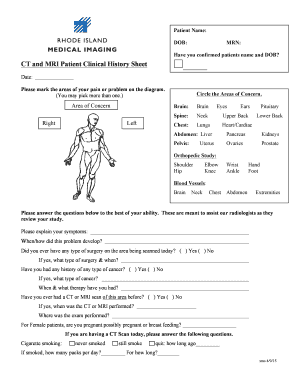
The MRI Patient History Checklist is a medical form used by patients to provide essential medical history information before an MRI procedure.
pdfFiller scores top ratings on review platforms




Who needs Mosaic Life Care Form 4444?
Explore how professionals across industries use pdfFiller.

Mosaic Life Care Form 4444 is needed by:
-
Patients undergoing MRI scans
-
Healthcare providers performing MRI procedures
-
Medical facilities administering MRIs
-
Radiologists and medical imaging professionals
-
Patient representatives completing forms for others
Comprehensive Guide to Mosaic Life Care Form 4444
What is the MRI Patient History Checklist?
The MRI Patient History Checklist is a vital document used to gather essential medical history before undergoing an MRI procedure. This form entails collecting personal details and pertinent medical history to ensure effective preparation for the MRI. Required fields typically include information about prior medical conditions, symptoms, and any existing implants that may influence the MRI process.
Purpose and Benefits of the MRI Patient History Checklist
Completing the MRI Patient History Checklist is crucial for patients as it provides healthcare providers with a comprehensive view of their medical background. One significant benefit of this checklist is the enhancement of safety and accuracy in interpreting MRI results. Furthermore, having complete information can expedite the appointment process, allowing for a smoother experience during the imaging procedure.
Key Features of the MRI Patient History Checklist
This checklist features various fields designed to capture detailed information relevant to the MRI process. Key elements include:
-
Symptomatic information relevant to the MRI.
-
Details about any past injuries.
-
Options for electronic submission.
-
The necessity of signing and dating the completed form.
These usability features facilitate a simpler completion process and ensure that patient information is comprehensively documented.
Who Needs the MRI Patient History Checklist?
The MRI Patient History Checklist is primarily intended for patients who are preparing for an MRI. This form is particularly crucial for individuals with specific medical concerns, such as those who have implants, chronic conditions, or other health issues that need special attention. Additionally, parents or guardians may need to fill out this form on behalf of minors or incapacitated individuals.
How to Fill Out the MRI Patient History Checklist Online (Step-by-Step)
To successfully complete the MRI Patient History Checklist online, follow these steps:
-
Open the checklist and enter your personal details including name and contact information.
-
Provide your weight and height as required.
-
Indicate the reason for the MRI and any specific symptoms you are currently experiencing.
-
Be thorough when detailing your medical history, ensuring all relevant information is included.
-
Double-check for common mistakes, such as incomplete fields or incorrect information.
How to Sign the MRI Patient History Checklist
Correctly signing the MRI Patient History Checklist is essential for its validity. You have a couple of options when it comes to signing the form:
-
Digital signature, which can be added using tools such as pdfFiller.
-
Traditional wet signature, which requires printing the form and signing it manually.
Ensure that your signature is present and the date is clearly marked, as this confirms your acknowledgment of the details provided in the checklist.
Submitting the MRI Patient History Checklist
Once the MRI Patient History Checklist is completed, it can be submitted through various methods:
-
Online submission using platforms like pdfFiller.
-
In-person delivery at the healthcare facility.
Be mindful of any processing times or deadlines for submission, and always retain a copy of the completed form for your personal records.
Security and Compliance for the MRI Patient History Checklist
Users can feel confident in the security of their information when submitting the MRI Patient History Checklist. pdfFiller employs 256-bit encryption and complies with HIPAA regulations to safeguard sensitive medical data. Maintaining confidentiality during the handling of such documents is a priority, ensuring that your information remains secure throughout the entire process.
Visual Example of a Completed MRI Patient History Checklist
For users looking for guidance, a visual example can be invaluable. A filled-out MRI Patient History Checklist showcases:
-
A screenshot highlighting typical entries in each section.
-
Explanatory notes indicating what information should be provided where.
-
Specific tips for ensuring the accuracy of the provided information.
Begin Your MRI Patient History Checklist with pdfFiller
pdfFiller offers an efficient platform for filling out the MRI Patient History Checklist. With its user-friendly capabilities, you can easily edit and eSign documents. Take advantage of pdfFiller's ease of use while ensuring your data remains protected and accessible throughout the process.
How to fill out the Mosaic Life Care Form 4444
-
1.To access the MRI Patient History Checklist on pdfFiller, visit the pdfFiller website and use the search bar to find the form by entering its name.
-
2.Once the form is open, familiarize yourself with the layout. Use the toolbar options to zoom in or out for easier navigation.
-
3.Before you start filling out the form, gather any necessary information, including personal details, past medical history, symptoms, and any implants you may have.
-
4.Begin by entering your personal details in the designated fields, such as your name, weight, and height. It’s important to provide accurate information.
-
5.Next, proceed to the section where you need to indicate the reason for the MRI. Clearly specify any relevant symptoms or injuries that apply.
-
6.Use the checkboxes to indicate any previous medical conditions or implants that might affect the MRI procedure. Be thorough to ensure your safety.
-
7.Don't forget to sign and date the form at the bottom. This step verifies that the information is accurate and complete.
-
8.After completing the fields, review your entries carefully to ensure all information is correct and nothing is left blank.
-
9.When satisfied with your form, use the 'Save' option to store a digital copy. You can also download it as a PDF or submit it directly to your healthcare provider through pdfFiller.
-
10.For further assistance, utilize the help section or customer support feature on pdfFiller if you encounter any issues while filling out the form.

Who needs to complete the MRI Patient History Checklist?
The MRI Patient History Checklist must be completed by patients scheduled for an MRI scan. It ensures healthcare providers have essential medical history information needed for safe imaging.
Are there any specific documents required to fill out this form?
While the form primarily requires personal information, it is helpful to have documents related to your medical history, such as previous medical records, a list of medications, or information about any current symptoms or injuries.
How do I submit the MRI Patient History Checklist after filling it out?
You can submit the completed MRI Patient History Checklist through pdfFiller by downloading it as a PDF and then sending it directly to your healthcare provider either via email or through their patient portal.
Is there a deadline for completing the MRI Patient History Checklist?
It’s recommended to complete and submit the MRI Patient History Checklist at least 24 hours before your scheduled MRI appointment. This will provide your healthcare team adequate time to review your information.
What are some common mistakes to avoid when filling out this form?
Common mistakes include leaving fields blank, providing inaccurate personal information, or failing to indicate relevant medical history. Make sure all information is complete and accurate before submitting it.
Can someone else fill out the form on my behalf?
Yes, a representative can fill out the MRI Patient History Checklist for you, but they must ensure that the information provided is accurate. The form will still need your signature to validate the information.
What should I do if I have questions while completing the form?
If you have questions during the completion of the form, consult the customer support feature on pdfFiller, or contact your healthcare provider for assistance to ensure accuracy.
Related Forms




Related Catalogs
Get the latest insights from our blog


If you believe that this page should be taken down, please follow our DMCA take down process
here
.
This form may include fields for payment information. Data entered in these fields is not covered by PCI DSS compliance.