
Last updated on
Oct 2, 2026
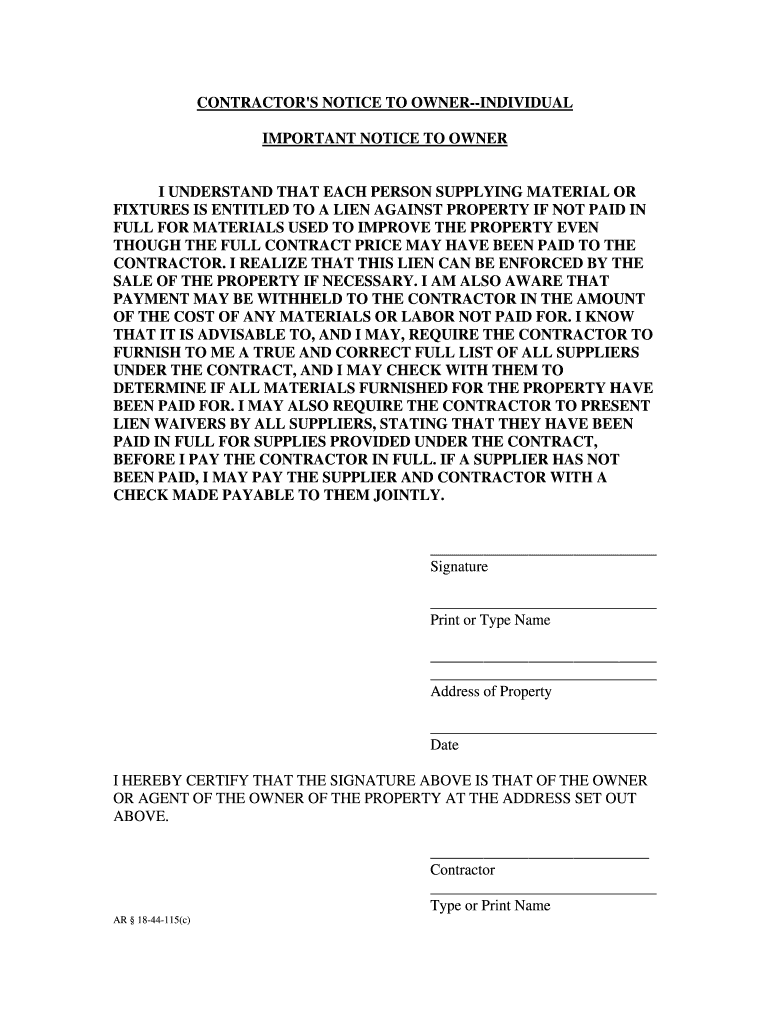
Get the free Contractor's Notice to Owner
We are not affiliated with any brand or entity on this form

Fill out
Complete the form online in a simple drag-and-drop editor.

eSign
Add your legally binding signature or send the form for signing.

Share
Share the form via a link, letting anyone fill it out from any device.

Export
Download, print, email, or move the form to your cloud storage.
Why pdfFiller is the best tool for your documents and forms


End-to-end document management
From editing and signing to collaboration and tracking, pdfFiller has everything you need to get your documents done quickly and efficiently.
Accessible from anywhere
pdfFiller is fully cloud-based. This means you can edit, sign, and share documents from anywhere using your computer, smartphone, or tablet.
Secure and compliant
pdfFiller lets you securely manage documents following global laws like ESIGN, CCPA, and GDPR. It's also HIPAA and SOC 2 compliant.
What is Contractor's Notice to Owner
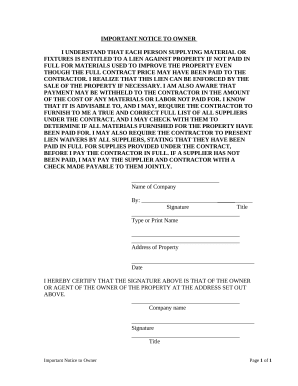
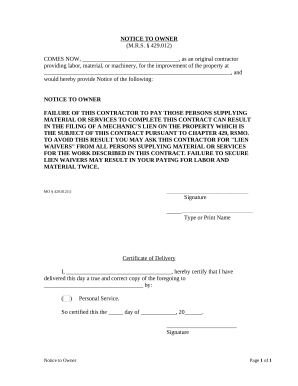
The Contractor's Notice to Owner is a legal document used by contractors in Arkansas to inform property owners about potential liens on property improvements and their associated rights and responsibilities.
pdfFiller scores top ratings on review platforms




Who needs Contractor's Notice to Owner?
Explore how professionals across industries use pdfFiller.

Contractor's Notice to Owner is needed by:
-
Property Owners in Arkansas
-
Contractors working in Arkansas
-
Legal professionals advising on construction law
-
Real estate agents assisting clients with property transactions
-
Individuals involved in construction or property improvement projects
Comprehensive Guide to Contractor's Notice to Owner
What is the Contractor's Notice to Owner?
The Contractor's Notice to Owner is a legal document utilized in Arkansas to officially inform property owners of their rights and obligations concerning construction liens. It serves a crucial role in the lien process, ensuring that all parties involved are aware of the potential for liens on property improvements. This notice must be signed by both the homeowner and the contractor, which solidifies the acknowledgment of the information contained within the document. It is essential for safeguarding the interests of contractors and property owners alike.
Purpose and Benefits of the Contractor's Notice to Owner
Completing the Contractor's Notice to Owner offers several advantages for both property owners and contractors. Primarily, it provides legal implications and protections, ensuring contractors receive payment for their services or materials used. Additionally, this notice is instrumental in preventing disputes and fostering transparency throughout the construction process. By formalizing communication, it creates a clear record that can protect both parties in case of legal issues related to payments.
Who Needs the Contractor's Notice to Owner?
The Contractor's Notice to Owner is designed for contractors operating in Arkansas and property owners who are receiving improvements on their properties. For example, when a homeowner engages a contractor for renovations, this form becomes crucial in protecting both parties. However, misconceptions often arise regarding the necessity of its completion, leading to gaps in essential communication about lien rights and responsibilities.
How to Fill Out the Contractor's Notice to Owner Online
Filling out the Contractor's Notice to Owner can be efficiently done using pdfFiller. Follow these steps for a seamless process:
-
Access the contractor notice to owner form on pdfFiller’s platform.
-
Utilize the interactive fields that prompt for necessary information, including signatures and dates.
-
Ensure all fields are completed accurately to avoid submission errors.
-
Save the filled form for your records or for easy retrieval later.
This platform ensures your document is securely managed and accessible whenever needed.
Common Errors and How to Avoid Them
When completing the Contractor's Notice to Owner, several common errors can occur. Here are pitfalls to avoid:
-
Omitting required signatures from both contractor and owner.
-
Failing to include accurate dates, which can lead to disputes.
-
Neglecting to double-check details for accuracy.
To ensure compliance, verify that all necessary fields are filled out, and consider using validation tools available on platforms like pdfFiller to streamline the process.
Submission Methods for the Contractor's Notice to Owner
When it comes to submitting your completed Contractor's Notice to Owner, you have several options. You can submit your document:
-
Online through pdfFiller’s platform.
-
By printing the completed form and mailing it directly.
-
By delivering it in person, where applicable.
Be mindful of any state-specific requirements that may apply, and adhere to timelines associated with submission to safeguard your rights.
What Happens After You Submit the Contractor's Notice to Owner?
After the submission of the Contractor's Notice to Owner, both the contractor and property owner must be aware of the next steps. Typically, follow-up actions may include:
-
Confirming receipt of the notice.
-
Understanding record retention requirements for future reference.
Both parties should also ensure that they protect the submitted information to maintain confidentiality and prevent unauthorized access.
Security and Compliance for the Contractor's Notice to Owner
Handling sensitive documents like the Contractor's Notice to Owner presents security challenges. PdfFiller implements stringent security measures, including 256-bit encryption and compliance with HIPAA and GDPR regulations. Best practices for maintaining compliance with state laws should also be followed, ensuring that both the document and the information within it are securely managed.
Utilizing pdfFiller for Your Contractor's Notice to Owner Needs
Using pdfFiller to manage your Contractor's Notice to Owner presents numerous advantages. Features like eSigning and document sharing simplify the process, allowing users to complete legal forms efficiently. By taking advantage of these capabilities, you can ensure a smooth and hassle-free form-filling experience, tailored specifically for your needs.
How to fill out the Contractor's Notice to Owner
-
1.Access the Contractor's Notice to Owner form by visiting pdfFiller and searching for the form name in the search bar.
-
2.Once located, click on the form to open it in the pdfFiller editor interface, which allows for easy filling and editing.
-
3.Before filling out the form, gather all necessary information, including your name, address, the contractor's details, and any relevant information about the property improvements.
-
4.Fill in the required fields, including names, addresses, and dates, making sure to provide accurate and complete information in each section.
-
5.Ensure both the owner and contractor's signature fields are signed. You can use pdfFiller's eSignature feature to create signatures easily.
-
6.After completing the form, review all entered information for accuracy and completeness to avoid errors that could delay processing.
-
7.Once reviewed, save the completed form to your pdfFiller account, or choose to download it as a PDF for your records and submission.

Who needs to sign the Contractor's Notice to Owner?
Both the property owner and the contractor need to sign the Contractor's Notice to Owner. This signature process certifies that both parties acknowledge their understanding of potential liens.
Are there any specific deadlines for submitting this form in Arkansas?
While the Contractor's Notice to Owner does not have a strict submission deadline, it is advisable to provide it early in the project to ensure proper notification of lien rights. Check local laws for specifics.
How can I submit the Contractor's Notice to Owner form?
You can submit the form by providing it directly to the property owner or contractor involved in the project. Alternatively, you may need to file it with local authorities depending on the project's requirements.
What should I do if I make a mistake while filling out the form?
If you make a mistake, you can easily correct it within the pdfFiller interface by clicking on the field and editing the information. Ensure to double-check your corrections before finalizing the document.
Is notarization required for the Contractor's Notice to Owner in Arkansas?
No, notarization is not required for the Contractor's Notice to Owner in Arkansas. However, both parties must sign the document to validate it.
What supporting documents do I need when filing this form?
Typically, no specific supporting documents are required when submitting the Contractor's Notice to Owner. However, having relevant property details and contractor information handy will be beneficial.
How long does it take to process the Contractor's Notice to Owner?
Processing times can vary based on local laws and filing methods. Generally, once submitted, the notice is effective immediately, but it’s recommended to check with local authorities.
Related Content
Related Forms




Get the latest insights from our blog


If you believe that this page should be taken down, please follow our DMCA take down process
here
.
This form may include fields for payment information. Data entered in these fields is not covered by PCI DSS compliance.