
Last updated on
Oct 31, 2026

Get the free GD11 Excavations Checklist
We are not affiliated with any brand or entity on this form

Fill out
Complete the form online in a simple drag-and-drop editor.

eSign
Add your legally binding signature or send the form for signing.

Share
Share the form via a link, letting anyone fill it out from any device.

Export
Download, print, email, or move the form to your cloud storage.
Why pdfFiller is the best tool for your documents and forms


End-to-end document management
From editing and signing to collaboration and tracking, pdfFiller has everything you need to get your documents done quickly and efficiently.
Accessible from anywhere
pdfFiller is fully cloud-based. This means you can edit, sign, and share documents from anywhere using your computer, smartphone, or tablet.
Secure and compliant
pdfFiller lets you securely manage documents following global laws like ESIGN, CCPA, and GDPR. It's also HIPAA and SOC 2 compliant.
What is Excavations Checklist
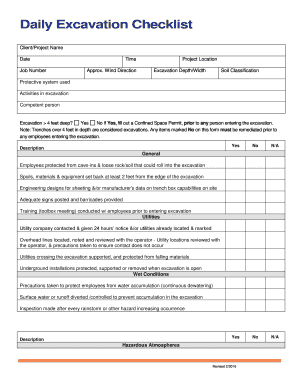
The GD11 Excavations Checklist is a health and safety document used by managers in the UK construction industry to assess and manage risks associated with excavation work.
pdfFiller scores top ratings on review platforms




Who needs Excavations Checklist?
Explore how professionals across industries use pdfFiller.

Excavations Checklist is needed by:
-
Construction Site Managers
-
Health and Safety Officers
-
Project Supervisors
-
Excavation Contractors
-
Compliance Officers
-
Training Coordinators
Comprehensive Guide to Excavations Checklist
What is the GD11 Excavations Checklist?
The GD11 Excavations Checklist is a crucial health and safety document used within the UK construction industry. Its primary purpose is to assess and manage risks associated with excavation work, ensuring safety compliance throughout the process. The checklist addresses various types of risks related to excavation activities, such as ground instability, hazardous materials, and potential utility strikes.
Furthermore, it mandates a managerial signature, emphasizing its role in regulatory compliance. By utilizing the GD11 Excavations Checklist, teams are better equipped to identify and mitigate risks effectively, fostering a safer working environment.
Purpose and Benefits of the GD11 Excavations Checklist
The GD11 Excavations Checklist is essential for enhancing safety management on construction sites. This checklist not only ensures compliance with safety regulations but also facilitates comprehensive risk assessments, ultimately minimizing workplace hazards. By employing this checklist, teams can significantly improve safety protocols and procedures during excavation activities.
Benefits of using the checklist include the following:
-
Enhanced safety compliance through systematic documentation
-
Improved identification of risks and implementation of safety measures
-
Promotion of a secure work environment for all excavation projects
Key Features of the GD11 Excavations Checklist
The GD11 Excavations Checklist is comprehensive, including several significant components aimed at ensuring safety and compliance. Key features consist of:
-
Identification of major hazards specific to excavation work
-
Detailing safety measures to mitigate identified risks
-
Requirements for compliance with health and safety regulations
Additionally, the checklist includes sections that address health considerations and environmental factors related to excavation. This structure allows for the effective gathering of comprehensive safety information, which is crucial for safe excavation practices.
Who Needs the GD11 Excavations Checklist?
The GD11 Excavations Checklist is necessary for various professionals involved in excavation projects. It is particularly vital for managers, who not only use the checklist but also must sign off to validate its accuracy and completeness. Their role is significant, especially in high-risk excavation scenarios where thorough documentation and compliance checks are critical.
The following roles are typically required to utilize the checklist:
-
Site Managers
-
Health and Safety Officers
-
Excavation Supervisors
How to Fill Out the GD11 Excavations Checklist Online
Filling out the GD11 Excavations Checklist using pdfFiller is a straightforward process. Follow these steps for effective completion:
-
Access the checklist through pdfFiller's platform.
-
Review each section and input the necessary data, ensuring accuracy.
-
Utilize checkbox options for safety checks and emergency plans as required.
Before starting, gather all pertinent information to streamline the filling process. This preparation will help ensure that you complete the checklist accurately and efficiently.
Reviewing and Validating the GD11 Excavations Checklist
Reviewing the completed GD11 Excavations Checklist is vital to ensure accuracy and compliance with regulatory standards. It is essential to verify that all fields have been filled out correctly and address any common errors that may arise during completion.
Consider using the following checklist to avoid errors:
-
Confirm all required fields are filled.
-
Check for inconsistencies in the provided information.
-
Ensure all signatures are obtained where necessary.
Managers play a crucial role in this validation process, as their oversight guarantees thoroughness and compliance within excavation projects.
How to Sign the GD11 Excavations Checklist
Signing the GD11 Excavations Checklist is essential for verification. Users can use either digital or wet signatures, depending on their preferences and legal requirements. Not providing a signature can lead to significant implications concerning the legality of the document.
For digital signing, pdfFiller offers an eSigning feature that simplifies the signing process, ensuring that users can meet their compliance requirements efficiently.
Where to Submit the GD11 Excavations Checklist
After completing the checklist, you must submit it to the designated regulatory bodies that require this documentation for oversight. Ensure to adhere to submission deadlines and processing times to maintain compliance with safety regulations.
Knowing where to submit the checklist is critical for avoiding delays and ensuring that all documentation meets the necessary compliance standards.
Security and Compliance for the GD11 Excavations Checklist
Data security and compliance are paramount when handling sensitive documents like the GD11 Excavations Checklist. pdfFiller takes the protection of your information seriously by employing robust security features, such as 256-bit encryption and adherence to regulations like GDPR.
Users can trust that their data is secure while using pdfFiller to manage their excavation safety documentation.
Enhance Your GD11 Excavations Checklist Experience with pdfFiller
Utilizing pdfFiller enhances the experience of filling out and managing the GD11 Excavations Checklist. With a cloud-based service, users can access the checklist anytime, anywhere, facilitating easy updates and collaboration.
Additional functionalities such as form sharing and document organization also support users in effectively managing their construction projects and ensuring compliance with necessary safety protocols.
How to fill out the Excavations Checklist
-
1.To access the GD11 Excavations Checklist on pdfFiller, visit the pdfFiller website and search for the form by its name or browse through the category for Business Forms.
-
2.Once you have located the form, click on it to open and start editing. You will be presented with the form fields, checkboxes, and signature lines required for completion.
-
3.Before you begin filling out the form, gather all relevant information, including details on hazards, safety measures, environmental factors, and any previous assessments. This will help ensure you complete the form accurately.
-
4.Navigate through the checklist by clicking on the fields. Fill in responses to the items as appropriate, using the 'Yes', 'No', or 'N/A' options available. Make sure to provide additional notes where required to elaborate on your answers.
-
5.After completing all the necessary fields, review the entire checklist to ensure that all sections are filled out properly and that there are no missing entries. Pay particular attention to compliance and emergency planning sections.
-
6.Once you are satisfied with your entries, sign the form by clicking on the signature field. If required, you may invite others to sign or review before final submission.
-
7.To save your work, click the save button. You can download the completed GD11 Excavations Checklist in PDF format or submit it directly through pdfFiller's submission options, depending on your needs.

Who is eligible to use the GD11 Excavations Checklist?
The GD11 Excavations Checklist is primarily designed for use by construction site managers and health and safety officers. Any personnel responsible for excavation work and safety management can utilize the form.
Are there deadlines for submitting the GD11 Excavations Checklist?
While there are no strict deadlines typically associated with this checklist, it should be completed before commencing any excavation work to ensure compliance with safety regulations.
How should I submit the completed GD11 Excavations Checklist?
You can submit the completed GD11 Excavations Checklist through pdfFiller by using the submission options provided on the platform or download it to submit via your preferred method, such as email or print.
What supporting documents are required with this form?
Although the GD11 Excavations Checklist does not explicitly require supporting documents, it is advisable to have previous safety assessments, risk evaluations, and environmental impact reports readily available for reference.
What are common mistakes to avoid when completing this checklist?
Common mistakes include leaving sections incomplete, misunderstanding hazard assessments, and failing to gather necessary signatures. Ensure all fields are thoroughly completed and review the form for accuracy prior to submission.
What is the processing time after submitting the GD11 Excavations Checklist?
Processing time may vary depending on the organization or agency requiring the checklist. Typically, it is advisable to allow for a review period before starting excavation work.
Is notarization required for the GD11 Excavations Checklist?
No, notarization is not required for the GD11 Excavations Checklist. However, it must be signed by a manager to ensure accountability and compliance with safety regulations.
Related Forms




Related Catalogs
Get the latest insights from our blog



If you believe that this page should be taken down, please follow our DMCA take down process
here
.
This form may include fields for payment information. Data entered in these fields is not covered by PCI DSS compliance.