
Last updated on
Nov 4, 2026

PK Registration Form for Membership Drive P-II 2015 free printable template
We are not affiliated with any brand or entity on this form

Fill out
Complete the form online in a simple drag-and-drop editor.

eSign
Add your legally binding signature or send the form for signing.

Share
Share the form via a link, letting anyone fill it out from any device.

Export
Download, print, email, or move the form to your cloud storage.
Why pdfFiller is the best tool for your documents and forms


End-to-end document management
From editing and signing to collaboration and tracking, pdfFiller has everything you need to get your documents done quickly and efficiently.
Accessible from anywhere
pdfFiller is fully cloud-based. This means you can edit, sign, and share documents from anywhere using your computer, smartphone, or tablet.
Secure and compliant
pdfFiller lets you securely manage documents following global laws like ESIGN, CCPA, and GDPR. It's also HIPAA and SOC 2 compliant.
What is PK Registration Form for Membership Drive P-II
The Federal Government Employees Housing Foundation Registration Form is an application document used by federal government employees in Pakistan to request membership in the housing foundation.
pdfFiller scores top ratings on review platforms




Found my way here to create a W2...seems like the easiest choice!
Very easy to use. Quickly filled out 32 forms.
Who needs PK Registration Form for Membership Drive P-II?
Explore how professionals across industries use pdfFiller.

PK Registration Form for Membership Drive P-II is needed by:
-
Federal government employees in Pakistan
-
Applicants seeking housing benefits
-
Officers verifying applications
-
Legislators involved in housing initiatives
-
Personnel from government departments processing applications
Comprehensive Guide to PK Registration Form for Membership Drive P-II
Understanding the Federal Government Employees Housing Foundation Registration Form
The Federal Government Employees Housing Foundation Registration Form is essential for federal employees in Pakistan who wish to apply for housing membership. This form streamlines the process of submitting applications, ensuring that applicants provide all necessary information to qualify for housing opportunities. Understanding the registration form's importance can significantly enhance the likelihood of a successful application.
This form plays a vital role in facilitating housing membership applications for federal employees, enabling them to secure housing solutions that meet their needs.
Purpose and Benefits of the Federal Government Employees Housing Foundation Registration Form
The primary purpose of the Federal Government Employees Housing Foundation Registration Form is to enable federal employees to gain access to affordable housing options. By joining the housing foundation, applicants can avail a variety of benefits, such as eligibility for housing schemes and priority access to housing developments.
After submitting the form, applicants can expect to receive updates regarding their application status, as well as information about next steps in the process. The efficiency of this system ensures that applicants are kept informed throughout.
Who Needs the Federal Government Employees Housing Foundation Registration Form?
The registration form is specifically designed for federal government employees who wish to apply for housing through the foundation. To qualify, individuals must meet certain eligibility criteria established by the foundation. Generally, this includes being an active employee in a federal department.
Individuals who qualify can take advantage of the benefits provided by the housing foundation and ensure they are on the path to securing housing opportunities.
How to Fill Out the Federal Government Employees Housing Foundation Registration Form Online
Filling out the Federal Government Employees Housing Foundation Registration Form online is straightforward. Follow these steps for digital completion:
-
Access the form on the official website.
-
Fill in personal and official information accurately.
-
Use features of pdfFiller, such as autofill and template saving, to enhance your experience.
-
Review your entries for any errors or omissions.
-
Sign the form electronically before submission.
Fields and Sections Explained in the Federal Government Employees Housing Foundation Registration Form
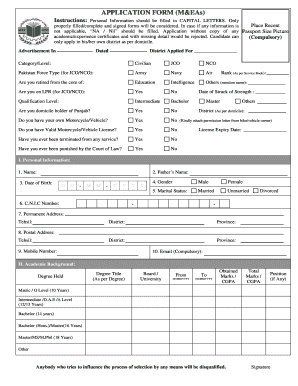
The registration form comprises several key fields that are crucial for the application process. Applicants must include their personal information, CNIC number, date of birth, and service details. Each section requires specific information to assess eligibility effectively.
-
Personal Information: Full name, contact details, and address
-
Official Information: Department name and service status
-
Supporting Documents: Photograph and photocopy of CNIC
Common Errors and How to Avoid Them When Submitting the Federal Government Employees Housing Foundation Registration Form
Many applicants encounter common pitfalls during the submission process. To avoid mistakes, consider the following tips:
-
Double-check all information for accuracy, especially identification numbers.
-
Ensure that your contact details are current and correct.
-
Review all attached documents to ensure they meet the requirements.
By being diligent in these areas, applicants can improve their chances of a successful submission.
Submission Methods for the Federal Government Employees Housing Foundation Registration Form
Once completed, the registration form can be submitted through various methods. Typically, applicants can submit their forms in person at designated offices or via postal services. Each method has its own procedures, and applicants should choose the most convenient option for them.
-
In-Person: Visit the nearest housing foundation office.
-
Through Post: Mail the completed form to the designated address.
Fees and Payment Methods for the Federal Government Employees Housing Foundation Registration Form
Applying for membership through the Federal Government Employees Housing Foundation may involve certain fees. These fees can vary based on the specific housing scheme. Applicants should be aware of the fees associated with their application and available payment options.
-
Payment can typically be made at branches of Askari Bank Limited.
-
Check for any fee waivers if applicable, based on employment status.
What to Do After Submitting the Federal Government Employees Housing Foundation Registration Form
After submitting the registration form, applicants should monitor their application status. This can typically be done through contact with the foundation or checking online resources provided after submission. Additionally, applicants may receive confirmation and updates regarding processing timelines.
Utilizing pdfFiller for Your Federal Government Employees Housing Foundation Registration Form
Using pdfFiller to complete the Federal Government Employees Housing Foundation Registration Form offers several advantages. The platform ensures secure handling of personal information with 256-bit encryption and compliance with privacy regulations.
pdfFiller’s ease of use allows for efficient form filling, signing, and submitting without the need for downloads. This guarantees that applicants can manage their documents safely and securely.
How to fill out the PK Registration Form for Membership Drive P-II
-
1.Access the Federal Government Employees Housing Foundation Registration Form on pdfFiller by searching for the form name in the search bar.
-
2.Open the form by clicking on it. You will see various fields that need to be filled out.
-
3.Gather necessary information before starting. This includes your name, date of birth, CNIC number, service status, and department details, along with a photograph and a photocopy of your CNIC.
-
4.Begin filling out the personal information section. Click on each field to enter text using your keyboard or select options from drop-down boxes where needed.
-
5.Complete the official information section, ensuring accuracy as your department will need to verify details.
-
6.Choose your preferred housing locations from the options provided in the form's designated area. Make sure to check any required boxes accordingly.
-
7.Review all entries made throughout the form for completeness and correctness. It’s crucial that your information is accurate to avoid delays.
-
8.Finalize the form by signing where indicated. You may need to enable electronic signature options available on pdfFiller if you are signing digitally.
-
9.After signing, save your progress by clicking the save button. You can download the form to your device, or use the built-in submit options to send it directly to your department or the housing foundation.

Who is eligible to complete the Federal Government Employees Housing Foundation Registration Form?
Eligibility to complete the form is limited to federal government employees in Pakistan. You must provide accurate personal and official information and ensure that you meet the criteria for housing membership.
What documents are required when submitting the form?
Applicants must provide a photocopy of their CNIC and a recent photograph. Ensure these documents are ready before you begin filling out the form.
Is there a fee associated with submitting the application?
Yes, a membership fee is required. This fee must be deposited at any branch of Askari Bank Limited before submission to complete your application.
How do I ensure my application is processed correctly?
Double-check all the information entered on your form. Make sure signatures required from the applicant and the verifying department are completed accurately.
What is the processing time for the application?
Processing times for membership applications can vary, but typically the housing foundation will communicate relevant timelines upon receiving your completed form.
Can I fill out the form electronically?
Yes, the form is available in fillable format on pdfFiller, allowing for electronic completion and submission.
What are common mistakes to avoid when filling out this form?
Common mistakes include incomplete fields, signing errors, and submitting without the required documents. Review all instructions carefully to ensure accuracy.
PK Registration Form for Membership Drive P-II Form Versions
Related Forms




Related Catalogs
Get the latest insights from our blog


If you believe that this page should be taken down, please follow our DMCA take down process
here
.
This form may include fields for payment information. Data entered in these fields is not covered by PCI DSS compliance.