
Last updated on
Nov 9, 2026
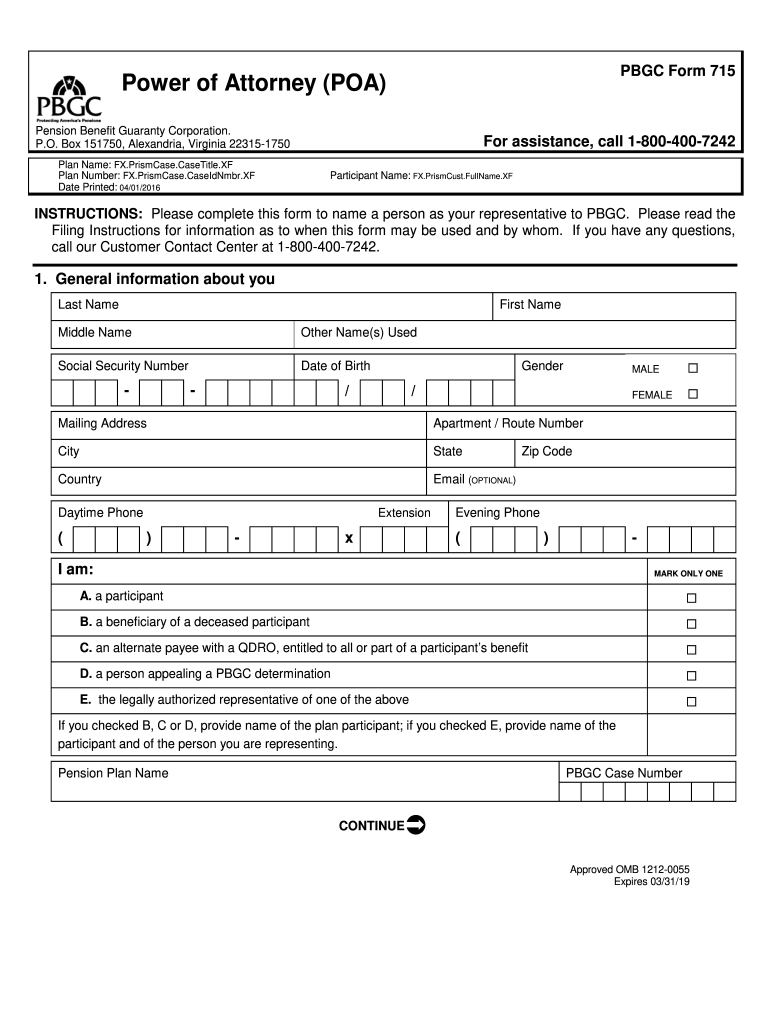
PBGC 715 2019-2026 free printable template
pdfFiller is not affiliated with any government organization

Fill out
Complete the form online in a simple drag-and-drop editor.

eSign
Add your legally binding signature or send the form for signing.

Share
Share the form via a link, letting anyone fill it out from any device.

Export
Download, print, email, or move the form to your cloud storage.
Why pdfFiller is the best tool for your documents and forms


End-to-end document management
From editing and signing to collaboration and tracking, pdfFiller has everything you need to get your documents done quickly and efficiently.
Accessible from anywhere
pdfFiller is fully cloud-based. This means you can edit, sign, and share documents from anywhere using your computer, smartphone, or tablet.
Secure and compliant
pdfFiller lets you securely manage documents following global laws like ESIGN, CCPA, and GDPR. It's also HIPAA and SOC 2 compliant.
What is PBGC 715
The Power of Attorney Form 715 is a legal document used by individuals to authorize a representative to manage actions with the Pension Benefit Guaranty Corporation (PBGC) on their behalf.
pdfFiller scores top ratings on review platforms




Who needs PBGC 715?
Explore how professionals across industries use pdfFiller.

PBGC 715 is needed by:
-
Individuals needing to designate a representative for PBGC matters
-
Beneficiaries of pension plans seeking representation
-
Payees requiring assistance with PBGC actions
-
Legal representatives acting on behalf of clients
-
Participants in pension plans needing advocate support
-
Individuals involved in PBGC disputes or claims
Comprehensive Guide to PBGC 715
What is the Power of Attorney Form 715?
The Power of Attorney Form 715 serves as a legal document that allows participants to designate a representative to handle matters involving the Pension Benefit Guaranty Corporation (PBGC). This form is crucial for individuals who may need assistance due to incapacity or other personal circumstances that prevent them from managing their affairs effectively. Anyone involved with the PBGC, including beneficiaries and alternate payees, may utilize this form when certain situations arise, such as retirement or pension-related issues.
Understanding the importance of the Power of Attorney Form 715 is essential for ensuring that one’s interests are properly represented. The form provides a structured way to grant authority to someone else, ensuring that legal complexities are minimized.
Purpose and Benefits of the Power of Attorney Form 715
The primary purpose of the Power of Attorney Form 715 is to name a representative who can act on behalf of a participant regarding PBGC matters. This arrangement ensures that all necessary documents can be signed by a designated individual, relieving participants from the burden of paperwork that may be too complicated or time-consuming. Having a representative also means that all actions taken are legally sanctioned, which can prevent disputes later.
-
The representative can efficiently manage and access relevant information regarding pension benefits.
-
Participants can feel assured that their interests are handled correctly during their absence or incapacity.
-
Appointing a trusted individual can speed up processes when dealing with the PBGC.
Key Features of the Power of Attorney Form 715
This form includes several user-friendly features designed to simplify the completion process. One of its key attributes is the fillable fields, which require specific personal information such as names, addresses, and Social Security Numbers. Clear instructions accompany the form, ensuring users understand how to fill it out correctly. This accessibility is enhanced by the availability of the form through pdfFiller, making it easy for users to complete and submit it digitally.
-
Fillable fields include essential data points like names and signatures.
-
Instructions provided guide users through the filling process.
-
Accessible via pdfFiller for easy completion.
Who Needs the Power of Attorney Form 715?
Various individuals may require the Power of Attorney Form 715 to streamline their dealings with the PBGC. For example, participants who are nearing retirement or beneficiaries needing assistance with claims may find this form pivotal. Additionally, individuals facing challenges such as health issues or absences might need to appoint a representative to ensure their pension matters are effectively managed.
-
Participants unable to manage their affairs independently.
-
Beneficiaries seeking more ease in handling PBGC matters.
-
Individuals planning for future incapacity, allowing for quick and trusted representation.
How to Fill Out the Power of Attorney Form 715 Online (Step-by-Step)
Completing the Power of Attorney Form 715 online is a straightforward process, especially using pdfFiller. To begin, users can access the form directly through the platform and start filling it out. The following steps outline the procedure:
-
Open the Power of Attorney Form 715 in pdfFiller.
-
Complete each fillable field, including Last Name, SSN, and address.
-
Ensure both the payee and representative sign and date the form.
-
Review all entries for accuracy and compliance before submission.
Signing the Power of Attorney Form 715
When it comes to signing the Power of Attorney Form 715, particular requirements must be met to ensure validity. Users have the option to use a digital signature or a traditional wet signature, depending on their preference and accessibility. It's also vital to confirm the identity of the signers, ensuring that the form is legally sound.
pdfFiller streamlines the signing process by providing e-signature capabilities, which can help in validating signatures quickly and efficiently.
Submission Methods and Delivery for the Power of Attorney Form 715
After filling out the Power of Attorney Form 715, users need to know how to submit it properly. Several submission methods are available, allowing flexibility based on user preference. Users can choose to submit the form online through pdfFiller or send it via traditional mail. It is important to know where to direct the completed form to ensure it reaches the appropriate PBGC office.
-
Submit the form online through pdfFiller.
-
Mail the completed form to the designated PBGC address.
-
Check for any associated fees and estimated processing times for submissions.
Common Errors to Avoid When Filling Out the Power of Attorney Form 715
While completing the Power of Attorney Form 715, users may encounter frequent pitfalls that could render the form invalid. Common errors include leaving crucial fields blank or providing incorrect information. It's essential to double-check the signature validation and clarity of dates to maintain compliance before submission.
-
Avoid skipping required fields that must be filled out.
-
Ensure signatures are valid and properly dated.
-
Cross-check all information entered for accuracy.
Security and Compliance for the Power of Attorney Form 715
Users can rest assured that the handling of the Power of Attorney Form 715 is secure, thanks to pdfFiller's robust security features. The platform employs 256-bit encryption and adheres to strict compliance standards such as HIPAA and GDPR, providing a safe environment for sensitive document processing and storage. Understanding the importance of privacy and data protection is essential when dealing with personal information during the form completion process.
Experience Hassle-Free Document Management with pdfFiller
For those seeking an efficient method for managing the Power of Attorney Form 715, pdfFiller offers a seamless document management experience. The platform’s cloud-based editor simplifies the form-filling process, making it user-friendly and accessible from anywhere with internet connectivity. With a large and trusted user base, pdfFiller is an excellent option for individuals looking to manage their legal documents effectively.
How to fill out the PBGC 715
-
1.Start by accessing pdfFiller and logging into your account.
-
2.Search for the Power of Attorney Form 715 in the template library.
-
3.Open the form and familiarize yourself with the structure and fields.
-
4.Gather necessary personal details such as your name, social security number, and address.
-
5.Fill in the required fields, including your contact information and the representative's details.
-
6.Use the checkboxes to specify the actions you authorize the representative to take.
-
7.Carefully review each section for accuracy, paying attention to the spelling of names and numbers.
-
8.Once completed, ensure both you and the representative sign and date the form as required.
-
9.After finishing, use pdfFiller's tools to save your form and choose the appropriate options for downloading or sharing.
-
10.Finally, submit the completed form via the preferred method outlined in the instructions if needed.

Who is eligible to use the Power of Attorney Form 715?
Any individual who wishes to designate a representative to act on their behalf with the Pension Benefit Guaranty Corporation (PBGC) can use the Power of Attorney Form 715, including participants, beneficiaries, and payees.
What is the deadline for submitting the Power of Attorney Form 715?
While there is no specific deadline mentioned for the Power of Attorney Form 715, it should be submitted as soon as possible to avoid delays in representation and PBGC interactions.
How should I submit the Power of Attorney Form 715?
You can submit the Power of Attorney Form 715 through the PBGC's website, by mail, or via any instructions provided on the form. Ensure to follow the specific submission guidelines as required.
What supporting documents are required with the form?
Typically, no additional supporting documents are required with the Power of Attorney Form 715. However, it is advisable to verify whether any specific identification or related documents need to accompany your form.
What common mistakes should I avoid when filling out the form?
Common mistakes include incorrect spelling of names, missing signatures, and not providing complete personal details. Thoroughly reviewing the form before submitting can help avoid these issues.
How long does it take to process the Power of Attorney Form 715?
Processing times can vary, but typically you can expect a few weeks for the Power of Attorney Form 715 to be acknowledged by the PBGC. Contact them directly for more specific timelines.
Can the Power of Attorney Form 715 be notarized?
No, the notarization of the Power of Attorney Form 715 is not required. However, ensuring that both parties sign the document is essential for it to be valid.
Related Forms



Get the latest insights from our blog



If you believe that this page should be taken down, please follow our DMCA take down process
here
.
This form may include fields for payment information. Data entered in these fields is not covered by PCI DSS compliance.