
Last updated on
Nov 7, 2026

Get the free Accident Report Form
We are not affiliated with any brand or entity on this form

Fill out
Complete the form online in a simple drag-and-drop editor.

eSign
Add your legally binding signature or send the form for signing.

Share
Share the form via a link, letting anyone fill it out from any device.

Export
Download, print, email, or move the form to your cloud storage.
Why pdfFiller is the best tool for your documents and forms


End-to-end document management
From editing and signing to collaboration and tracking, pdfFiller has everything you need to get your documents done quickly and efficiently.
Accessible from anywhere
pdfFiller is fully cloud-based. This means you can edit, sign, and share documents from anywhere using your computer, smartphone, or tablet.
Secure and compliant
pdfFiller lets you securely manage documents following global laws like ESIGN, CCPA, and GDPR. It's also HIPAA and SOC 2 compliant.
What is accident report form
The Accident Report Form is a document used by production companies in the entertainment industry to document accidents involving performers for compliance and insurance purposes.
pdfFiller scores top ratings on review platforms




Who needs accident report form?
Explore how professionals across industries use pdfFiller.

Accident report form is needed by:
-
Production companies managing filming activities
-
Safety officers ensuring compliance with regulations
-
Performers involved in live or recorded productions
-
Insurance adjusters requiring accident documentation
-
Legal teams addressing accident-related claims
Comprehensive Guide to accident report form
What is the Accident Report Form?
The Accident Report Form is a crucial document used in the entertainment industry to systematically document accidents involving performers. Its primary purpose lies in ensuring accurate reporting of incidents that occur on film sets and during production, enhancing overall production safety. By maintaining a comprehensive record, production companies can better manage risks associated with performer injury and compliance with California accident form regulations.
Purpose and Benefits of the Accident Report Form
Submitting the Accident Report Form presents multiple advantages for production companies. Primarily, it aids in compliance with essential safety regulations, protecting the well-being of all involved. This form is also vital for legal documentation and insurance purposes, providing necessary evidence in case of a performer injury or other production-related incidents.
Key Features of the Accident Report Form
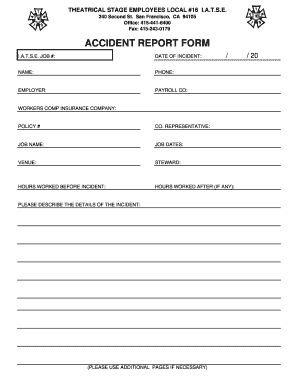
The structure of the Accident Report Form includes fillable fields and checkboxes designed to capture critical information about the incident. Key details requested on the form encompass information about the accident, medical treatment received, and participant information. The design facilitates efficient completion, particularly for commercial accidents and incidents involving stunt performer injury.
Who Needs the Accident Report Form?
This form is essential for a variety of roles within the entertainment industry, including producers, production companies, and performers. It becomes necessary in various scenarios, such as accidents occurring during filming, to ensure proper documentation and a focus on production company safety.
How to Fill Out the Accident Report Form Online (Step-by-Step)
-
Access the Accident Report Form through pdfFiller.
-
Begin by entering the performer’s information in the designated fields.
-
Document the accident date using the provided format.
-
Provide a comprehensive description of the accident.
-
Review all entered details for accuracy before submission.
Common Errors and How to Avoid Them
When filling out the Accident Report Form, several common mistakes can lead to inefficiencies. To ensure accurate and complete submissions, avoid incomplete fields and ensure that all necessary checkboxes are ticked. Utilize a review checklist to cross-check the submitted information against the requirements of field validation.
Submission Methods and Deadlines for the Accident Report Form
Completed Accident Report Forms can be submitted online via pdfFiller, or through designated postal services as per California production regulations. It is critical to note the key deadlines for submission to satisfy regulatory requirements, avoiding potential penalties or delays in processing your form.
What Happens After You Submit the Accident Report Form?
Upon submission of the Accident Report Form, the processing of documentation begins, which may include follow-up actions as necessary. To track the status of your submission, keep any confirmation received and be prepared to provide additional details if requested.
Supporting Documents Required for the Accident Report Form
In addition to filling out the form, several supporting documents may be required to validate the accident claim. This documentation typically includes medical reports, witness statements, and any photographic evidence related to the accident, reinforcing the importance of thorough evidence collection.
How pdfFiller Enhances Your Experience with the Accident Report Form
pdfFiller provides enhanced capabilities for handling the Accident Report Form, allowing users to edit, eSign, and securely share their documents. Its cloud-based PDF editor ensures a user-friendly process, while maintaining the highest security standards to safeguard sensitive information, including 256-bit encryption and compliance with HIPAA and GDPR.
Get Started with the Accident Report Form Today!
Utilizing pdfFiller simplifies the process of filling out the Accident Report Form. With intuitive features tailored for ease of use, users can quickly complete the form and ensure thorough documentation of any incidents, promoting a safer environment within the entertainment industry.
How to fill out the accident report form
-
1.To access the Accident Report Form on pdfFiller, navigate to the website and search for the form by name in the search bar. Click on the form link to open it in the editor.
-
2.Once the form is open, use the interactive fields to complete the required information. Click on each field to enter text or select from checkboxes as applicable.
-
3.Before filling out the form, gather necessary information about the accident. This includes details about the performer, the date of the accident, and a brief description of the incident.
-
4.As you fill out the form, follow the instructions provided, ensuring all required fields are completed accurately for effective documentation.
-
5.After completing all sections, review your entries carefully for any errors or missing information. Ensure that all details accurately represent the accident.
-
6.Once satisfied with your form, save your changes. Use pdfFiller's save option to keep a copy of your filled form.
-
7.You can also download the form as a PDF or submit it directly through pdfFiller, following the submission options provided in the platform.

Who is eligible to fill out the Accident Report Form?
The Accident Report Form is intended for use by production companies, safety personnel, and performers involved in accidents during filming activities.
Is there a specific deadline for submitting this form?
While there may not be a strict deadline, it is advisable to submit the Accident Report Form as soon as possible after an incident to ensure compliance with safety regulations.
How can I submit the completed Accident Report Form?
You can submit the completed form via pdfFiller by choosing the submission options available. Alternatively, you can download it and send it via email or conventional mail as per your company’s procedures.
What supporting documents do I need to attach?
Common supporting documents may include medical reports, witness statements, or any photographic evidence that can substantiate the details of the accident.
What are some common mistakes to avoid when filling out this form?
Ensure all fields are filled out accurately and completely. Avoid leaving any required fields blank, and double-check dates and descriptions to prevent errors.
What is the processing time for this form?
Processing times may vary by company policy, but it is recommended to process the form quickly for compliance with safety regulations and insurance claims.
What should I do if I notice a mistake after submitting the form?
If you notice a mistake after submission, contact your supervisor or the relevant department immediately to address the error and provide corrected information as needed.
Related Forms




Related Catalogs
Get the latest insights from our blog


If you believe that this page should be taken down, please follow our DMCA take down process
here
.
This form may include fields for payment information. Data entered in these fields is not covered by PCI DSS compliance.