
Last updated on
Oct 31, 2026

Get the free Aide Activity Record Form
We are not affiliated with any brand or entity on this form

Fill out
Complete the form online in a simple drag-and-drop editor.

eSign
Add your legally binding signature or send the form for signing.

Share
Share the form via a link, letting anyone fill it out from any device.

Export
Download, print, email, or move the form to your cloud storage.
Why pdfFiller is the best tool for your documents and forms


End-to-end document management
From editing and signing to collaboration and tracking, pdfFiller has everything you need to get your documents done quickly and efficiently.
Accessible from anywhere
pdfFiller is fully cloud-based. This means you can edit, sign, and share documents from anywhere using your computer, smartphone, or tablet.
Secure and compliant
pdfFiller lets you securely manage documents following global laws like ESIGN, CCPA, and GDPR. It's also HIPAA and SOC 2 compliant.
What is Aide Record
The Aide Activity Record Form is a healthcare document used by consumers and healthcare aides to record and certify the activities and hours worked by the aide.
pdfFiller scores top ratings on review platforms




Who needs Aide Record?
Explore how professionals across industries use pdfFiller.

Aide Record is needed by:
-
Healthcare aides needing to document their work hours
-
Consumers requiring a record of aide activities
-
Healthcare agencies managing caregiver documentation
-
Human resources departments in healthcare settings
-
Legal representatives for medical compliance
-
Accounting departments processing payment for services
Comprehensive Guide to Aide Record
What is the Aide Activity Record Form?
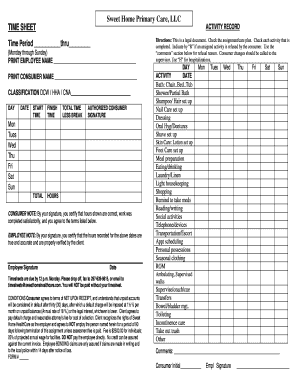
The Aide Activity Record Form is a vital healthcare document used to record and certify the activities and hours worked by healthcare aides for consumers. This essential form plays an important role in healthcare documentation by providing a structured method to ensure transparency in service delivery. Key components of this form include fields for consumer and employee names, comprehensive descriptions of activities performed, and spaces for necessary signatures.
-
Definition of the Aide Activity Record Form
-
Overview of its role in healthcare documentation
-
Key components included in the form, such as consumer and employee names, activities performed, and signatures
Purpose and Benefits of the Aide Activity Record Form
Accurately keeping records of aide activities and work hours is crucial for both consumers and employees. This form facilitates transparency and accountability in healthcare provision, benefiting consumers by ensuring that services are documented and validated. For employees, it provides accurate documentation essential for payment processing.
-
Importance of accurately recording aide activities and work hours
-
Benefits for consumers, including transparency and accountability
-
Benefits for employees, such as proper documentation for payment
Key Features of the Aide Activity Record Form
This form features several user-friendly components that make it effective for recording vital information. It includes fillable fields like 'Consumer/Client Name' and 'Employee Signature,' along with checkboxes for activities performed, facilitating ease of use. Additionally, the form outlines important terms and conditions regarding payment and employment, ensuring that all parties are informed and compliant.
-
Overview of fillable fields including ‘Consumer/Client Name’ and ‘Employee Signature’
-
Explanation of checkboxes for activities performed
-
Inclusion of terms and conditions related to payment and employment
Who Needs to Use the Aide Activity Record Form?
The Aide Activity Record Form is designed for consumers receiving care and the healthcare aides delivering that care. It is essential in various settings, particularly home health care, where accurate documentation is vital for compliance with healthcare regulations. Completion of the form is critical for ensuring all requirements are met while delivering care.
-
Roles of consumers and healthcare aides in utilizing the form
-
Situations and settings where the form is applied, such as home health care
-
Importance of completion for compliance with healthcare regulations
How to Fill Out the Aide Activity Record Form Online
Filling out the Aide Activity Record Form online is streamlined for user convenience. To begin, access the form via pdfFiller. It is advisable to gather all necessary information beforehand to facilitate a smooth completion process. Each field is clearly defined, and understanding common pitfalls can help users avoid errors.
-
Instructions on accessing the form via pdfFiller
-
Tips for gathering necessary information before filling out the form
-
Detailed explanations of each field, including common pitfalls
How to Sign the Aide Activity Record Form
The signing process for the Aide Activity Record Form can be completed using either digital or wet signatures. Digital signatures are convenient and can be executed quickly using pdfFiller, while wet signatures retain a traditional approach. It is important for both the consumer and the employee to sign the form to validate the document's authenticity.
-
Differences between digital signatures and wet signatures
-
Step-by-step guidance on how to eSign using pdfFiller
-
Importance of signatures from both consumer and employee for validity
Submission Methods for the Aide Activity Record Form
Users have multiple options for submitting their completed Aide Activity Record Form. Submissions can be made electronically or via physical delivery, depending on local regulations. Familiarizing oneself with the appropriate methods is crucial to ensure timely submission without complications.
-
Various submission methods, including electronic and physical delivery
-
Instructions on where to send the completed form based on local regulations
-
Potential fees, deadlines, and required processing time
Security and Compliance with the Aide Activity Record Form
Security and compliance are paramount when handling the Aide Activity Record Form. pdfFiller implements stringent security measures, including encryption and HIPAA compliance, to protect sensitive healthcare documentation. Maintaining the confidentiality of these records is essential to adhere to privacy laws and regulations.
-
Security measures in place through pdfFiller, such as encryption and HIPAA compliance
-
Discussion on privacy and data protection regarding healthcare documentation
-
Importance of maintaining records securely
Maximize Your Experience with pdfFiller
Utilizing pdfFiller can significantly enhance your experience when filling out the Aide Activity Record Form. The platform offers an array of features that facilitate editing, eSigning, and overall document management. With a user-friendly interface and cloud-based accessibility, pdfFiller makes the form completion process simple and efficient.
-
Highlight key capabilities of pdfFiller relevant to this form, such as editing and eSigning
-
Assurance of user-friendly interface and cloud-based accessibility
-
Encouragement to try pdfFiller to simplify the form completion process
How to fill out the Aide Record
-
1.Access pdfFiller and create an account or log in using your credentials.
-
2.Once logged in, use the search bar to find 'Aide Activity Record Form'.
-
3.Open the form by clicking on it and allow the interface to load fully.
-
4.Familiarize yourself with the fillable fields, including consumer and employee name sections.
-
5.Before filling out, gather necessary information like dates, activities performed, and required signatures.
-
6.Click on the first field labeled 'CONSUMER / CLIENT NAME' and enter the appropriate name.
-
7.Proceed to the field 'PRINT EMPLOYEE NAME' and input the healthcare aide's name clearly.
-
8.Complete each date and activity section based on the actual service dates and tasks performed.
-
9.Ensure you check any necessary boxes to confirm details such as payment terms.
-
10.Once all fields are filled, review the entire form thoroughly for any missing information.
-
11.Utilize the preview option to see a complete view of how the document appears.
-
12.Finalize your entries by clicking on the 'Save' button located at the top right of the screen.
-
13.Download the completed form by selecting the 'Download' option or directly print it using pdfFiller.
-
14.If needed, share the form with the necessary parties via email or directly from the platform.

Who is eligible to use the Aide Activity Record Form?
Eligibility to use the Aide Activity Record Form includes healthcare aides who are tracking their hours and consumers who require documentation of services. Both parties must sign the form.
What should I do if I miss a field while filling out the form?
If you miss a field while filling out the Aide Activity Record Form, simply navigate back to that section by clicking on it, enter the needed information, and ensure all required fields are filled before finalizing.
How do I submit the completed Aide Activity Record Form?
After filling out the Aide Activity Record Form, you can save, download, or print it directly from pdfFiller. The completed form can then be emailed or delivered in person as specified by your organization.
Are there any specific documents needed to complete this form?
To complete the Aide Activity Record Form, you will need the names of the consumer and healthcare aide, dates of service, and a record of activities performed during that period.
What common mistakes should I avoid when filling out this form?
Common mistakes to avoid include not entering all required fields, skipping signature sections, and providing incorrect dates or activities. Always double-check your entries before finalizing.
What are the processing times for this form?
Processing times for the Aide Activity Record Form typically depend on the organization's review policies. Ensure proper submission to avoid delays in processing for payment or record-keeping.
Do I need to notarize this form?
No, the Aide Activity Record Form does not require notarization. The signatures from the consumer and employee are sufficient for validation.
Related Forms




Related Catalogs
Get the latest insights from our blog


If you believe that this page should be taken down, please follow our DMCA take down process
here
.
This form may include fields for payment information. Data entered in these fields is not covered by PCI DSS compliance.