
Last updated on
Nov 7, 2026
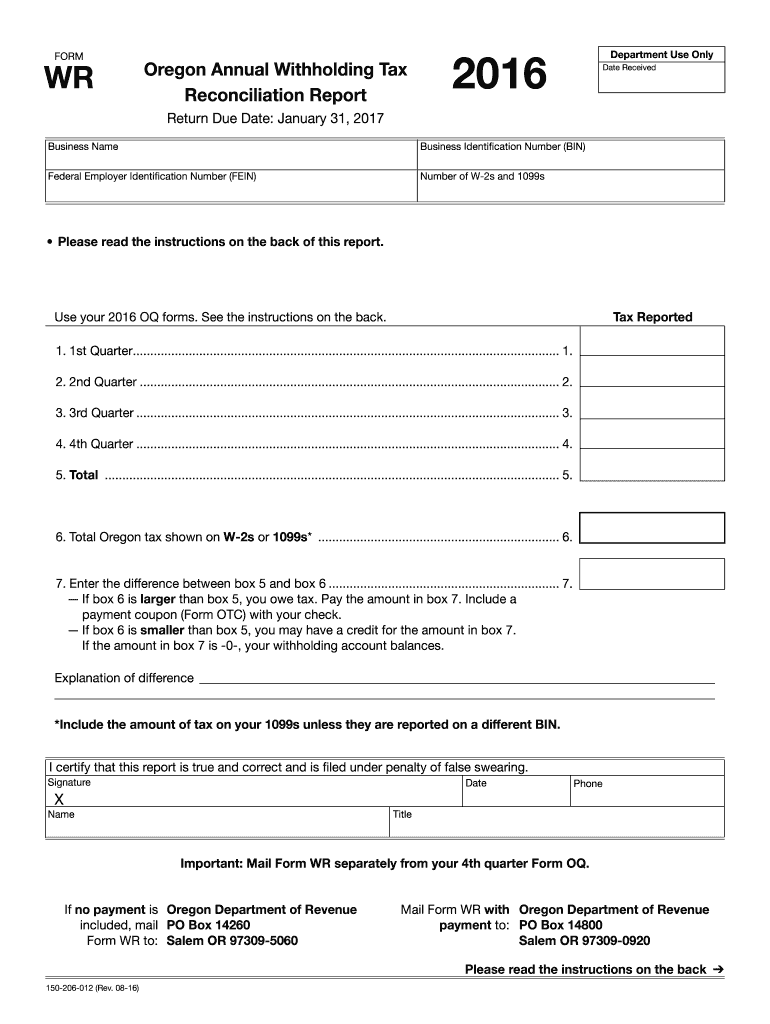
OR OR-WR 2016 free printable template
pdfFiller is not affiliated with any government organization

Fill out
Complete the form online in a simple drag-and-drop editor.

eSign
Add your legally binding signature or send the form for signing.

Share
Share the form via a link, letting anyone fill it out from any device.

Export
Download, print, email, or move the form to your cloud storage.
Why pdfFiller is the best tool for your documents and forms


End-to-end document management
From editing and signing to collaboration and tracking, pdfFiller has everything you need to get your documents done quickly and efficiently.
Accessible from anywhere
pdfFiller is fully cloud-based. This means you can edit, sign, and share documents from anywhere using your computer, smartphone, or tablet.
Secure and compliant
pdfFiller lets you securely manage documents following global laws like ESIGN, CCPA, and GDPR. It's also HIPAA and SOC 2 compliant.
What is OR OR-WR
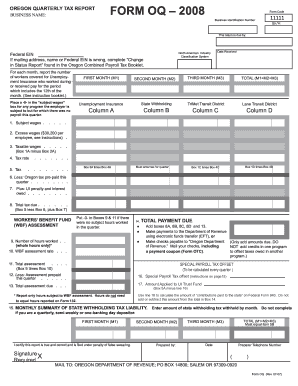
The Oregon Annual Withholding Tax Reconciliation Report is a state tax form used by businesses to reconcile annual withholding taxes reported on W-2s and 1099s.
pdfFiller scores top ratings on review platforms




Very user friendly, would highly recommend.
IT IS VERY EASY TO USE AND FILL, SAVE, SEND AND CHANGE PDF DOCUMENTS
Who needs OR OR-WR?
Explore how professionals across industries use pdfFiller.

OR OR-WR is needed by:
-
Businesses operating in Oregon
-
HR departments managing employee tax withholdings
-
Payroll firms responsible for tax reporting
-
Accountants preparing tax returns
-
Tax compliance officers within companies
-
Employers providing W-2s and 1099s to employees
Comprehensive Guide to OR OR-WR
Understanding the Oregon Annual Withholding Tax Reconciliation Report
The Oregon Annual Withholding Tax Reconciliation Report, also known as Form WR, is essential for businesses operating in Oregon. It serves to reconcile the annual withholding tax as reported on W-2s and 1099s, ensuring accurate financial reporting. By completing this form, businesses affirm their tax compliance and maintain good standing with state regulations.
Reconciling the withholding tax ensures the amounts reported on W-2s and 1099s align with what businesses have submitted throughout the year. It is crucial for avoiding discrepancies that may lead to audits or financial penalties. The deadline for submission of this form is January 31 of the following year, and compliance with this timeline helps avoid any unnecessary fees.
Purpose and Benefits of the Oregon Annual Withholding Tax Reconciliation Report
Filing the Oregon Annual Withholding Tax Reconciliation Report is beneficial for several reasons. Accurate reconciliation aids businesses in verifying their tax obligations and avoiding penalties associated with tax filing errors. Meeting these filing requirements also ensures compliance with Oregon tax laws, protecting businesses from potential legal issues.
Moreover, maintaining accurate records and timely submissions contributes to smoother business operations and financial integrity. These efforts ultimately lead to a stronger reputation within the business community.
Who Needs the Oregon Annual Withholding Tax Reconciliation Report?
The requirement to file the Oregon Annual Withholding Tax Reconciliation Report extends to various types of businesses. Companies that withhold income tax for their employees or make payments that require withholding are mandated to submit this form. Eligibility for filing often depends on the business structure, such as corporations, partnerships, or sole proprietorships.
-
Corporations and partnerships that withhold taxes
-
Employers who have employees earning wages
-
Businesses making payments to contractors under certain conditions
There may be exceptions, such as for businesses that do not withhold tax or have minimal operations within the state. Specific guidelines may be applicable based on the business type.
When to File the Oregon Annual Withholding Tax Reconciliation Report
Clarity on submission timelines is vital for compliance. The Oregon Annual Withholding Tax Reconciliation Report is due by January 31 of the following year. Businesses must be aware of any extensions that might apply, as well as the consequences that follow late filings, including penalties or interest on owed taxes.
-
Filing due date: January 31
-
Potential extensions available under certain circumstances
-
Consequences of failing to file on time
-
Consider seasonal aspects that may affect tax reporting
How to Fill Out the Oregon Annual Withholding Tax Reconciliation Report Online
Completing the Oregon Annual Withholding Tax Reconciliation Report online can be simplified using tools like pdfFiller. The process begins with accessing the form online, followed by filling it out step-by-step.
-
Begin by entering your Business Name and FEIN.
-
Proceed to input required tax information accurately into designated fields.
-
Review the document for accuracy and completeness before submission.
Common issues may arise while filling out the form, such as technical difficulties or lack of clarity in specific fields. Knowing how to troubleshoot these problems can enhance the filing experience.
Submitting the Oregon Annual Withholding Tax Reconciliation Report
Once the Oregon Annual Withholding Tax Reconciliation Report is completed, businesses must choose a submission method. There are two primary options: electronic submission and paper filing. Filing electronically often ensures faster processing and confirmation.
-
For electronic submissions, ensure to follow instructions provided on the Oregon Department of Revenue website.
-
Paper filings should be sent to the designated address specified by the Oregon Department of Revenue.
-
Include separate payment with the necessary payment coupon if applicable.
Security and Compliance While Submitting the Oregon Annual Withholding Tax Reconciliation Report
During the submission process, ensuring security and compliance with the relevant laws is crucial. Utilizing services like pdfFiller guarantees that user data is protected through advanced security features, including 256-bit encryption.
Compliance with state tax laws and regulations is reinforced through secure filing methods. Businesses can be assured that their sensitive information remains confidential and securely handled throughout the submission process.
Post-Submission: What Happens Next?
After submitting the Oregon Annual Withholding Tax Reconciliation Report, businesses can expect a few outcomes that vary based on the submission's accuracy. Verification of submission and tracking options are typically available, allowing users to see the status of their forms.
-
You may receive confirmation from the Oregon Department of Revenue.
-
Be prepared for potential outcomes including approvals, rejections, or requests for additional information.
-
If corrections are needed, follow appropriate channels to amend submissions promptly.
Utilizing pdfFiller for Your Oregon Annual Withholding Tax Reconciliation Report
Leveraging pdfFiller for filling out the Oregon Annual Withholding Tax Reconciliation Report brings numerous advantages. Features such as fillable forms, eSigning, and document management streamline the entire process, making it easier for businesses to meet their filing obligations.
User testimonials signify how pdfFiller has aided many in successfully navigating tax forms. The platform not only simplifies the preparation but also enhances overall compliance through effective document handling.
Resources and Additional Support for Oregon Tax Forms
For further assistance on the Oregon Annual Withholding Tax Reconciliation Report, businesses can access a variety of official resources. The Oregon Department of Revenue provides comprehensive guidelines and FAQs to aid in the completion of tax forms.
-
Visit the Oregon Department of Revenue for official resources.
-
Look for support in multiple languages, including Portuguese, to assist diverse users.
-
Engage with community forums for shared experiences and additional guidance.
How to fill out the OR OR-WR
-
1.Access the Oregon Annual Withholding Tax Reconciliation Report template on pdfFiller by visiting their website and searching for the form number or title in the search bar.
-
2.Once the form appears, click on it to open it in the pdfFiller interface, where you can start editing.
-
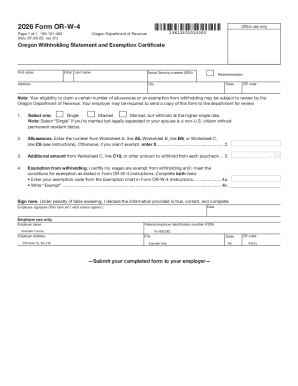
3.Before you begin filling out the form, gather necessary information such as your Business Name, Federal Employer Identification Number (FEIN), and total withholding amounts reported on W-2s and 1099s.
-
4.Begin filling out the form by clicking on the designated fields. Use the fillable fields to enter your business details, ensuring to accurately input your FEIN and any required tax amounts.
-
5.Make sure to complete all necessary fields, including the 'Signature', 'Date', 'Phone', and 'Name Title' fields. Review each entry to avoid errors.
-
6.After filling out the form, take a moment to review everything. Check all entered values against your documents, ensuring accuracy before finalizing.
-
7.Once you are satisfied with your entries, you can save your completed form directly on pdfFiller. Choose to download it in PDF format or print it as needed.
-
8.For submission, follow the instructions provided on the form to submit to the Oregon Department of Revenue, ensuring you meet the January 31 deadline.

Who is required to file the Oregon Annual Withholding Tax Reconciliation Report?
Businesses in Oregon that report withholding taxes on W-2s and 1099s are required to file this form annually.
What is the deadline for submitting the Oregon withholding tax form?
The completed form must be submitted to the Oregon Department of Revenue by January 31 of the following year, ensuring timely compliance.
Can I submit the form online?
Typically, this form must be submitted via mail to the Oregon Department of Revenue. Check their official site or pdfFiller for specific electronic submission options.
What information needs to be included with the form?
You need to include your Federal Employer Identification Number (FEIN), total tax amounts, and the signature of an authorized business representative.
Are there any common mistakes to avoid while filling out the form?
Common mistakes include miscalculating total withheld amounts, omitting required signatures, or failing to verify the information against W-2s/1099s. Double-check all entries to prevent issues.
How long does it take to process the form once submitted?
Processing times may vary, but typically you should expect confirmation within 4-6 weeks after submission. Always verify with the Oregon Department of Revenue for updates.
What should I do if I owe taxes when submitting the form?
If you owe taxes, you should send your payment separately along with a payment coupon (Form OTC) to ensure proper processing of your taxes.
OR OR-WR Form Versions
Related Content
Related Forms



Get the latest insights from our blog


If you believe that this page should be taken down, please follow our DMCA take down process
here
.
This form may include fields for payment information. Data entered in these fields is not covered by PCI DSS compliance.