
Last updated on
Oct 31, 2026

Get the free HRM Information Collection Form
We are not affiliated with any brand or entity on this form

Fill out
Complete the form online in a simple drag-and-drop editor.

eSign
Add your legally binding signature or send the form for signing.

Share
Share the form via a link, letting anyone fill it out from any device.

Export
Download, print, email, or move the form to your cloud storage.
Why pdfFiller is the best tool for your documents and forms


End-to-end document management
From editing and signing to collaboration and tracking, pdfFiller has everything you need to get your documents done quickly and efficiently.
Accessible from anywhere
pdfFiller is fully cloud-based. This means you can edit, sign, and share documents from anywhere using your computer, smartphone, or tablet.
Secure and compliant
pdfFiller lets you securely manage documents following global laws like ESIGN, CCPA, and GDPR. It's also HIPAA and SOC 2 compliant.
What is HRM Info Form
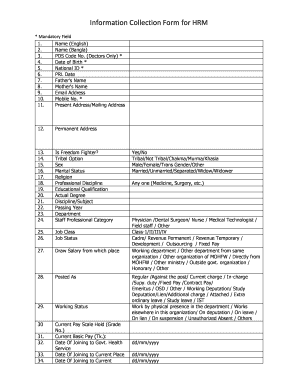
The HRM Information Collection Form is an employment document used by healthcare professionals in Bangladesh to provide essential personal and professional information to their employer.
pdfFiller scores top ratings on review platforms




Who needs HRM Info Form?
Explore how professionals across industries use pdfFiller.

HRM Info Form is needed by:
-
Healthcare professionals in Bangladesh
-
Employers in the healthcare sector
-
Human Resources departments
-
Recruitment agencies
-
Administrative staff handling employee onboarding
-
Regulatory bodies overseeing employee documentation
Comprehensive Guide to HRM Info Form
What is the HRM Information Collection Form?
The HRM Information Collection Form serves a vital role in the onboarding process for healthcare professionals in Bangladesh. This document is designed to gather essential personal and professional data from new hires, ensuring a smooth transition into their roles.
It includes critical information such as personal details, employment history, and professional qualifications. For employers, this form enhances the onboarding experience by ensuring compliance with local employment regulations and facilitating the maintenance of updated employee records.
Purpose and Benefits of the HRM Information Collection Form
The HRM Information Collection Form streamlines the information-gathering process for new hires, improving overall efficiency. Utilizing this form helps ensure that all necessary data is collected quickly and accurately.
Moreover, it supports adherence to local employment laws, safeguarding both employers and employees. By keeping comprehensive and updated records, organizations can better manage their workforce and comply with regulatory requirements.
Key Features of the HRM Information Collection Form
This form is designed with user-friendliness in mind, featuring a variety of fillable input fields to streamline completion. Key elements include:
-
Name (English)
-
Date of Birth
-
National ID
Additional features, such as checkbox options for quick selections and compatibility with digital tools, facilitate easier filling and submission. These elements ensure that both employers and healthcare professionals find the form efficient and accessible.
Who Needs the HRM Information Collection Form?
The HRM Information Collection Form is essential for healthcare professionals and HR departments involved in employee onboarding. It is necessary to complete this form during the hiring process to gather the required information effectively.
In addition, maintaining accurate records assists employers in compliance efforts and ensures that they have essential data on hand.
How to Fill Out the HRM Information Collection Form Online
Filling out the HRM Information Collection Form online is straightforward. Follow these steps for efficient completion:
-
Access the form using an appropriate digital tool, such as pdfFiller.
-
Carefully fill in all required fields, including personal details and professional qualifications.
-
Double-check your entries to avoid common mistakes, such as misspellings.
-
Save your progress regularly to prevent data loss.
Utilizing tools like pdfFiller can enhance your experience by providing features for easy editing and submission of your completed form.
Submission Methods and Where to Submit the HRM Information Collection Form
Upon completing the HRM Information Collection Form, you have multiple options for submission. You can submit the form online or deliver it in person based on your employer's requirements.
Ensure that you include any necessary documents as attachments when submitting, if applicable. Check with your HR department for specific guidelines on where and how to submit your form.
Security and Compliance for the HRM Information Collection Form
When utilizing the HRM Information Collection Form, users can be assured of the security measures in place. Data protection strategies, such as encryption, are implemented to keep sensitive information safe.
Moreover, adherence to legal standards, including HIPAA and GDPR, guarantees that personal data is handled appropriately. This focus on security highlights the importance of safeguarding sensitive employee information throughout the onboarding process.
How pdfFiller Can Help with the HRM Information Collection Form
pdfFiller stands out as an effective solution for managing the HRM Information Collection Form. Its robust features assist users in filling out, editing, and managing their forms securely.
Benefits include capabilities for eSigning and sharing documents, making the overall process smoother and more efficient. Leveraging pdfFiller can enhance your experience when working with the HRM Information Collection Form.
Sample Completed HRM Information Collection Form
To ensure that you complete the HRM Information Collection Form accurately, it can be useful to reference a sample. A screenshot or detailed description of a completed form can clarify the sections that require attention.
Focusing on common areas of the form will help users understand what is expected and may reduce errors during submission.
Next Steps After Submission of the HRM Information Collection Form
Once you have submitted the HRM Information Collection Form, there are several important actions to consider. Expect typical processing times to vary based on the employer's procedures.
Keep an eye out for updates regarding your submission status, and be prepared to amend any errors or update information if necessary. Maintaining clear communication with your HR department will facilitate a smoother experience.
How to fill out the HRM Info Form
-
1.To access the HRM Information Collection Form on pdfFiller, navigate to the pdfFiller website and use the search bar to find the form by its name.
-
2.Once you locate the form, click on it to open the interactive editor.
-
3.Before filling out the form, gather all necessary personal details, such as your full name, date of birth, national identification number, and employment history.
-
4.In the pdfFiller interface, click on the designated fields to type in your information. You may also use the tab key to navigate between fields seamlessly.
-
5.For sections requiring specific formats, such as date entries, ensure to follow the example provided, typically in 'dd-mm-yyyy' format.
-
6.If applicable, review the checkbox options and mark those that apply to your situation by clicking on them.
-
7.After completing all fields, review your entries to ensure they are accurate and complete, checking for any typographical errors or missing information.
-
8.To finalize the document, click the save button at the top of the screen. You can also download the filled form directly to your computer at this point.
-
9.Finally, submit the completed form as instructed by your employer, which may include options for email submission or direct upload on their portal.

Who is eligible to use the HRM Information Collection Form?
The HRM Information Collection Form is intended for healthcare professionals in Bangladesh who are completing onboarding processes or updating their employment records. Eligible users typically include newly hired employees and existing staff submitting updated information.
When must I submit the completed form?
Submit the completed HRM Information Collection Form during your onboarding process. Ensure it is submitted by the deadline provided by your employer to avoid delays in your employment setup.
How do I submit the HRM Information Collection Form?
After completing the form on pdfFiller, you can submit it directly via email or upload it to your employer's portal as instructed. Always follow your employer's submission guidelines to ensure proper processing.
What supporting documents do I need to provide?
Along with the HRM Information Collection Form, you may need to submit supporting documents such as a copy of your National ID, proof of professional qualifications, and previous employment records.
What are common mistakes to avoid when filling out the form?
Common mistakes include omitting required fields, entering incorrect personal details, or failing to follow the specified format for dates. Always double-check your entries to avoid delays during processing.
How long does it take to process the form?
Processing times may vary depending on your employer's review procedures. Typically, you can expect confirmation of your submission within a week. Check with your HR department for specific timelines.
Can I edit the form after I’ve saved it?
Yes, you can return to pdfFiller to edit your saved form if you need to make changes. Ensure to save your updates before closing the program to retain the revised information.
Related Forms




Related Catalogs
Get the latest insights from our blog


If you believe that this page should be taken down, please follow our DMCA take down process
here
.
This form may include fields for payment information. Data entered in these fields is not covered by PCI DSS compliance.